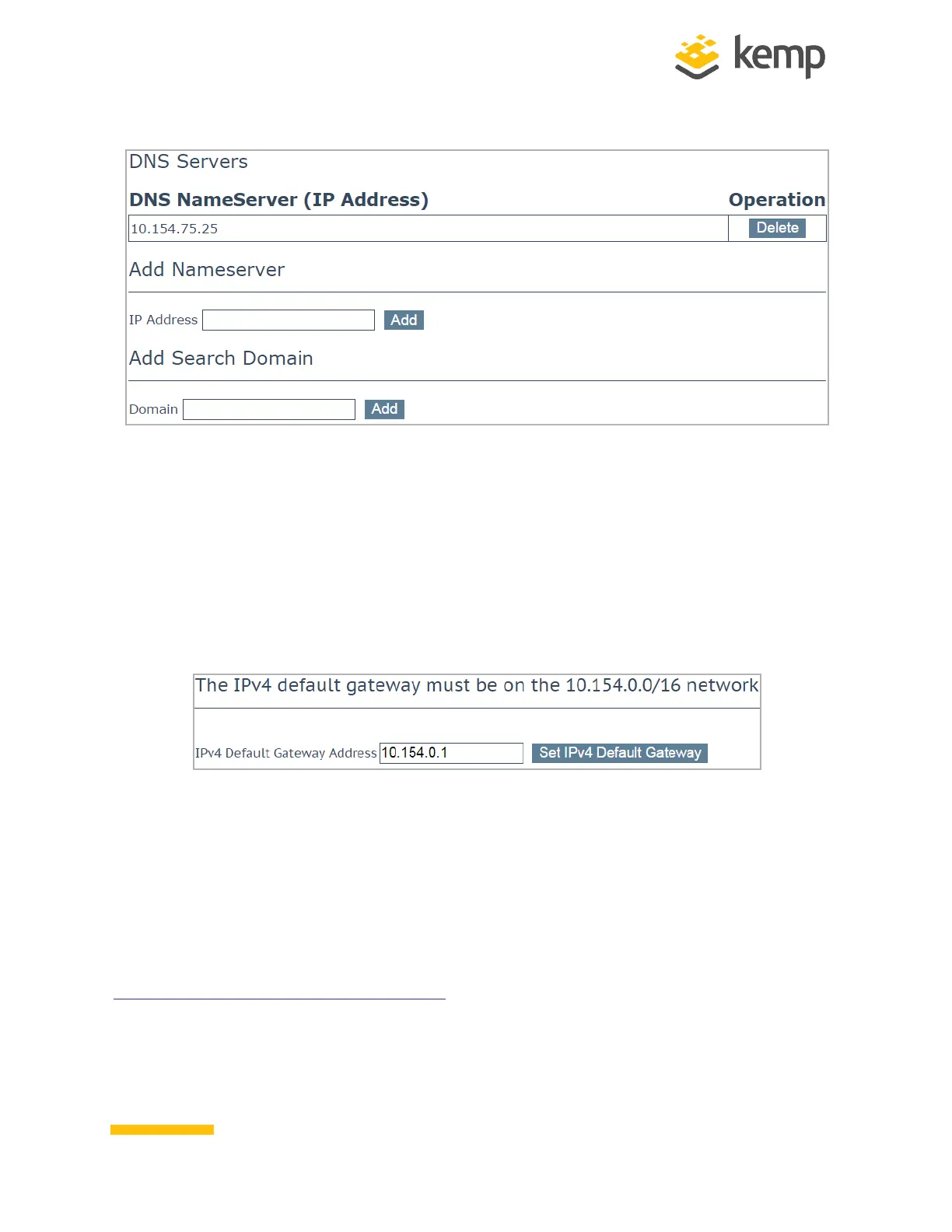
24. In the DNS configuration screen, enter the IP address(es) of the DNS Server(s) which will
be used to resolve names locally on the LoadMaster into the DNS NameServer text box.
25. Click Add.
26. Enter the domain name that is to be prepended to requests to the DNS nameserver into
the DNS NameServer text box.
27. Click Add.
28. In the main menu, go to System Configuration > Network Setup > Default Gateway.
29. Enter the IP address of the default gateway in the IPv4 Default Gateway Address text
box and click Set IPv4 Default Gateway.
30. If you have an IPv6 Default Gateway, please enter the value in the IPv6 Default Gateway
Address text box and click Set IPv4 Default Gateway.
The LoadMaster is now fully installed and ready to be used. For further information on how to
configure and implement the LoadMaster, such as steps on how to configure High Availability (HA),
please refer to the LoadMaster documentation which can be accessed on here:
http://kemptechnologies.com/documentation.
kemp.ax
11
Copyright 2002-2021, Kemp Technologies, All Rights Reserved
Hardware LoadMaster
2 Installing a Hardware LoadMaster



 To Next Page