CUUMINGTIPS
Carpet edges.
Guide eithersideorthe frontofthe nozzlealong a
baseboard. The fulllengthbrusheshelpremove
trapped dirtatcarpet edges.
Stairs.
Put handle in full upright position. Use the crevice tool
or fabric brush. Set the On/Off Switch to HI.
(Optional)
I PersonalInjury Hazard
Usecare if vacuum cleaner isplaced on stairs.If
if falls,personal injury or property damage could
result.
4P
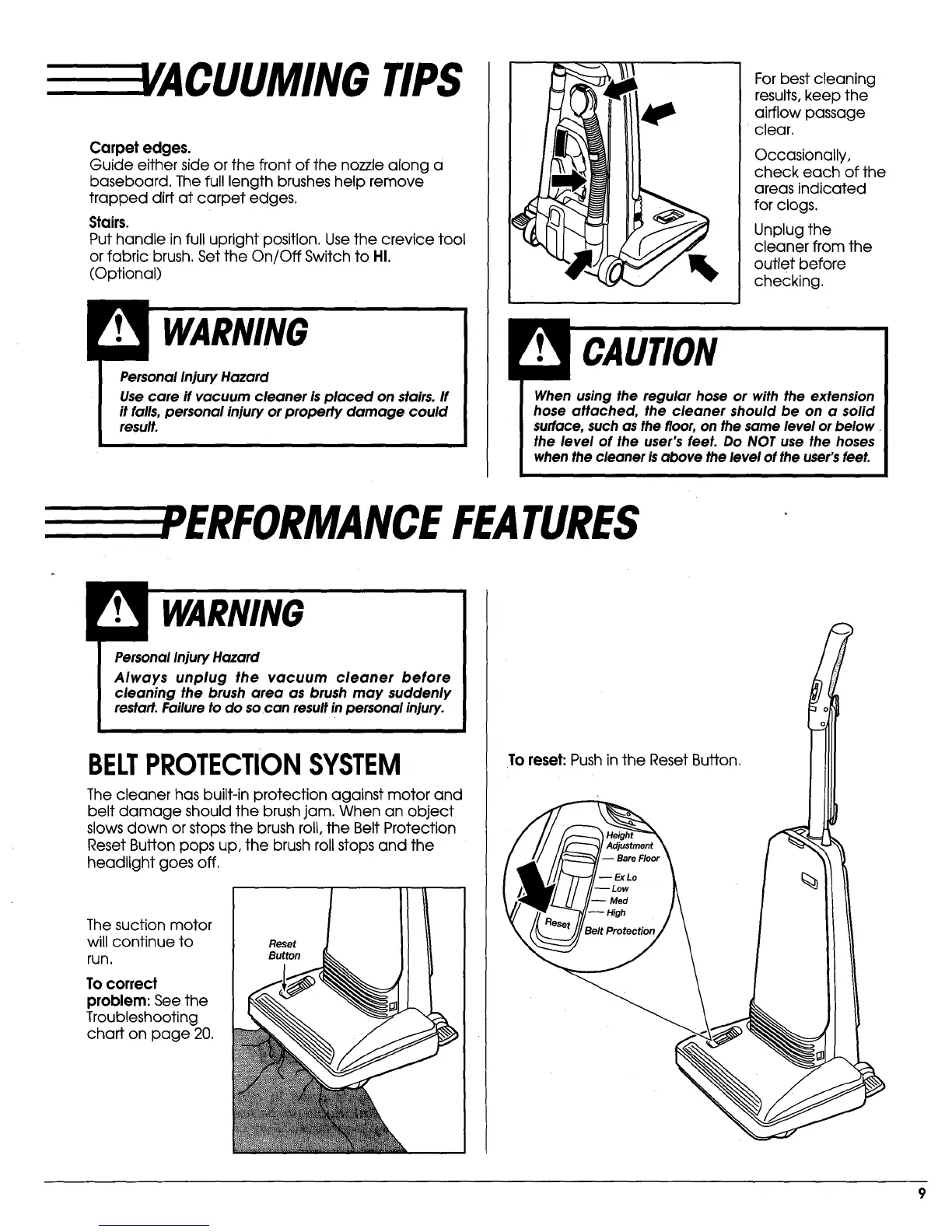
For best cleaning
results, keep the
airflow passage
clear.
Occasionally,
check each of the
areas indicated
for clogs.
Unplug the
cleaner from the
outlet before
checking.
When using the regular hose or with the extension
hose attached, the cleaner should be on a solid
surface,suchas thefloor,on the same level orbelow
the level of the user's feet. Do NOT use the hoses
when the cleaner isabove the level of the user'sfeet.
EEEEEEPERFORMANCEFEATURES
WARNING
PersonalInjuryHazard
Always unplug the vacuum cleaner before
cleaning the brush area as brush may suddenly
restart.Failureto do so can resultin personalinjury.
BELTPROTECTIONSYSTEM
The cleaner has built-in protection against motor and
belt damage should the brush jam. When an object
slows down or stops the brush roll, the Belt Protection
Reset Button pops up, the brush roll stops and the
headlight goes off.
The suction motor
will continue to
run.
To correct
problem: See the
Troubleshooting
chart on page 20.
Reset
Button
To reset:Pushinthe ResetButton,
m Bare Floor
m Ex Lo
-- Low
-- High
3elt Protection



 To Next Page