Calibrating the Stylus Touch Point
The stylus touch point can be calibrated to best meet the
user's needs. To adjust the stylus touch point on the touch
screen:
1. Press the Settings button on the "Home" screen. The
display will show the adjustable settings on the
screen.
•*aft 30 _,_e_d le rev¢#t _,ack t_ _dgi_el se_t_hgs
'lime l_r_t_28 se4z
. Press the Touch Screen Correction button. The
display will show pointer instructions and a "+" on the
screen.
NOTE: If the screen is not touched within 30 seconds,
the settings will revert back to the existing settings.
Using Home
When the Home button is pressed, the screen displays
the "Home" screen.
1. Press the Home button.
.
Child
Lock
Slide
Show
I C_ling off
Accent -J
,ighting
Water
Choose the desired function by pressing it on the
"Home" screen.
.
.
Using the stylus, lightly press on the center of the "+"
mark. The "+" mark will move on the screen. Repeat
this step 3 until the "+" mark no longer appears.
_@@_ a_ t_e terget me'_6 _reuad the _reet_
To save the new calibration data, touch the screen
within 30 seconds of the last "+" mark. This will save
the new settings and return the screen back to the
"Settings" screen.
18
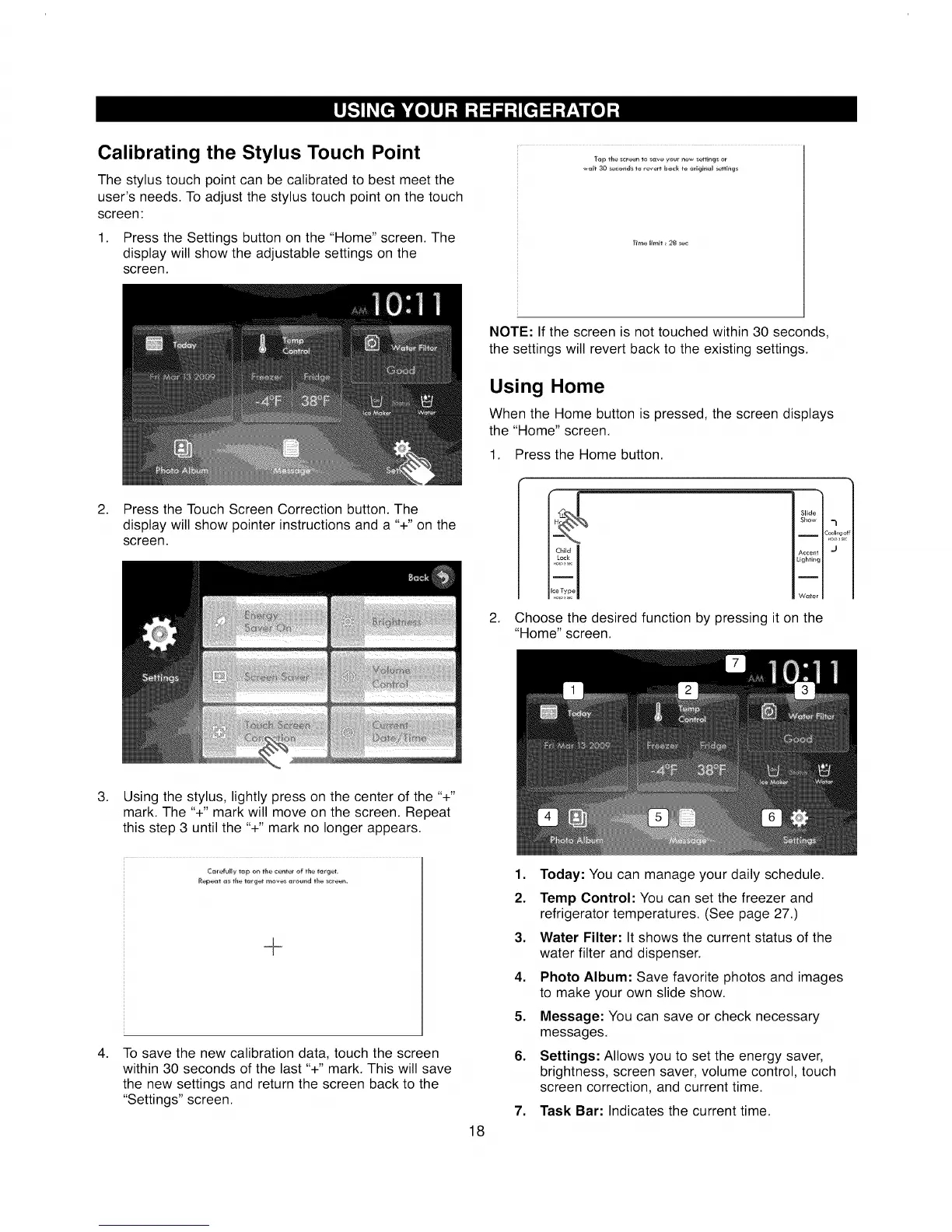
1. Today: You can manage your daily schedule.
2. Temp Control: You can set the freezer and
refrigerator temperatures. (See page 27.)
3. Water Filter: It shows the current status of the
water filter and dispenser.
4. Photo Album: Save favorite photos and images
to make your own slide show.
5. Message: You can save or check necessary
messages.
6. Settings: Allows you to set the energy saver,
brightness, screen saver, volume control, touch
screen correction, and current time.
7. Task Bar: Indicates the current time.



 To Next Page