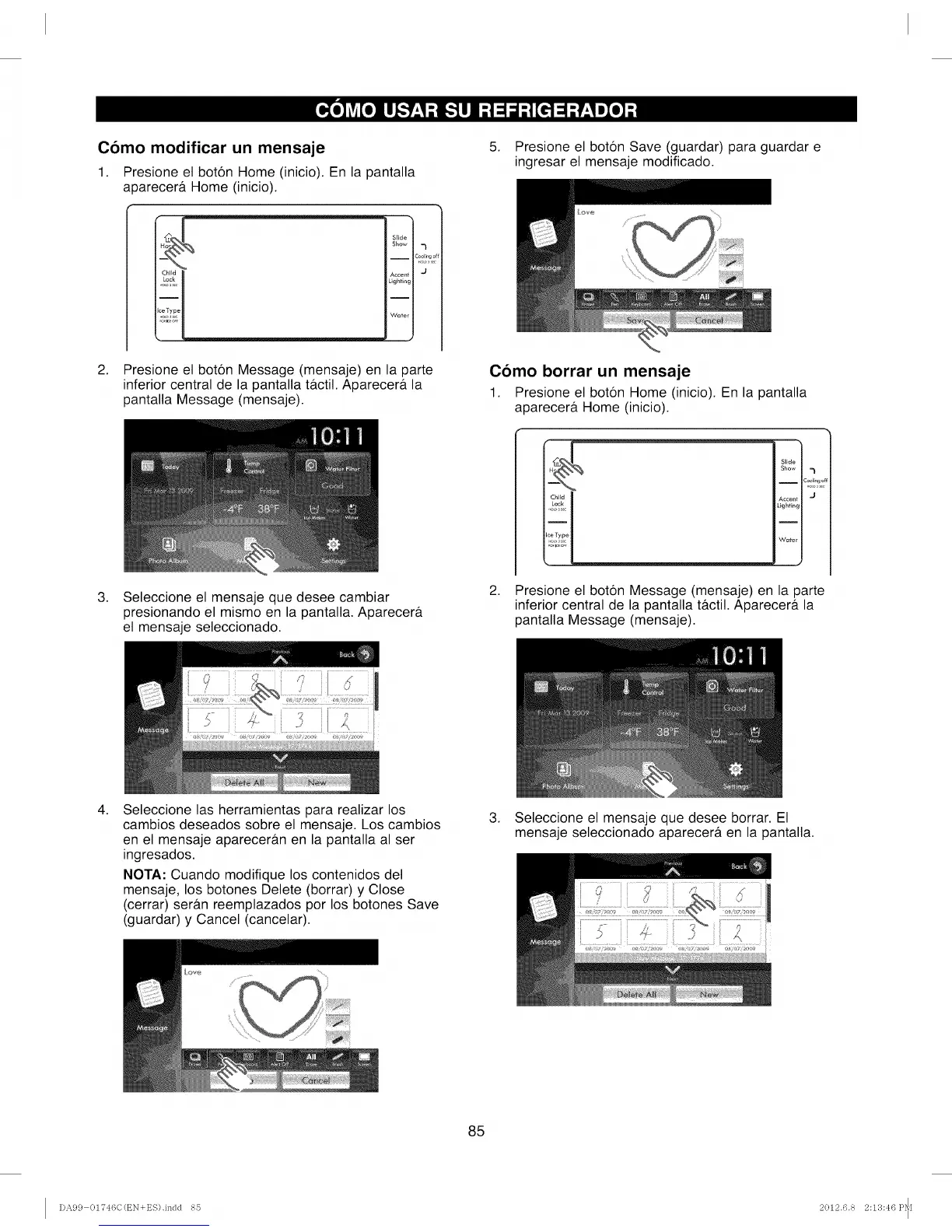
Como modificar un mensaje
1. Presione el boton Home (inicio). En la pantalla
aoarecerf Home (inicio).
Slide
Show _l
i Coollng o
......
Lighting
Water
2. Presione el boton Message (mensaje) en la parte
inferior central de la pantalla t&ctil. Aparecera la
pantalla Message (mensaje).
5. Presione el boton Save (guardar) para guardar e
ingresar el mensaje modificado.
Como borrar un mensaje
1. Presione el boton Home (inicio). En la pantalla
aparecera Home (inicio).
,
Seleccione el mensaje que desee cambiar
presionando el mismo en la pantalla. Aparecera
el mensaje seleccionado.
Slide
Show
c_2%_/
Accent 'J
Lighting
I
Water
2. Presione el boton Message (mensaje) en la parte
inferior central de la pantalla tactil. Aparecera la
pantalla Message (mensaje).
,
Seleccione las herramientas para realizar los
cambios deseados sobre el mensaje. Los cambios
en el mensaje apareceran en la pantalla al ser
ingresados.
NOTA: Cuando modifique los contenidos del
mensaje, los botones Delete (borrar) y Close
(cerrar) seran reemplazados por los botones Save
(guardar) y Cancel (cancelar).
,
Seleccione el mensaje que desee borrar. El
mensaje seleccionado aparecera en la pantalla.
............
85
DA99 01746C(t_N+ES).indd 85 2012.6.8 2:13:46 P_[



 To Next Page