CARE AND CLEANING
MAINTENANCE (CONT.)
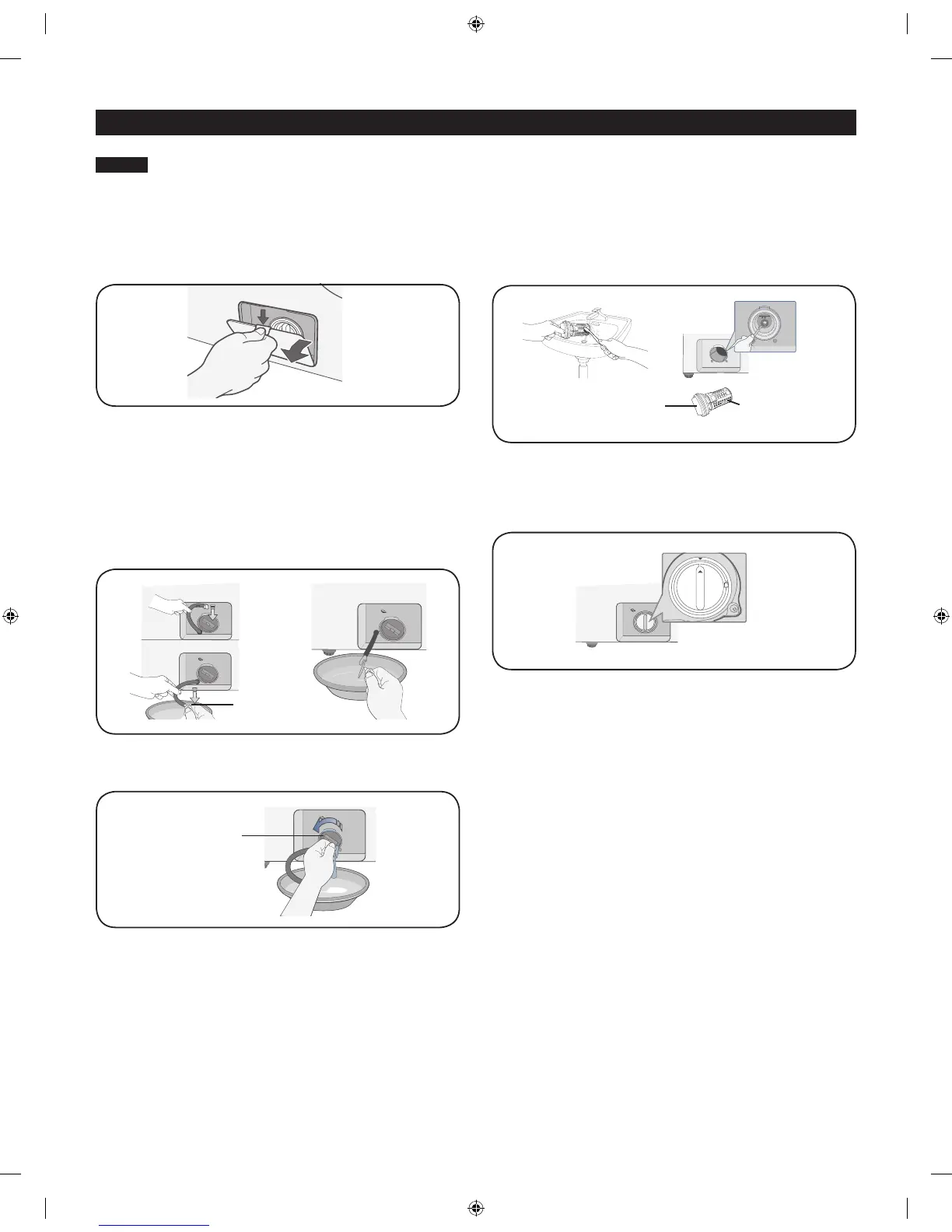
Cleaning the debris filter
We recommend cleaning the debris filter when water does not drain well or the “nd” error message is displayed.
1. Open the filter cover by pressing and pulling the handle of the
filter cover with your finger.
2. Holding the drain cap, pull the drain tube that is hooked on the
guide hook to the front. Do not pull the drain tube with excessive
force.
3. Place a bowl under the washing machine to catch any remaining
water. Then, hold the drain tube with one hand, and turn the
emergency drain cap counter clockwise with the other hand to
separate it from the drain tube.
4. Drain the remaining water completely.
5. Pull out the debris cap and debris filter assembly.
6. Wash any dirt or other material from the debris filter. Make sure
the drain pump propeller behind the debris filter is not blocked.
7. When you have finished cleaning the filter, insert the debris cap
and filter assembly back into the washer. Turn the debris filter
cap clockwise until the indicator on the debris filter cap is in the
12 o’clock position, pointing to the indicator on the washer.
8. Re-attach the emergency drain cap to the drain tube, and then
hook the tube to the hook guide.
9. Re-install the filter cover.
Drain cap
Debris filter cap
Debris filter cap Debris filte
592-49032-02855B-01_EN_v1.indd 24 2011-07-22 �� 11:42:17



 To Next Page