Norma
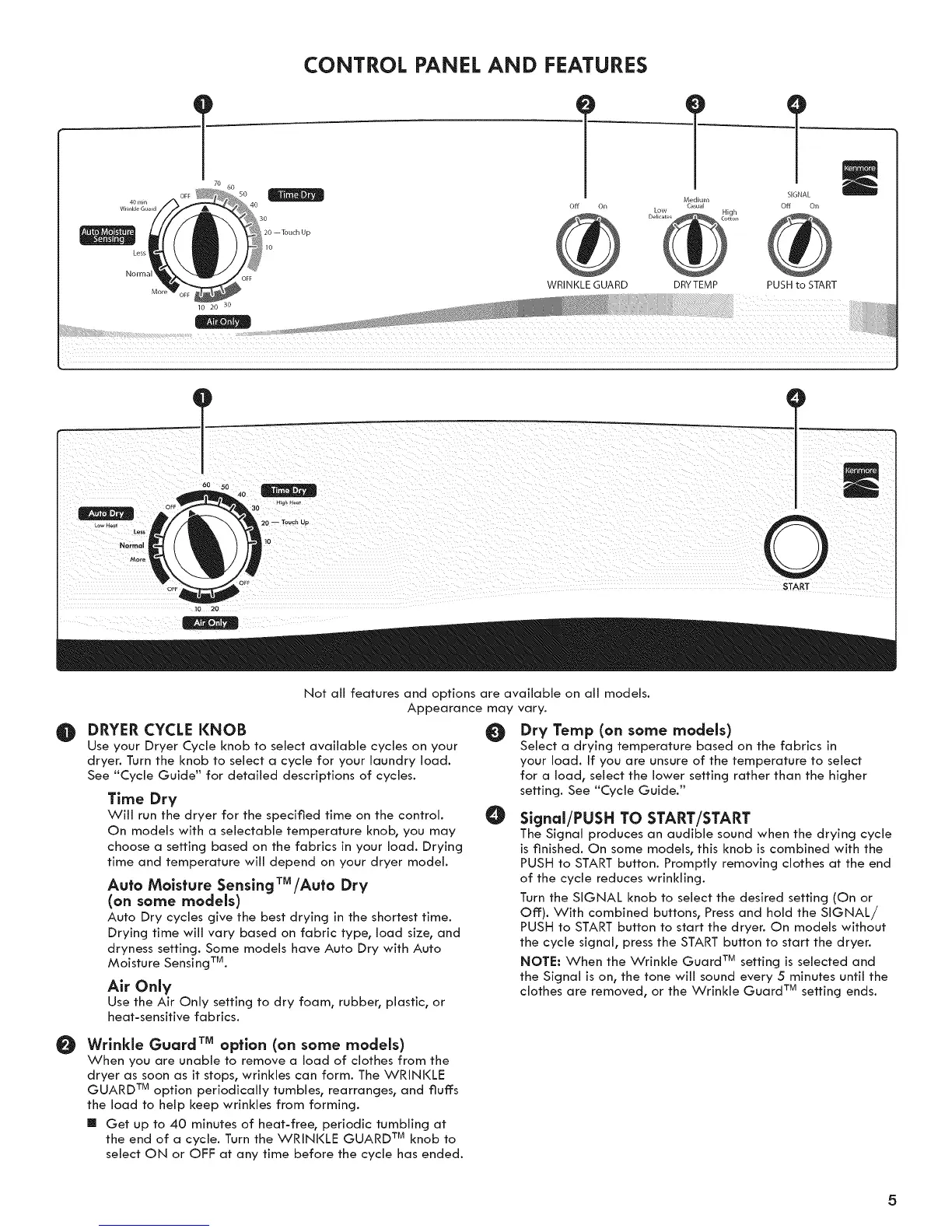
CONTROL PANEL AND FEATURES
T 7 ]L
Medium
off On Casual Off On
WRINKLE GUARD DRYTEMP PUSH to START
60 5O 40
20 -- Touch Ua
I,o
0
START
Not all features and options are available on all models.
Appearance may vary.
0 DRYER CYCLE KNOB
Use your Dryer Cycle knob to select available cycles on your
dryer. Turn the knob to select a cycle for your laundry load.
See "Cycle Guide" for detailed descriptions of cycles.
Time Dry
Will run the dryer for the specified time on the control.
On models with a selectable temperature knob_ you may
choose a setting based on the fabrics in your load. Drying
time and temperature will depend on your dryer model.
Auto Moisture Sensing TM/Auto Dry
(on some models)
Auto Dry cycles give the best drying in the shortest time.
Drying time will vary based on fabric type, load size, and
dryness setting. Some models have Auto Dry with Auto
Moisture Sensing TM.
Air Only
Use the Air Only setting to dry foam, rubbeb plastic, or
heat-sensitive fabrics.
@
O
Dry Temp (on some models)
Select a drying temperature based on the fabrics in
your load. If you are unsure of the temperature to select
for a load, select the lower setting rather than the higher
setting. See "Cycle Guide."
Signal/PUSH TO START/START
The Signal produces an audible sound when the drying cycle
is finished. On some models, this knob is combined with the
PUSH to START button. Promptly removing clothes at the end
of the cycle reduces wrinkling.
Turn the SIGNAL knob to select the desired setting (On or
Off:). With combined buttons, Press and hold the SIGNAL/
PUSH to START button to start the dryer. On models without
the cycle signal, press the START button to start the dryer.
NOTE: When the Wrinkle Guard TM setting is selected and
the Signal is on, the tone will sound every 5 minutes until the
clothes are removed, or the Wrinkle Guard TM setting ends.
Wrinkle Guard TM option (on some models)
When you are unable to remove a load of clothes from the
dryer as soon as it stops, wrinkles can form. The WRINKLE
GUARD TM option periodically tumbles, rearranges, and fluffs
the load to help keep wrinkles from forming.
[] Get up to 40 minutes of heat-free, periodic tumbling at
the end of a cycle. Turn the WRINKLE GUARD TM knob to
select ON or OFF: at any time before the cycle has ended.



 To Next Page