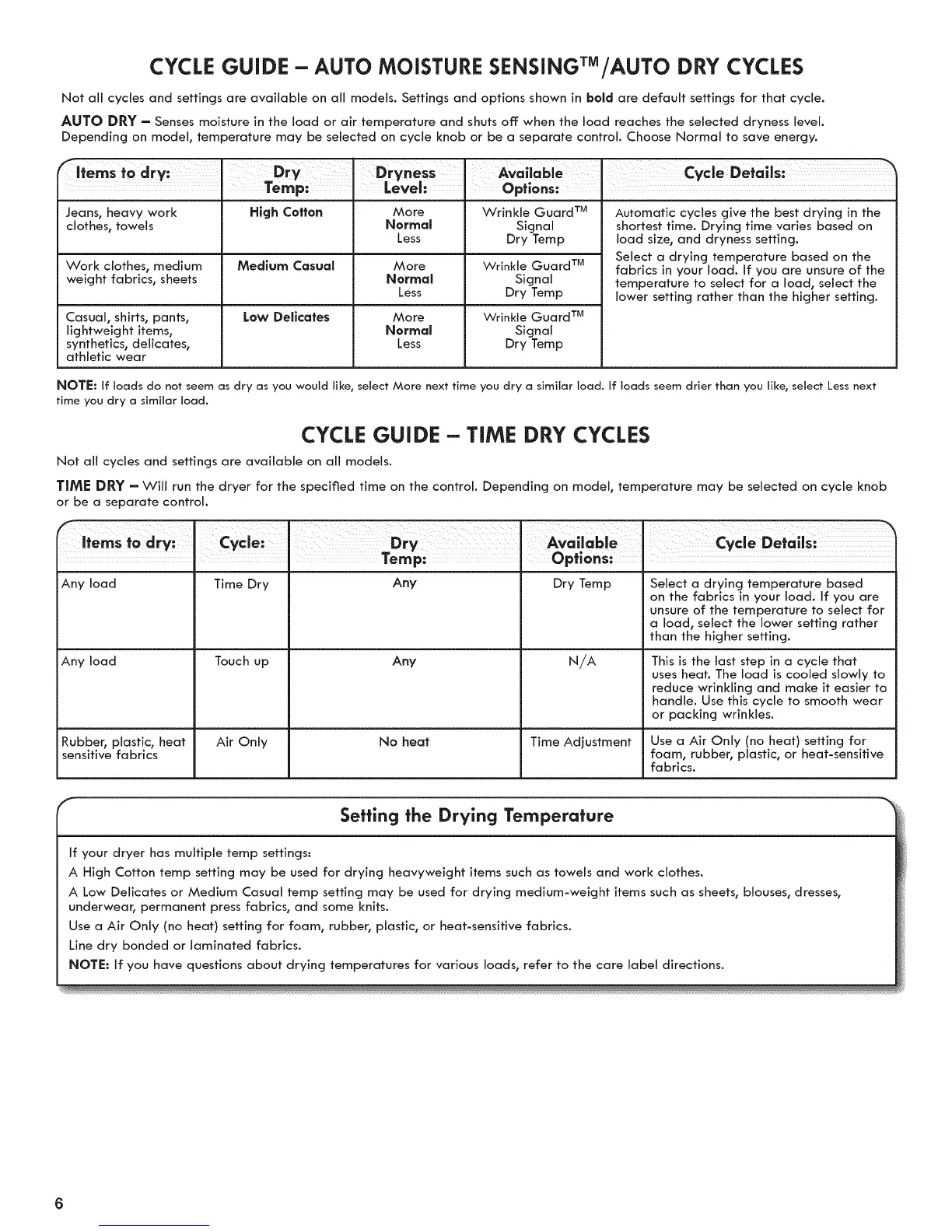
CYCLE GUIDE - AUTO MOISTURE SENSINGTM/AUTO DRY CYCLES
Not ail cycles and settings are available on all models. Settings and options shown in bold are default settings for that cycle.
AUTO DRY - Senses moisture in the load or air temperature and shuts off: when the load reaches the selected dryness level.
Depending on model, temperature may be selected on cycle knob or be a separate control. Choose Normal to save energy.
Temp: Level: Options:
Jeans, heavy work High Cotton More Wrinkle Guard TM
clothes, towels Normal Signal
Less Dry Temp
Work clothes, medium Medium Casual More
weight fabrics, sheets Normal
Less
Low Delicates
Casual, shirts, pants,
lightweight items,
synthetics, delJcates,
athletic wear
More
Normal
Less
Wrinkle Guard TM
Signal
Dry Temp
Wrinkle Guard TM
Signal
Dry Temp
Automatic cycles give the best drying in the
shortest time. Drying time varies based on
load size, and dryness setting.
Select a drying temperature based on the
fabrics in your load. If you are unsure of the
temperature to select for a load, select the
lower setting rather than the higher setting.
NOTE: If loads do not seem as dry as you would like, select More next time you dry a similar load. If loads seem drier than you like, select Less next
time you dry a similar load.
CYCLE GUIDE - TiME DRY CYCLES
Not all cycles and settings are available on all models.
TIME DRY - Will run the dryer for the specified time on the control. Depending on model, temperature may be selected on cycle knob
Dry Temp Select a drying temperature based
on the fabrics in your load. If you are
unsure of the temperature to select for
a load, select the lower setting rather
than the higher setting.
N/A This is the last step in a cycle that
uses heat. The load is cooled slowly to
reduce wrinkling and make it easier to
handle. Use this cycle to smooth wear
or packing wrinkles.
or be a separate control.
Avalloble
Options:
cycle: I
Temp:
Any load Time Dry Any
Any load Touch up Any
Rubber, plastic, heat Air Only No heat Time Adjustment Use a Air Only (no heat) setting for
sensitive fabrics foam, rubber, plastic, or heat-sensitive
fabrics.
Setting the Drying Temperature
If your dryer has multiple temp settings:
A High Cotton temp setting may be used for drying heavyweight items such as towels and work clothes.
A Low Delicates or Medium Casual temp setting may be used for drying medium-weight items such as sheets, blouses, dresses,
underwear, permanent press fabrics, and some knits.
Use a Air Only (no heat) setting for foam, rubber, plastic, or heat-sensitive fabrics.
Line dry bonded or laminated fabrics.
NOTE: If you have questions about drying temperatures for various loads, refer to the care label directions.



 To Next Page