5
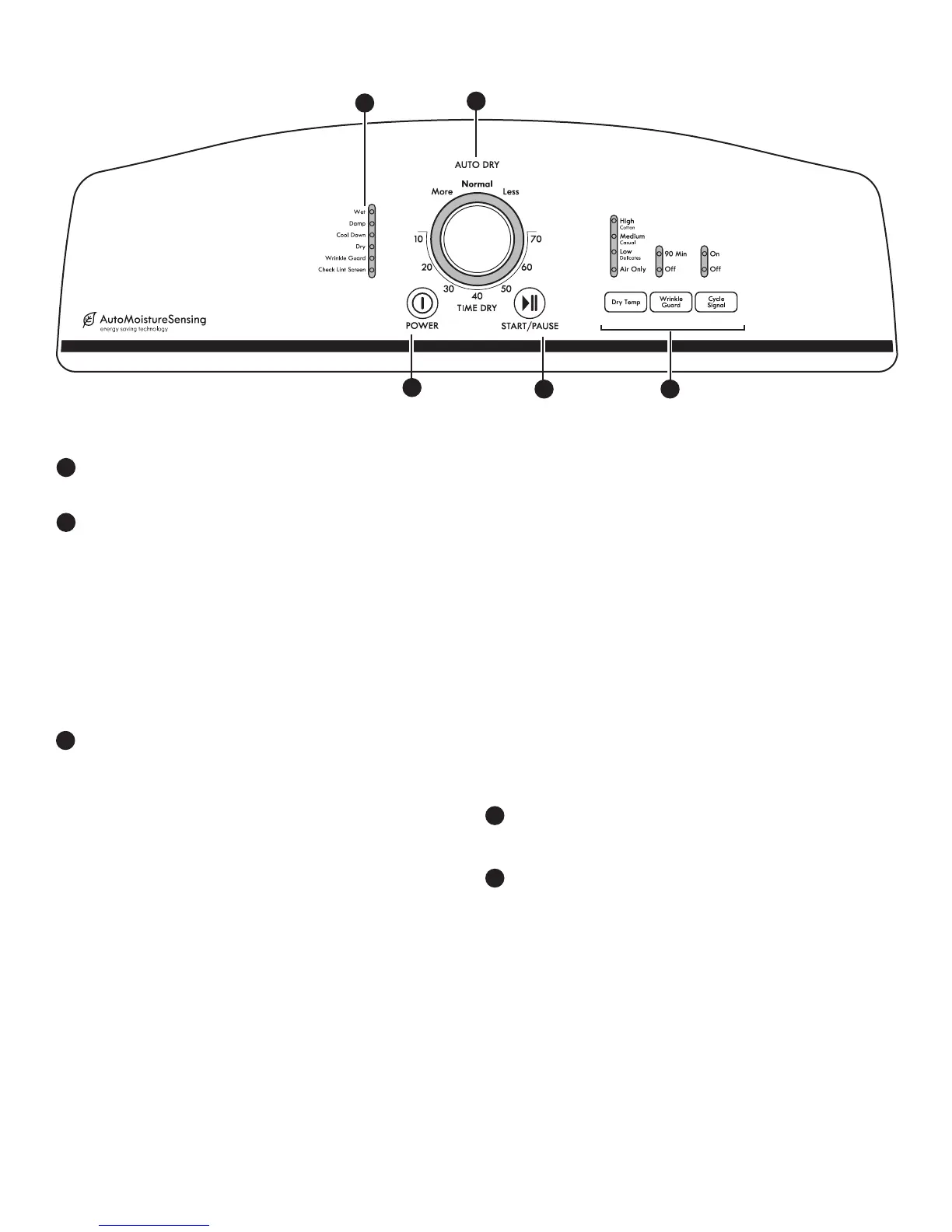
CYCLE STATUS LIGHTS
Lights indicate the progress of the drying cycles.
DRYER CYCLE KNOB
Use your Dry Cycle Knob to select available cycles on your
dryer. Turn the knob to select a cycle for your laundry load.
See “Cycle Guide” for detailed descriptions of cycles.
Auto Dry with Auto Moisture Sensing™ Control
Automatic cycles give the best drying in the shortest time.
Drying time will vary based on fabric type, load size, and
dryness setting.
Timed Dry
Will run the dryer for the specied time on the control.
OPTIONS AND SETTINGS
Dry Temp
Select a drying temperature based on the fabrics in
your load. If you are unsure of the temperature to select
for a load, select the lower setting rather than the higher
setting.
NOTE: The Air Only Temp feature is not available on the
Auto Dry Cycles.
1
2
3
Wrinkle Guard™ Feature
When you are unable to remove a load of clothes from the
dryer as soon as it stops, wrinkles can form. The WRINKLE
GUARD™ feature periodically tumbles, rearranges, and us
the load to help keep wrinkles from forming.
n
Get up to 60 or 150 minutes (for models with two
choices), 90 minutes (for models with only one choice) of
heat-free, periodic tumbling at the end of a cycle. Press
the WRINKLE Guard™ button to turn ON or OFF at any
time before the cycle has ended.
Cycle Signal
The Cycle Signal produces an audible sound when the drying
cycle is nished. Promptly removing clothes at the end of the
cycle reduces wrinkling.
Press CYCLE SIGNAL until the desired setting (On or O)
is selected.
NOTE: When the Wrinkle Guard™ setting is selected
and the Cycle Signal is on, the tone will sound every
20 minutes until the clothes are removed, or the Wrinkle
Guard™ setting ends.
START/PAUSE BUTTON
Press to START/PAUSE to start a cycle, or press START/PAUSE
once while a cycle is in process to pause the cycle.
POWER BUTTON
Press POWER to turn the dryer on and o.
2
3
1
4
4
Not all features and options are available on all models.
Appearance may vary.
5
5
CONTROL PANEL AND FEATURES



 To Next Page