2
CONTROL PANEL AND FEATURES
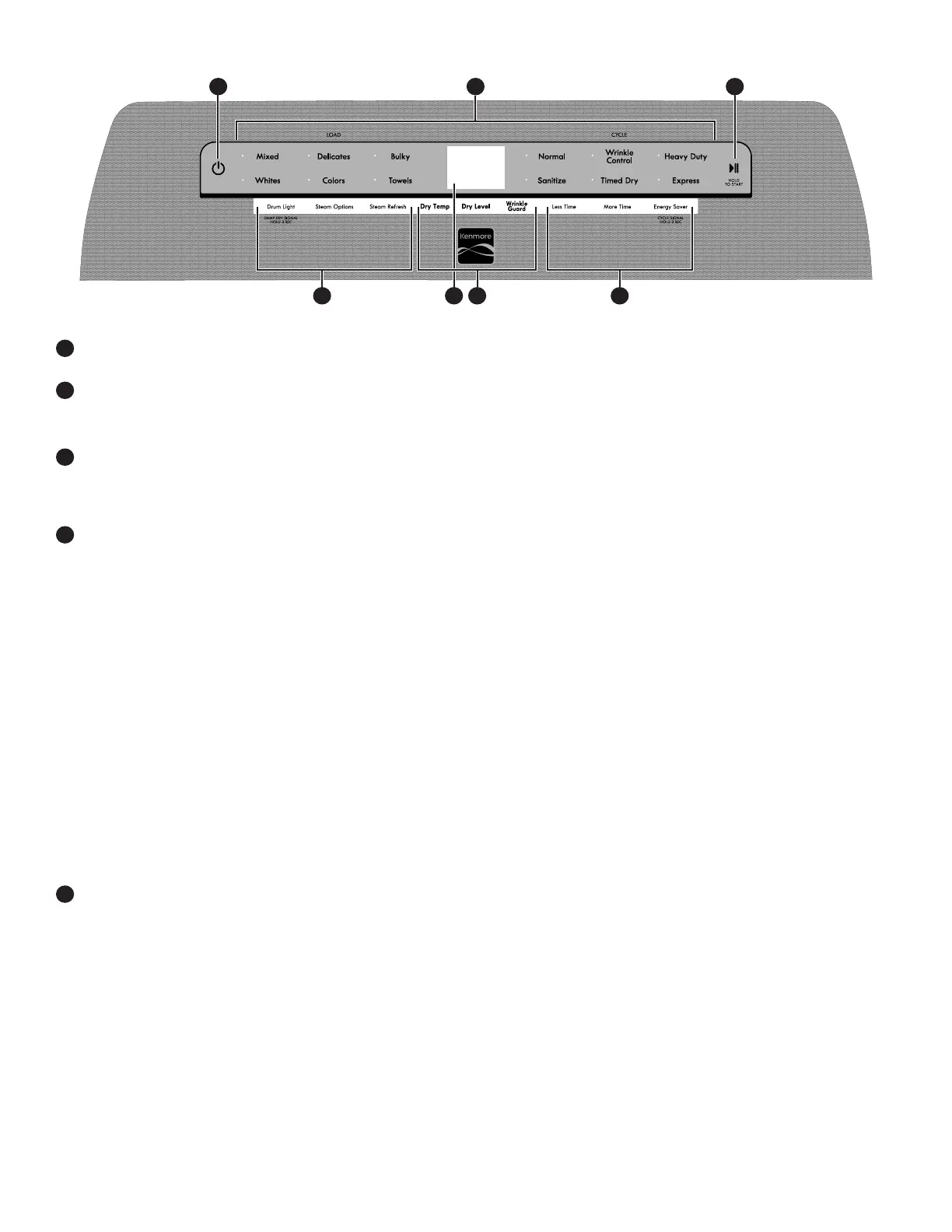
POWER
Touch to turn on/off or to stop/cancel a cycle.
LOAD/CYCLE
First select a cycle from the “Load” and then select the “Cycle”
to get the best combination cycle available for the type of items
you are going to dry. See “Cycle Guide” for cycle details.
START/PAUSE
Touch and hold; cycle will start after countdown.
Touch START/PAUSE during a cycle to pause it. Touch again to
resume.
1
2
3
MODIFIERS (Not all cycles and options are available on all
models.)
NOTE: Dryer remembers the last completed cycle and cycle
settings. The next time you turn dryer on, it will be set to run the
last cycle.
Dry Temp
Touch to modify the cycle’s available temperatures (Air Only,
Low, Medium, Medium High, High). Follow garment label
instructions for best results. Once a cycle has started, the
temperature can be changed within the first 5-8 minutes.
Dry Level
Touch to modify the cycle’s available dryness levels on the
sensor cycles (Less, Normal, More).
NOTE: Dry Level is for use with Automatic Cycles only.
Wrinkle Guard
®
Touch to turn on/off and on with steam (select models).
Wrinkle Guard
®
option adds up to 150 minutes of periodic
tumbling and heat to help reduce wrinkling. Wrinkle Guard
®
option with steam will add a short steam cycle after 60 minutes
to help smooth wrinkles.
CYCLE OPTIONS (Not all cycles and options are available on
all models.)
Use to select available modifiers for your dryer.
4
5
Damp Dry Signal
Touch DAMP DRY SIGNAL or touch and hold DRUM LIGHT
(depending on the model) for at least 3 seconds to turn the
Damp Dry Signal on or off. You will get a sound and display
notification as “Items are damp. You can pause and reposition
for best results”.
Drum Light
Touch to turn the drum light on/off.
Steam Options
Touch to add Steam and/or Reduce Static to selected cycle.
Steam option adds steam to the end of cycle to help smooth
wrinkle. Reduce Static will automatically tumble, pause and
introduce a small amount of moisture to the load to help reduce
static.
Steam Refresh (steam models only)
This cycle is best for reducing wrinkles from dry items. Cycle
time will increase, depending on number of items. This is an
independent cycle that cannot be combined with any other
cycle.
More Time/Less Time Timed Dry Adjust
Touch MORE TIME or LESS TIME with the Timed Dry/Express
cycle to increase or decrease the length of the cycle time.
Energy Saver
The Energy Saver option will default on only for the Mixed/
Normal cycle and is only available on that cycle. This option
allows you to increase your energy savings by using a slightly
lower heat level. The Energy Saver option will increase drying
times by approximately 40 minutes, which will be reflected on
the LCD Display. If optimal time is desired,
touch ENERGY SAVER to turn off this option.
Cycle Signal
Touch and Hold Energy Saver or touch Cycle signal depending
on model.
NOTE: Touch CYCLE SIGNAL to select the volume.
Appearance may vary depending on model.
1 32
65 4 5



 To Next Page