4
USING YOUR DRYER
*NOTE: See “Cycle Guide” for more information about cycles, settings, and options. Not all cycles, settings, and options are available with all
models. Read all your Manuals for more information on your unit.
If you accidentally select wrong language during digital un-boxing and/or you want to get back to Factory settings then perform Factory Reset.
FACTORY RESET
Press/hold both Dry Temp and Wrinkle Guard
®
keys until display count-down has completed. Unit will power back on with “Select Language”
display message.
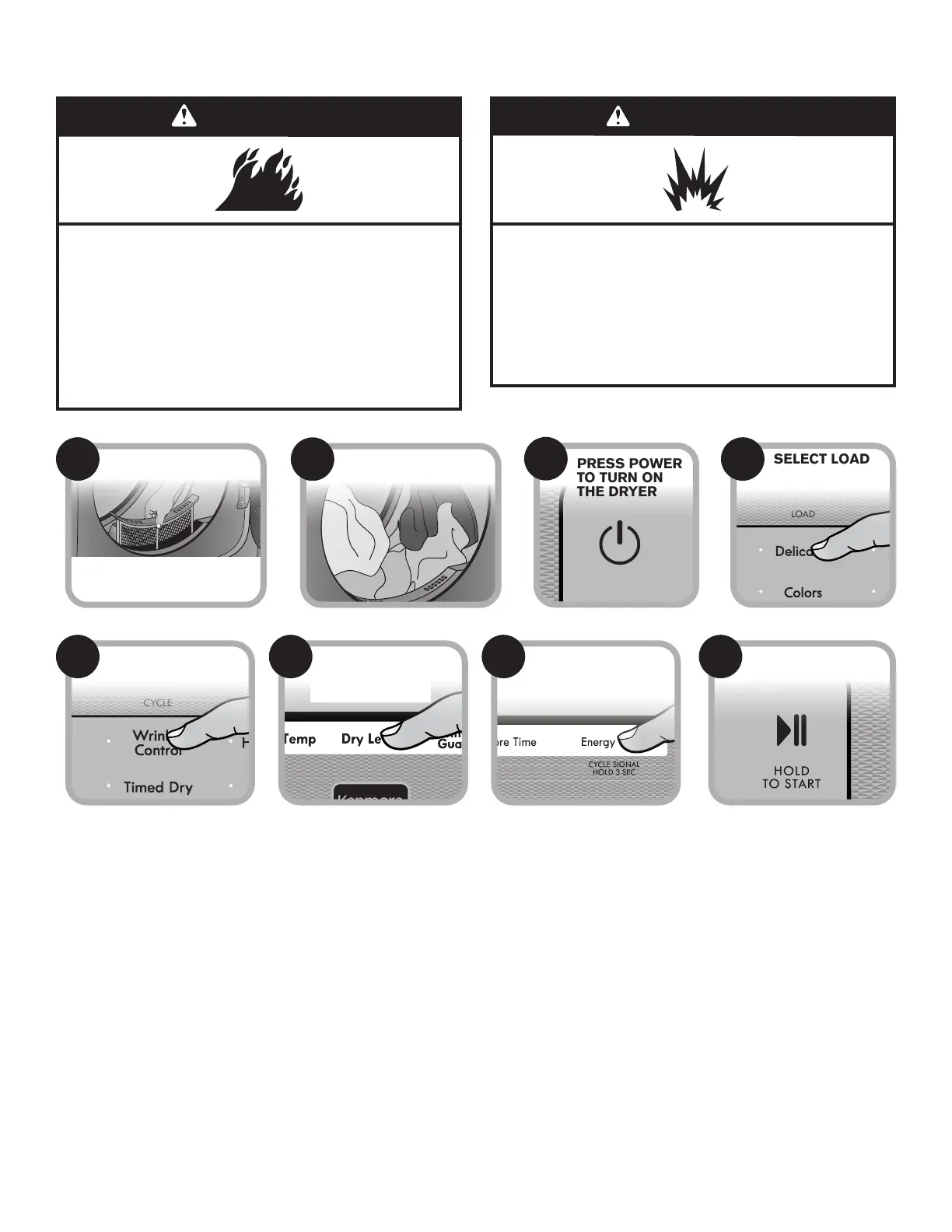
CLEAN LINT SCREEN
Clean the lint screen before each load.
Also, clean the exhaust vent at least
every 2 years.
1
LOAD DRYER
2
SELECT CYCLE
5
ADJUST CYCLE
SETTINGS, IF
DESIRED*
6
SELECT ANY
ADDITIONAL
OPTIONS*
7
TOUCH AND HOLD
START/PAUSE TO
BEGIN CYCLE
8
PRESS POWER
TO TURN ON
THE DRYER
3
SELECT LOAD
4
Fire Hazard
No washer can completely remove oil.
Do not dry anything that has ever had any type of oil on
it (including cooking oils).
Items containing foam, rubber, or plastic must be dried
on a clothesline or by using an Air Cycle.
Failure to follow these instructions can result in death
or fire.
WARNING
Explosion Hazard
Keep flammable materials and vapors, such as
gasoline, away from dryer.
Do not dry anything that has ever had anything
flammable on it (even after washing).
Failure to follow these instructions can result in death,
explosion, or fire.



 To Next Page