WARNING: Toreducetheriskofnre,electrlcshack,oriniurytopersons,readandfollowthis
entire Use & Care Guide, including the Important Safety Instructions, before operating this washer.
CONTROL PANEL FEATURES
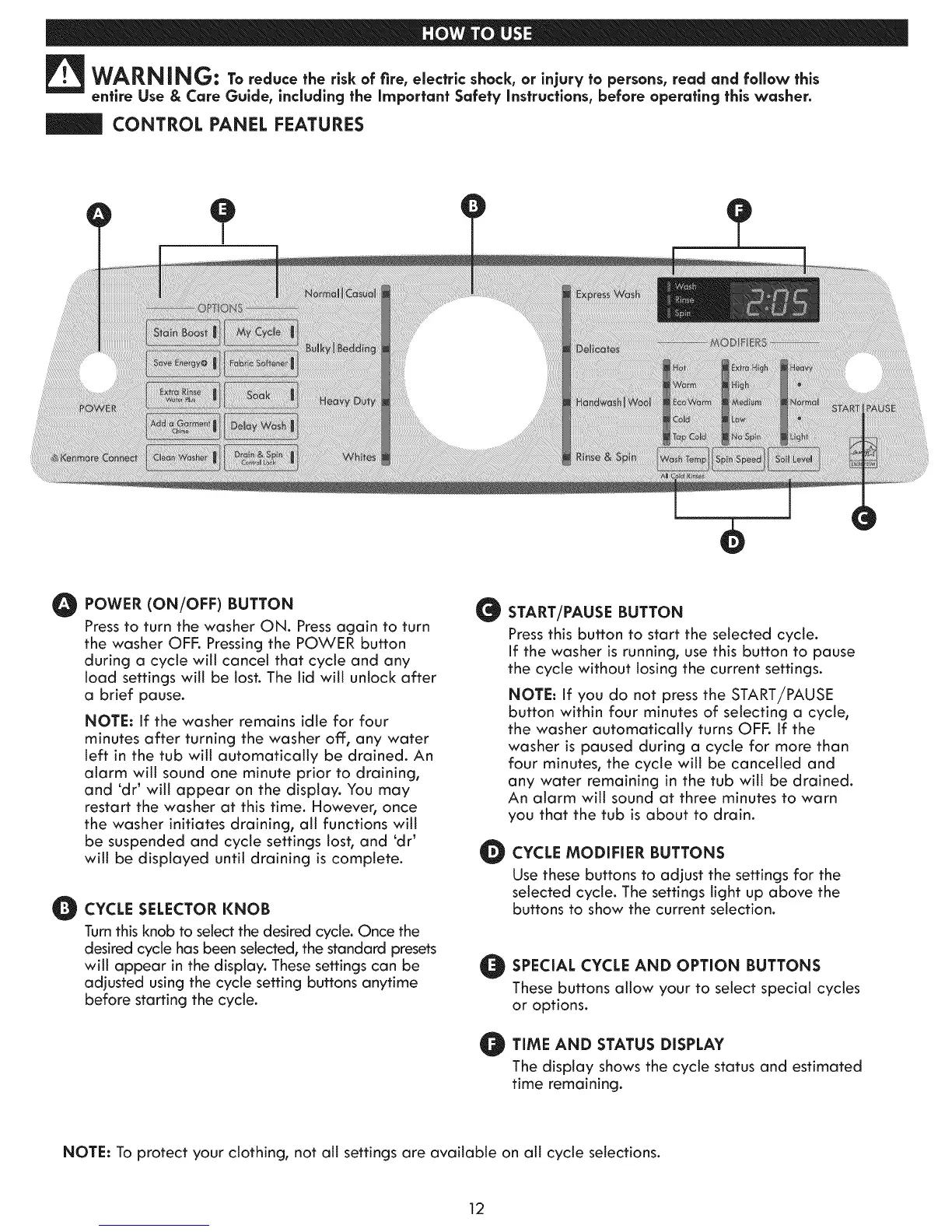
O POWER (ON/OFF) BUTTON G
Press to turn the washer ON. Press again to turn
the washer OFF. Pressing the POWER button
during a cycte will cancel that cycle and any
load settings will be lost. The lid witl unlock after
a brief pause.
NOTE: If the washer remains idle for four
minutes after turning the washer off, any water
left in the tub wit] automatically be drained. An
alarm wit] sound one minute prior to draining,
and 'dr _will appear on the display. You may
restart the washer at this time. However, once
the washer initiates draining, at] functions wit]
be suspended and cycte settings tost, and 'dr _
wit] be displayed until draining is complete.
O CYCLE SELECTOR KNOB
Turnthis knob to select the desired cycle. Once the
desired cycle has been selected, the standard presets
witl appear in the display. These settings can be
adjusted using the cycle setting buttons anytime
before starting the cycle.
O
START/PAUSE BUTTON
Press this button to start the selected cycle.
If the washer is running, use this button to pause
the cycle without losing the current settings.
NOTE: if you do not press the START/PAUSE
button within four minutes of selecting a cycle,
the washer automatically turns OFF. if the
washer is paused during a cycle for more than
four minutes, the cycle will be cancelled and
any water remaining in the tub will be drained.
An alarm will sound at three minutes to warn
you that the tub is about to drain.
CYCLE MODIFIER BUTTONS
Use these buttons to adjust the settings for the
selected cycle. The settings light up above the
buttons to show the current selection.
O SPECIAL CYCLE AND OPTION BUTTONS
These buttons allow your to select special cycles
or options.
O TIME STATUS DISPLAY
AND
The display shows the cycle status and estimated
time remaining,
NOTE: To protect your clothing, not all settings are available on all cycle selections.
12



 To Next Page