Contro Button Features
READ THE iNSTRUCTiONS CAREFULLY BEFORE USING THE OVEN. For satisfactory use of your oven, become
familiar with the various features and functions of the oven as described bebw, Detailed instructions for each feature
and function follow later in this Use & Care Guide.
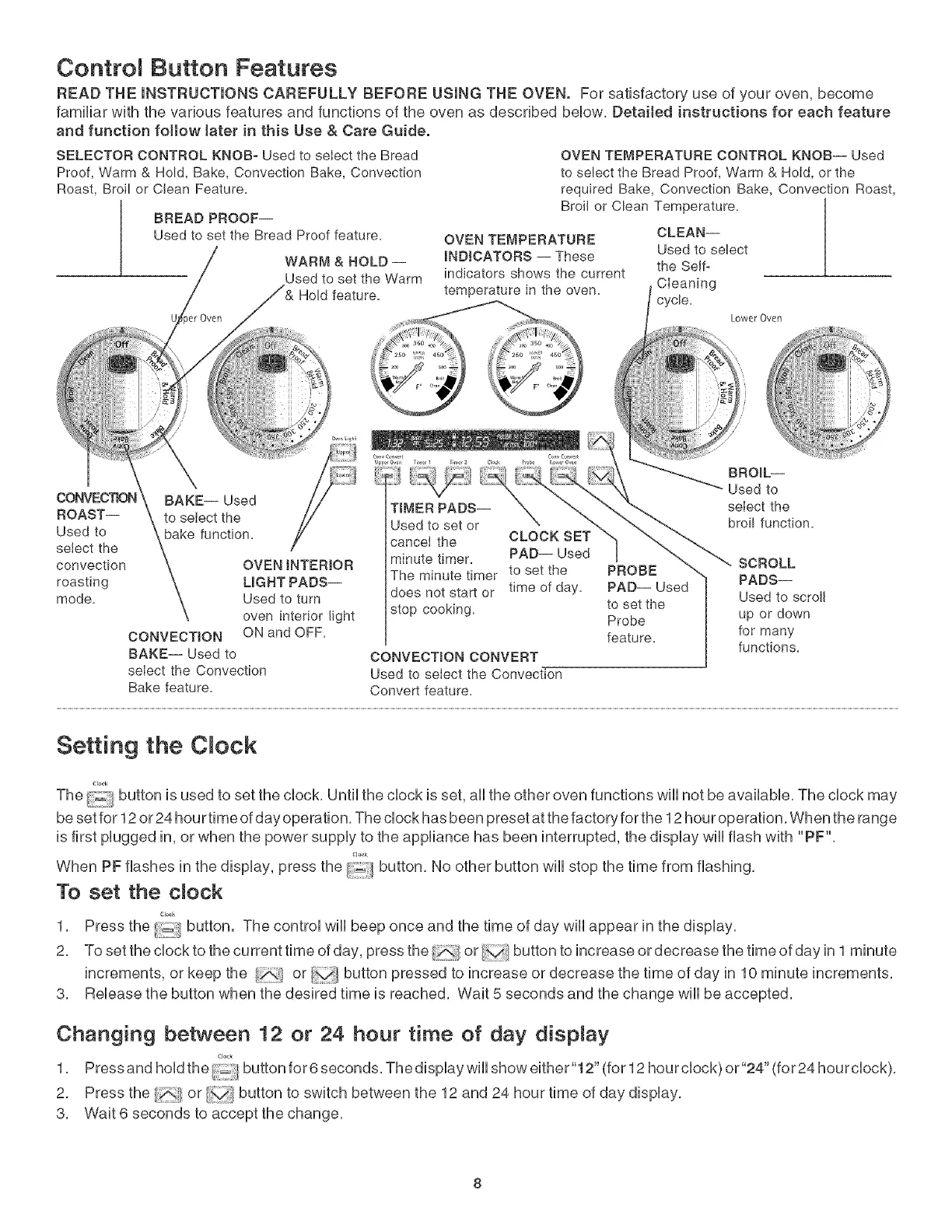
SELECTOR CONTROL KNOB- Used to select the Bread
Proof, Warm & Hold, Bake, Convection Bake, Cenvection
Roast, Broil or Clean Feature.
BREAD PROOF--
Used to set the Bread Proof feature.
WARM & HOLD --
Used to set the Warm
Hold feature.
CONVEC'RON BAKE-- Used
ROAST-- to select the
Used to bake function.
select the
convection OVEN INTERIOR
roasting LIGHT PADS--
mode. Used to turn
oven interior light
CONVECTION ON and OFF.
BAKE-- Used to
select the Convection
Bake feature.
OVEN TEMPERATURE CONTROL KNOB-- Used
to select the Bread Proof, Warm & Hold, or the
required Bake, Convection Bake, Convection Roast,
Broil or Clean Temperature.
OVEN TEMPERATURE
INDICATORS -- These
the Self-
indicators shows the current
temperature in the oven. CIeaning
cycle,
TIMER PADS--
Used to set or
cancel the CLOCK SET
minute timer. PAD-- Used
The minute timer to set the
time of day.
does not start or
stop cooking.
CONVECTION CONVERT
Used to select the Convection
Convert feature.
PROBE
PAD-- Used
to set the
Probe
feature.
CLEAN--
Used to select
Lower Oven
i,:
2 "
BROIL--
Used to
select the
broil function.
SCROLL
PADS--
Used to scroll
up or down
for many
functions.
Setting the C ock
Clo_k
The button is used to set the clock, Until the clock is set, aii the other oven functions wiii not be available, The clock may
be set for 12 or 24 hou rtime of day operation, The clock has been preset at the factory for the 12 hour operation, When the range
is first plugged in, or when the power supply to the appliance has been interrupted, the display will flash with "PF",
Cl_k
When PF flashes in the display, press the :_ button No other button will stop the time from flashing,
To set the dock
1, Press the i_iil/button. The control will beep once and the time of day will appear in the display,
2, Tosettheclocktothecurrenttimeofday, pressthe _;,</or buttontoincreaseordecreasethetimeofdayinl minute
increments, or keep the or button pressed to increase or decrease the time of day in 10 minute increments,
3, Release the button when the desired time is reached, Wait 5 seconds and the change will be accepted,
Changing between 12 or 24 hour time of day dispnay
1, Pressandhodthe/_buttonfor6seconds Thedspayw showeither"12"(for12hourclock)or"24"(for24hourclock),
2, Press the or v;/button to switch between the 12 and 24 hour time of day display,
3, Wait 6 seconds to accept the change,



 To Next Page