EasyManua.ls Logo

Kenner Electronic battle command STAR WARS - Page 8

Default Icon
9 pages
Print Icon
To Next Page IconTo Next Page
To Previous Page IconTo Previous Page
Loading...
4.
Press
r?3[
B
B
I
0
o
BiEBI
[0tllsRr
tDffTT
UNIIS
46
BTEBI
c0tll88r
t0ffit
unus
45
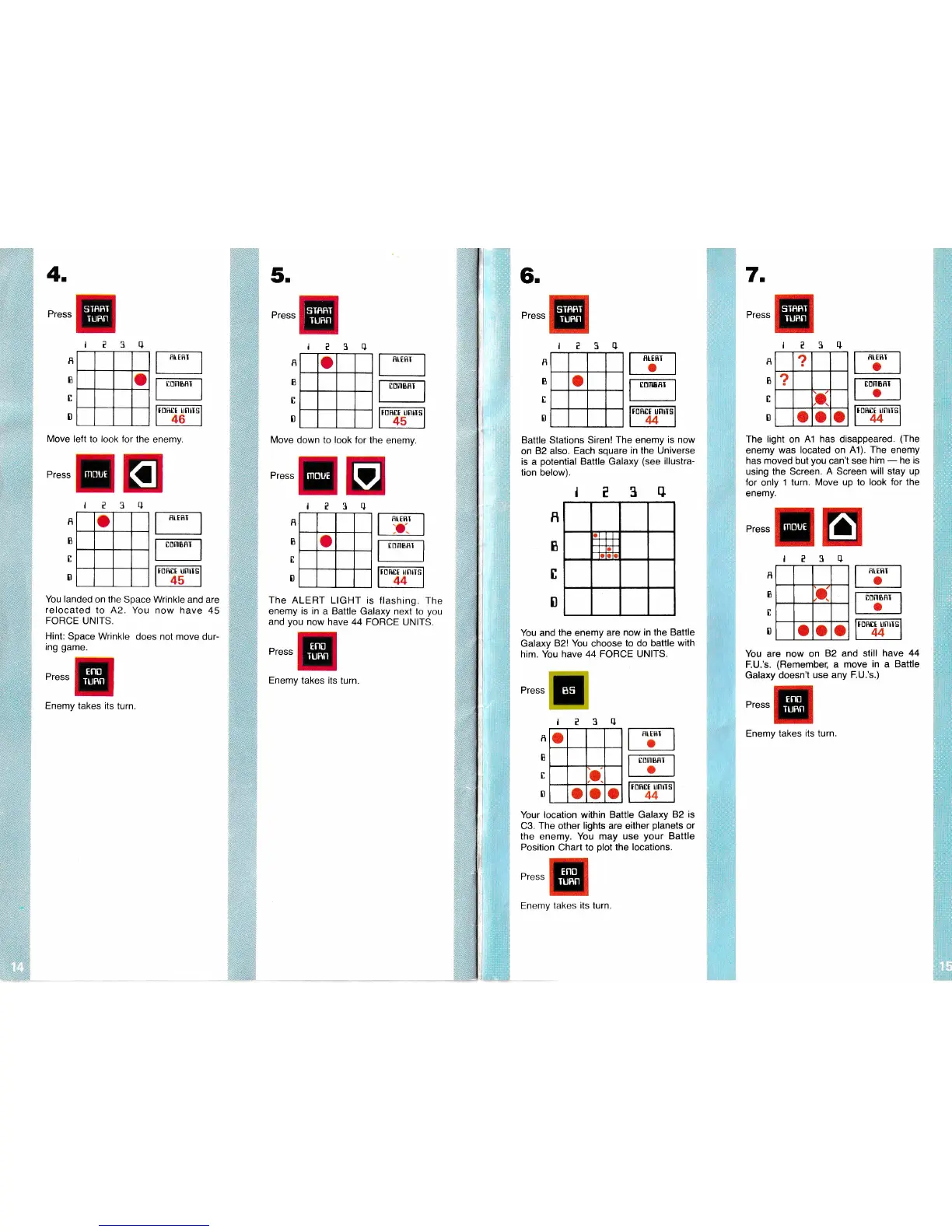
Move left to look for
the
enemy.
Press
o
You landed
on the Space Wrinkle and
are
relocated
to A2.
You now have 45
FORCE
UNITS,
Hint:
Space Wrinkle
does not move
dur-
ing
game.
Press
Enemy takes its
turn.
?3q
A
B
I
D
?3q
Move down to look
for the
enemy.
5.
Press
Press
BI.EflI
TDMBflI
r0ftrt
unrTs
45
I:NIIIBRI
t0Rtt
rnrrs
44
o
fl
B
c
0
t?39
a
The ALERT LIGHT
is flashing.
The
enemy is in
a Battle
Galaxy next to
you
and
you
now have 44 FORCE
UNITS.
Press
Enemy
takes its turn
I
I
l
0
MOUE
I[fttI
o.
6.
Press
o
Battle Stations Siren!
The enemy
is now
on
82 also. Each
square
in
the Universe
is
a
potential
Battle Galaxy
(see
illustra-
tion below).
l?3tI
You and the enemy
are now in the
Battle
Galaxy 82!
You
choose
to do battle with
him. You have 44 FORCE UNITS.
The light
on
A1
has
disappeared.
(The
enemy
was
located
on
A1).
The
enemY
has moved but
you
can't
see
him
-
he is
using
the Screen.
A
Screen
will stay up
for
only
1 turn.
Move up to look
for the
enemy.
Press
e3q
7
Press
?3+
fl
I
I
I
R
B
I
0
EIEBI
o
[0m88r
r0R0t
unlls
44
RI.ERI
o
I]DINBRI
o
tDhtt unus
44
?
2
r
o
o
o
TORES
UNIIS
44
COMBRI
o
toB[r unrrs
44
R
B
I
D
t?3q
a
o o o
You
are
now
on
82 and
still have
44
F.U.'s.
(Remembe[
a move
in
a
Battle
Galaxy doesn't
use any
F.U.'s.)
Press
Enemy takes
its turn
I
B
t
D
Press
q
o
,o
a
o
a
E
E
J
?
f
B
I
0
Your location within Battle Galaxy
82
is
C3.
The other
lights
are either
planets
or
the enemy. You may
use
your
Battle
Posilion
Chart to
plot
the locations.
Press
BIERI
a
COMBRI
a
I II
MOUE
fltERI
a
STRFT
IUBN
MOUE
Eno
TUBN
STRRT
TUHN
TUFN
Eno
TURN
Enemy lakes
its
turn.
TURN
I
TUBN