8.
Press
9.
Press
R
0
stENI
o
BTEflI
o
TDMBRI
o
TDFTT UNIIS
43
3?
q
o
o.
o o
o
e
o
o
o
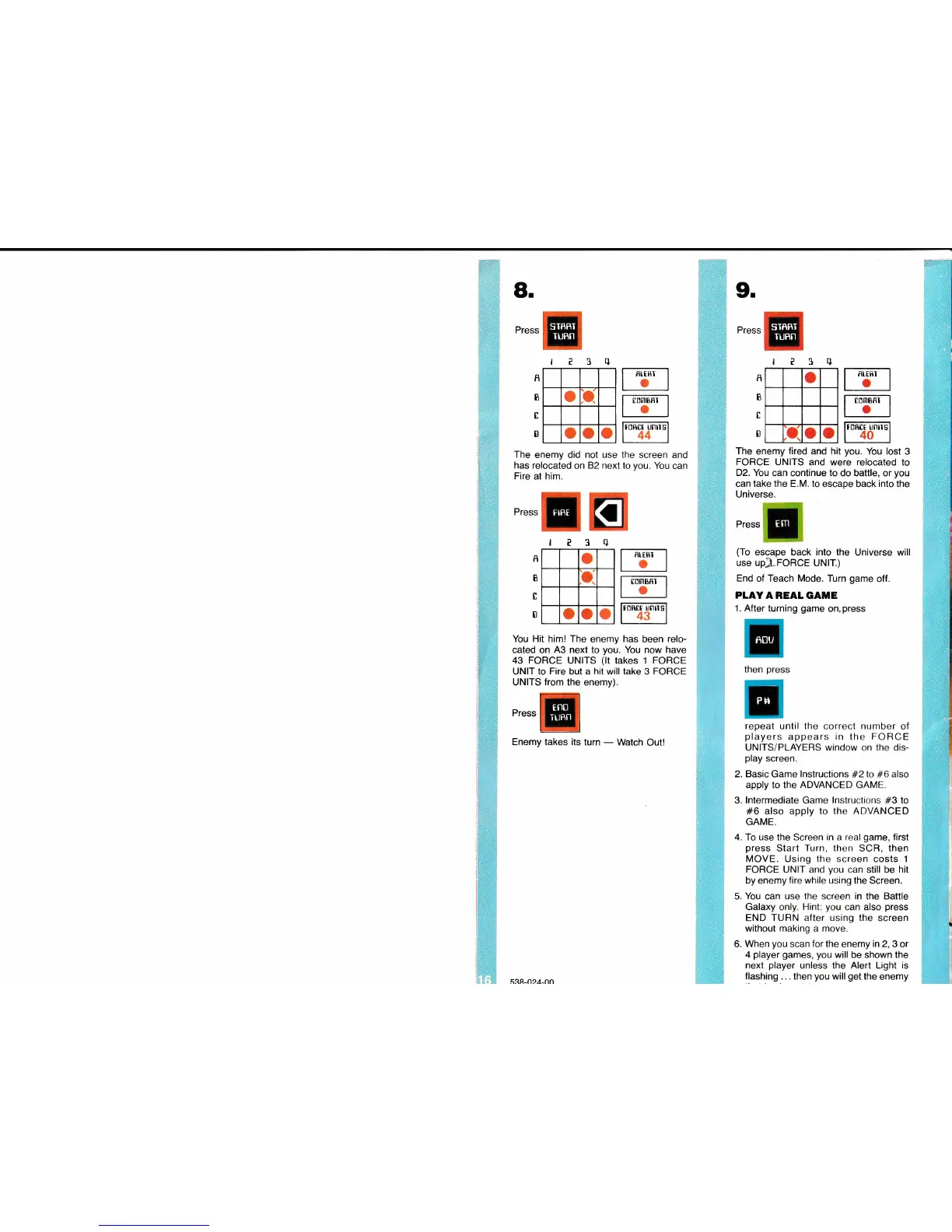
The
enemy did not use the
screen
and
has
relocated
on 82
next
to
you.
You
can
Fire
at him.
Press
The
enemy
fired
and hit
you.
You lost
3
FORCE
UNITS and were relocated to
D2. You
can continue to do battle,
or
you
can take the E.M. to
escape
back into
the
Universe.
Press
(To
escape back
into
the Universe
will
use
upJLFoRCE uNtT.)
End
of
Teach
Mode. Turn
game
off.
PLAYA REAL
GATIE
1. After turning
game
on,
press
then
press
repeat
until the correct number of
players
appears
in
the
FORCE
UNITS/PLAYERS window
on
the dis-
play
screen.
2.
Basic
Game lnstructions
#2
to
#6
also
apply to the
ADVANCED GAME.
3. lntermediate Game lnstructions
#3
to
#6
also apply
to the
ADVANCED
GAME.
4.
To use the Screen in
a
real
game,
first
press
Start Turn, then SCR, then
MOVE.
Using the screen costs
I
FORCE
UNIT and
you
can still be
hit
by
enemy
fire
while using
the
Screen.
5. You
can
use
the screen
in the Battle
Galaxy
only.
Hint:
you
can
also
press
END TURN after using the screen
without making a move.
6.
When
you
scan
for the
enemy
in 2,
3 or
4
player
games, you
will be shown the
next
player
unless the Alert Light
is
flashing
... then
you
will
get
the enemy
I
I
B
I
0
?3rl
o
jO.
o
o o
R
B
I
0
You Hit him! The
enemy
has
been relo-
cated on
A3 next to
you.
You now have
43 FORCE UNITS
(lt
takes 1 FORCE
UNIT to
Fire
but a
hit
will take 3 FORCE
UNITS
from
the
enemy).
Press
Enemy takes its
turn
-
Watch
Out!
BTERI
o
BOU
5eR-n2A-nn
reSq
u
tnnl
TUFN
TTomBsr I
lo
I
Ironm unirs'l
l|44
I
TUflN
FIBE
TURN
PS
l_ED'friBEi-.l
l.l
frclrr unirs'l
140
I



 To Previous Page