1.4 Driver Installation
1.4.1 OS Support
Windows 7 or later,macOS 10.08 or later
1.4.2 Install Driver
Please download the driver from our website: www.kentingtablet.com
After finishing installation, you can find the driver icon in the system tray area,
which means the driver was installed successfully and you can start using it now.
Notice:
1. Before installing, you need to uninstall other driver of similar products, including
the old driver of this product.
2. Before installing, please close all graphics software and anti-virus software to
avoid unnecessary mistake.
1.5 AAA Battery Installation (Battery Not Included)
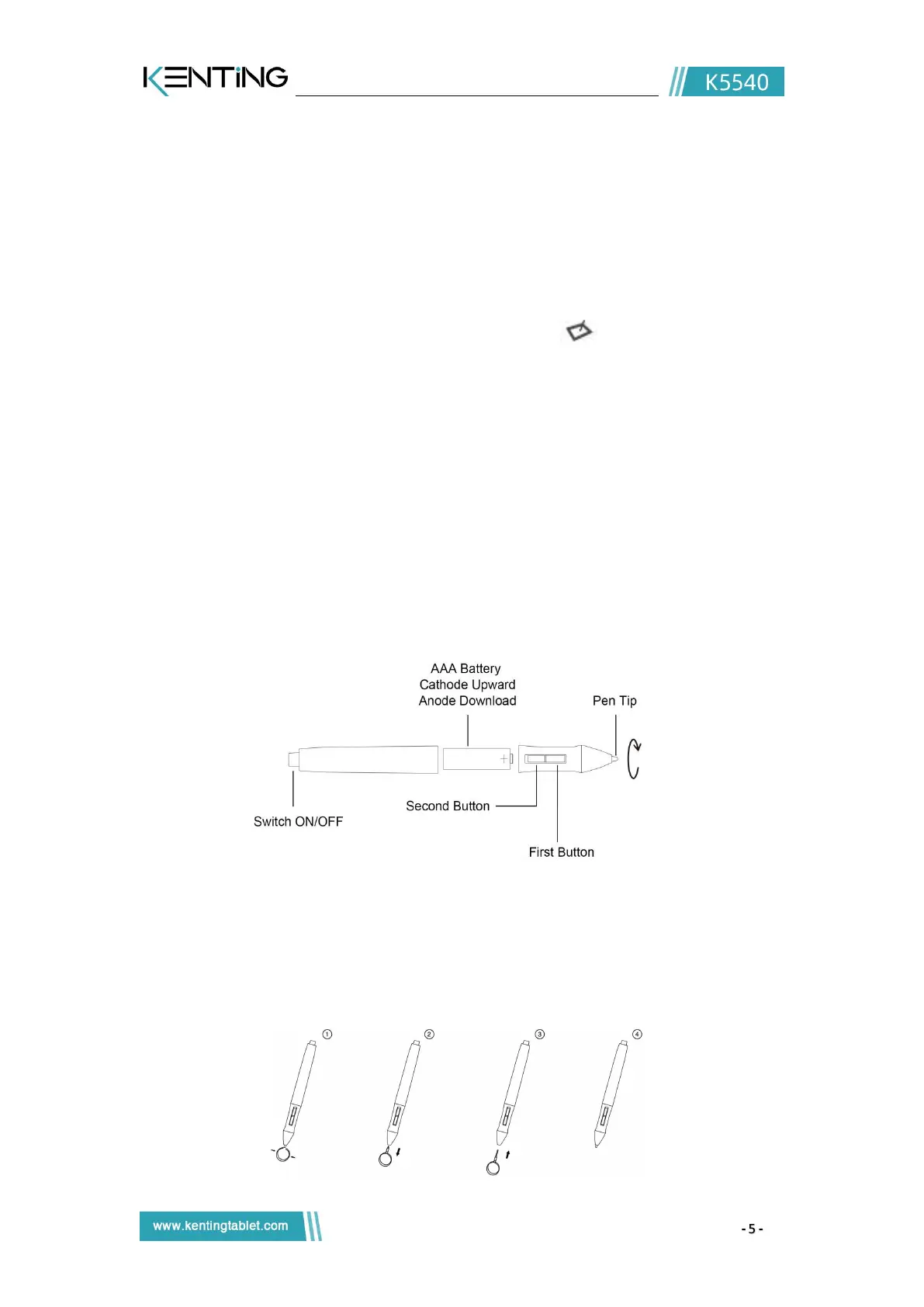
Unscrew the pen body, put an AAA battery, and please be attention to the side of +
mark should towards the tip of the pen.
1.6 Pen Nib Replacement
Nib will be wear off after using for a long time, then you need to replace a new nib.
1) Use the pen nib clip to pull the old nib straight out of the pen. (①②)
2) Insert a new pen nib into the stylus and push the nib until it stops. (③④)


 To Next Page