EasyManua.ls Logo

Kenwood CCC20 - User Manual

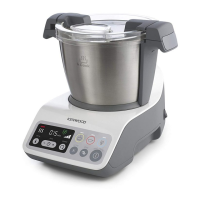
Kenwood CCC20
38 pages
Print Icon
To Next Page IconTo Next Page
Loading...
TYPE CCC20
instructions

Questions and Answers

  • C
    Christine ScottAug 1, 2025
    What to do if my Kenwood CCC20 Food Processor is not operating?
    • R
      Robert LesterAug 1, 2025
      If your Kenwood Food Processor isn't operating, make sure the bowl is correctly located on the power unit. Also, ensure you've pressed the Start button to begin cooking and that the time is properly set.
  • J
    Justin LewisAug 6, 2025
    Why is my Kenwood CCC20 Food Processor display not coming on?
    • S
      Susan TaylorAug 6, 2025
      If the display screen of your Kenwood Food Processor isn't coming on, the appliance might not be plugged in, or the Power ON switch hasn't been activated. Check that the appliance is plugged in and press the Power ON switch to the On position.
  • S
    Steven ClarkAug 11, 2025
    What does it mean when my Kenwood CCC20 displays H2O during steaming?
    • P
      pachecoshawnAug 11, 2025
      If your Kenwood Food Processor displays 'H2O' while steaming, it means the boil-dry protection has been activated because there's no water or it ran dry during operation. Switch the appliance off and then back on, and add water to the 300 ml level.
  • R
    Robert ChavezAug 15, 2025
    What to do if Kenwood Food Processor displays error message E03?
    • J
      Jennifer LawsonAug 15, 2025
      If your Kenwood Food Processor displays error message E03, it indicates the unit stalled or is overloaded. Reduce the amount of ingredients in the bowl, switch the appliance off, and let it cool down for 15 minutes before restarting.
  • P
    Paul BarberAug 21, 2025
    Why is food sticking to the bottom of my Kenwood CCC20?
    • T
      Taylor AdamsAug 21, 2025
      Food might be sticking or burning on the bottom of the bowl of your Kenwood Food Processor if you didn't use the stirring paddle or blade when softening vegetables, or if the temperature selected is too high. Always use the stirring paddle or blade and verify that you've selected the correct temperature.
  • B
    Barbara Rodriguez MDAug 26, 2025
    What to do if Kenwood Food Processor displays error message E01, E02, E04?
    • B
      Bryan JohnsonAug 26, 2025
      If your Kenwood Food Processor displays error messages E01, E02, or E04, the unit is not functioning correctly. Turn it off, unplug it, wait 30 seconds, and then plug it back in.

Summary

Safety and Preparation

General Safety Precautions

Essential safety guidelines for operating the appliance, including handling hot parts, electrical safety, and general usage rules.

Electrical Connection and Safety

Instructions for connecting the appliance to the power supply and essential electrical safety measures.

Display Screen Information

Understanding Display Symbols

Detailed explanation of all icons and indicators shown on the appliance's display screen.

Manual Mode

Manual Operation Controls

Guide to using the temperature, time, and stir controls in manual mode.

Troubleshooting

Common Issues and Solutions

A guide to diagnosing and resolving common problems encountered with the appliance.

Kenwood CCC20 Specifications

General IconGeneral
Capacity1500 g
BluetoothNo
Bowl capacity2.5 L
Product colorGrey, White
Pulse function-
Mixer functionsStirring
Steaming basketYes
Number of speeds3
Thermostat range65 - 100 °C
Auto programs quantity4
Bowl materialStainless steel
Housing materialPlastic
Weight and Dimensions IconWeight and Dimensions
Depth320 mm
Width260 mm
Height230 mm
Weight3800 g

Related product manuals