EasyManua.ls Logo

Kenwood CCL450SI - User Manual

Kenwood CCL450SI
200 pages
Print Icon
To Next Page IconTo Next Page
Loading...
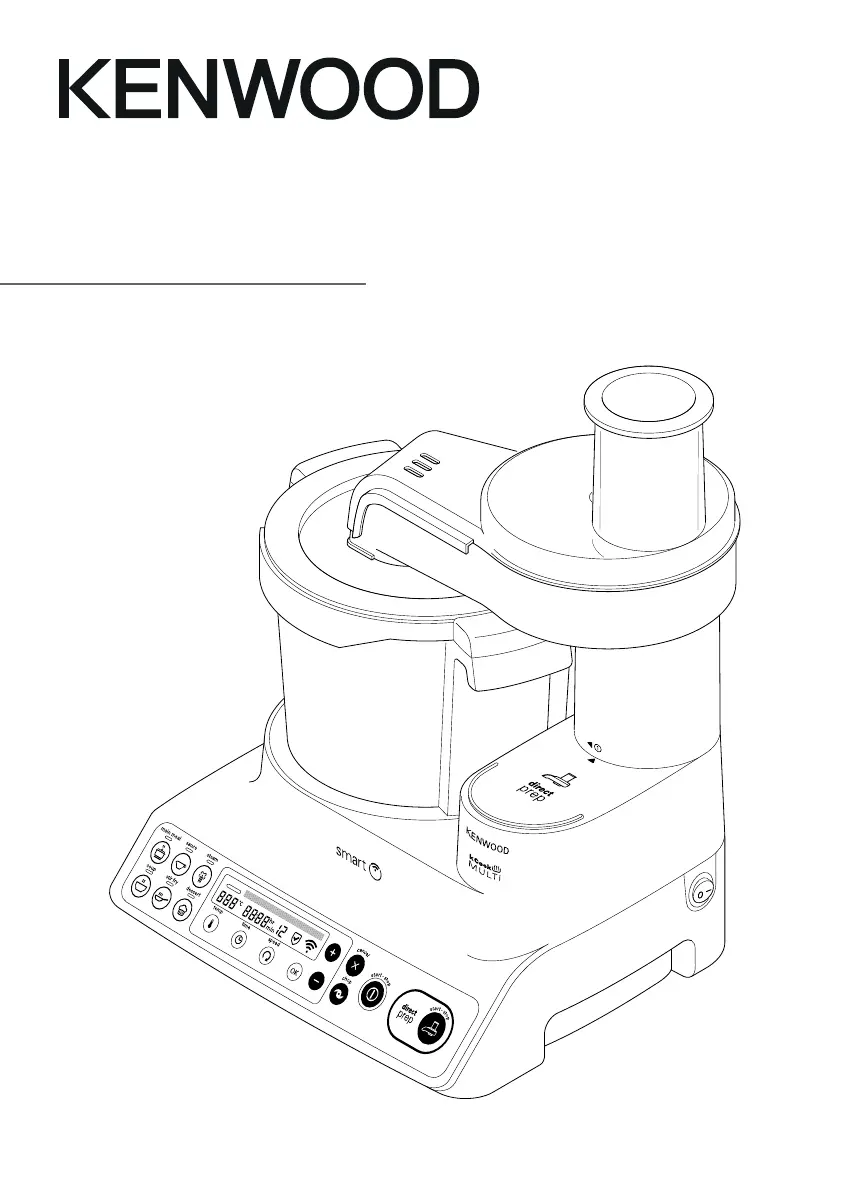
TYPE CCL45
instructions
istruzioni
instrucciones
Bedienungsanleitungen
gebruiksaanwijzing

Table of Contents

Questions and Answers

  • C
    Carol ClarkeAug 17, 2025
    Why is my Kenwood CCL450SI Food Processor not turning on?
    • K
      Karen MillerAug 17, 2025
      If your Kenwood Food Processor isn't powering on, first ensure it's properly plugged into a working outlet. Then, check that the On/Off switch is in the 'On' position.
  • D
    Diana BlairAug 20, 2025
    What does 'MOTOR OVERHEAT. ALLOW TO COOL' mean on my Kenwood CCL450SI?
    • C
      christian85Aug 20, 2025
      The 'MOTOR OVERHEAT. ALLOW TO COOL' message indicates that the motor of your Kenwood Food Processor is overloaded. To resolve this, switch off and unplug the unit, allowing it to cool down for 45 minutes before plugging it back in. If the message persists, let it cool for another 45 minutes.
  • P
    pcarrollAug 23, 2025
    What does 'MOTOR OVERLOAD' mean on my Kenwood CCL450SI?
    • E
      Ellen WilsonAug 23, 2025
      The 'MOTOR OVERLOAD' or 'MOTOR STALLED' message on your Kenwood Food Processor indicates that the appliance is overloaded. Reduce the quantity of food in the bowl to resolve this issue.
  • T
    Troy SmithAug 25, 2025
    Why is my Kenwood CCL450SI vibrating heavily during use?
    • S
      Steven JimenezAug 26, 2025
      Excessive vibration in your Kenwood Food Processor usually means there's an uneven load in the bowl, you've exceeded the maximum capacity, or you're using the wrong tool or speed. Try reducing the quantity of food or rearranging it in the bowl, and restart the unit. Refer to the program guidelines for the correct tool and speed settings.
  • B
    Bianca LopezAug 28, 2025
    What does 'CHECK WATER LEVEL' mean on my Kenwood Food Processor?
    • E
      Emily KingAug 28, 2025
      The 'CHECK WATER LEVEL' message during steaming on your Kenwood Food Processor means the boil-dry protection has been activated due to insufficient water. Add water up to the 1-liter mark and restart the program.
  • D
    David HuangAug 30, 2025
    What does error code E:20 - E:29 mean on my Kenwood Food Processor?
    • V
      Vicki ThompsonAug 30, 2025
      Error messages E:20 through E:29 on your Kenwood Food Processor indicate that the appliance is not functioning correctly. To resolve this, switch off and unplug the unit, then plug it back in and restart.
  • W
    Wayne JohnsonSep 2, 2025
    What does error code E:34 mean on my Kenwood CCL450SI Food Processor?
    • M
      Michelle StewartSep 2, 2025
      Error code E:34 on your Kenwood Food Processor indicates a Wi-Fi credentials issue. Check your Wi-Fi password, factory reset the Wi-Fi (refer to the “Wi-Fi Menu” section), and restart the Appliance Setup from the Kenwood World app.
  • M
    Megan RandallSep 5, 2025
    How to prevent food from sticking to the bottom of my Kenwood CCL450SI Food Processor?
    • J
      Jon MurraySep 5, 2025
      To prevent food from sticking or burning in your Kenwood Food Processor, always use the stir tool or knife blade, especially when softening vegetables. Also, ensure that you have selected the correct temperature and consider increasing the stir speed.
  • J
    Jeffrey WhiteSep 8, 2025
    Why isn't the timer counting down on my Kenwood CCL450SI Food Processor?
    • K
      Karen TurnerSep 8, 2025
      The timer on your Kenwood Food Processor may not count down during the heating stage until the correct temperature is reached. This is normal. If the temperature is set above 100°C, but the water content of the food is preventing the temperature from exceeding 100°C, reduce or select the correct temperature.
  • O
    omorganSep 12, 2025
    What does fast flashing mean on my Kenwood CCL450SI?
    • W
      williammullinsSep 12, 2025
      Fast flashing indicates that Wi-Fi is available, but the Kenwood Food Processor is unable to connect to Kenwood cloud servers. You may need to restart your router, or contact your Internet Service Provider.

Summary

Safety Precautions

Kenwood World App Connectivity

Wi-Fi Menu Settings

Details the Wi-Fi connection menu options, including setup and reset.

Appliance Key and Parts Identification

Appliance Language Selection

Step-by-step guide to change the display language on the appliance screen.

Operating the Cooking Food Processor

Manual Cooking Mode

Guide to manually controlling temperature, time, and speed for custom cooking.

Using Pre-set Programmes

Instructions on how to select and utilize the appliance's built-in cooking programmes.

Direct Prep Attachment Operation

Direct Prep Cutting Discs

Identifies and describes the functions of the various cutting discs included with the attachment.

Direct Prep Assembly and Usage

Detailed steps for assembling the Direct Prep attachment and performing operations.

Understanding Display Screen Symbols

Manual Cooking Mode Controls

Manual Mode Temperature Settings

Options and ranges for setting the temperature in manual cooking mode.

Manual Mode Time Settings

Options and ranges for setting the cooking time in manual mode.

Manual Mode Speed Settings

Options and ranges for setting the speed in manual cooking mode.

Guide to Pre-set Programmes

Main Meal Programme Recipes

Sauce Programme Recipes

Steam Programme Guide

Soup Programme Recipes

Stir Fry Programme Recipes

Recipe suggestions and programming guidance for the Stir Fry function.

Dessert Programme Recipes

Manual Functions Speed Chart

Appliance Care and Cleaning

Cleaning the Power Unit

Specific instructions for cleaning the main power unit of the appliance.

Cleaning Bowl Drive Shaft and Plug

Steps for cleaning the bowl drive shaft assembly and the bowl plug.

Cleaning the Appliance Lid

Instructions for safely dismantling and cleaning the appliance's lid.

Cleaning the Direct Prep Attachment

Procedures for dismantling and cleaning the Direct Prep attachment after use.

Service and Customer Support

Troubleshooting Common Issues

A guide to identify and resolve common problems encountered with the appliance.

Kenwood CCL450SI Specifications

General IconGeneral
Bowl MaterialPlastic
SpeedsVariable
Pulse FunctionYes
Weight5.4 kg
Included AccessoriesBlades

Related product manuals