Need help?
Do you have a question about the Kenwood DDX9906XR and is the answer not in the manual?
Basic functions of this unit and where to find more info.
Explains how to interpret screens and panels shown in the manual.
Safety warnings and precautions for installation and use.
How to prevent damage to the monitor screen.
Instructions for cleaning the unit's faceplate and exterior.
Explains condensation on the disc player lens and its effects.
Guidelines for handling discs to prevent damage and ensure playback.
Process for the unit to acquire satellite signals for the first time.
Information on GLONASS system and its use with GPS.
Advice for smartphone users to ensure optimal performance.
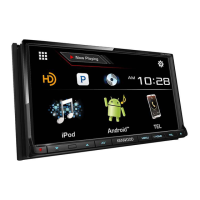
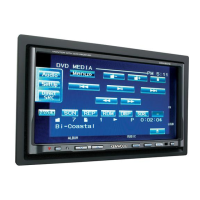
Identifies and describes buttons on the front panel of various models.
Step-by-step guide on how to power the unit on and off.
Steps for initial setup when using the unit for the first time.
How to select the display language for menus and settings.
How to set the clock synchronization and adjust time.
How to set key illumination color and adjust viewing angle.
How to set parameters for the connected camera.
Information on OEM setup requiring a commercial adapter.
How to set the demonstration mode.
How to set up a security code to protect the receiver from theft.
Steps to modify an existing security code.
Steps to remove or cancel the security code.
Manual procedure to set the date and time.
How to increase or decrease the audio volume level.
Adjusting screen tilt and viewing angle for better visibility.
Adjusting the screen viewing angle for optimal image appearance.
Explains methods of interacting with the touchscreen: touch, hold, flick, swipe.
Overview of the HOME screen and its main functions.
Instructions on how to access the HOME screen.
How to change and interact with widgets on the HOME screen.
How to access and use the popup menu.
Description of the screen showing all available playback sources.
Guide to selecting different audio/video sources.
Instructions for placing the unit into standby mode.
How to rearrange source icons on the HOME screen for quick access.
Overview of functions available on various source control screens.
Common function keys and operations within list screens.
Step-by-step guide to inserting and removing discs.
Basic operational steps for DVD and VCD playback.
How to navigate and operate menus on a DVD disc.
How to connect and use a USB storage device.
Proper procedure for removing a USB device.
Information on compatible types of USB devices.
Preparation and steps for connecting an iPod or iPhone.
How to connect iPod/iPhone using a specific cable accessory.
Pairing an iPhone via Bluetooth for connection.
List of compatible iPod and iPhone models.
General operation guide for USB and iPod devices.
Basic operation for the HD Radio tuner on specific models.
Description of the HD Radio tuner control screen elements.
Details on displayed information like station frequency and content.
How to switch between different station seek modes.
Explanation of keys for tuning and other operations.
How to use and store preset stations.
Description of the function panel and its options.
Explanation of indicator lights for digital/analog reception.
Basic operation for the standard radio tuner on specific models.
How to store and recall radio stations in memory.
Procedure for automatically storing good reception stations.
How to manually store the currently received station.
How to select a station from the preset list.
Steps to register a Bluetooth audio player or cell-phone with the unit.
Choosing the desired function (Hands-Free, Audio, Phonebook) after pairing.
How to use the telephone function via Bluetooth connection.
Step-by-step guide to making a phone call using the hands-free system.
How to select which phone to use when two are connected.
How to make a call using the call history.
How to make a call using the stored phonebook contacts.
How to select the first letter to find contacts in the phonebook.
Choosing a contact from the phonebook list to initiate a call.
Choosing how to make a call (call records, phonebook, preset, number).
Features available during an active phone call.
How to adjust microphone input level for voice quality.
How to adjust the volume of the person you are speaking to.
How to temporarily mute your microphone during a call.
Sending tones via the unit for phone menu navigation.
Changing audio output between phone speaker and unit speaker.
How to dismiss the hands-free call screen.
How to re-access the hands-free screen.
How to terminate an active phone call.
Adjusting audio settings like balance, fader, and equalizer.
How to adjust the equalizer settings for optimal sound.
Adjusting gain levels for specific frequency bars in the equalizer.
Selecting pre-defined equalizer curves.
Saving custom equalizer settings.
Resetting the equalizer curve to a flat (default) state.
Applying the current equalizer settings to all audio sources.
Enabling Bass Extend feature for lower frequencies.
Adjusting the subwoofer volume level.
Adjusting fader and balance for audio distribution.
Important precautions and warnings before installing the unit.
Critical safety warnings related to wiring and power connections.
Cautions regarding handling the unit and its metal parts.
Additional notes and recommendations for installation.
List of accessories provided for installing the unit.
Step-by-step instructions for installing the unit in the vehicle.
Instructions for installing the unit in different car types.
Unit installation instructions specific to non-Japanese car models.
Unit installation instructions specific to Japanese car models.
How to attach the trim plate for specific models.
Instructions for mounting the GPS antenna inside the vehicle.
Instructions for installing and positioning the external microphone.
Steps for safely removing the unit from the dashboard.
Steps for removing the trim plate before unit removal.
Wiring diagram and terminal connections for most models.
Wiring diagram and terminal connections specifically for DDX819WBTL.
Guide for setting up a 3-way speaker system with external amplifiers.
Connecting external components to units except DDX819WBTL.
Connecting external components to the DDX819WBTL model.
How to connect the unit to an external amplifier.
Connecting the SiriusXM tuner to compatible models.
Connecting the iDatalink interface.
Connection for TV tuner remote output on specific model.
Using the jack for AV-IN or camera input.
Connecting a dashboard camera to compatible models.
Connecting the GPS antenna to compatible models.
Connecting the external Bluetooth microphone.
How to properly secure the USB extension cable.
Connecting a USB device to models other than DDX819WBTL.
Connecting a USB device to the DDX819WBTL model.
Connecting an iPod/iPhone to models other than DDX819WBTL.
Connecting an Android smartphone to models other than DDX819WBTL.
Connecting an Android smartphone to the DDX819WBTL model.
Connecting cameras to models other than DDX819WBTL.
Connecting cameras to the DDX819WBTL model.
How to assign camera inputs and set camera views.
Technical specifications for Bluetooth and general unit operation.
 General
| Display Size | 6.8 inches |
|---|---|
| Bluetooth | Yes |
| Apple CarPlay | Yes |
| Android Auto | Yes |
| HDMI Input | Yes |
| USB Ports | 2 |
| Audio Formats Supported | MP3, WMA, AAC, FLAC, WAV |
| HD Radio | Yes |
| SiriusXM Ready | Yes |
| Backup Camera Input | Yes |
| iDatalink Maestro | Yes |
| Video Playback | Yes |
| Max Video Resolution | 1080p |
| Built-in DSP | Yes |
| Power Output | 200 Watts (50W x 4) |
| RMS Power Output | 22W x 4 |
| Peak Power Output | 50 Watts |
| Navigation | Optional |
| Wireless Connectivity | Yes |
| EQ Settings | 13-band equalizer |

 To Next Page