Basic Operations
9English
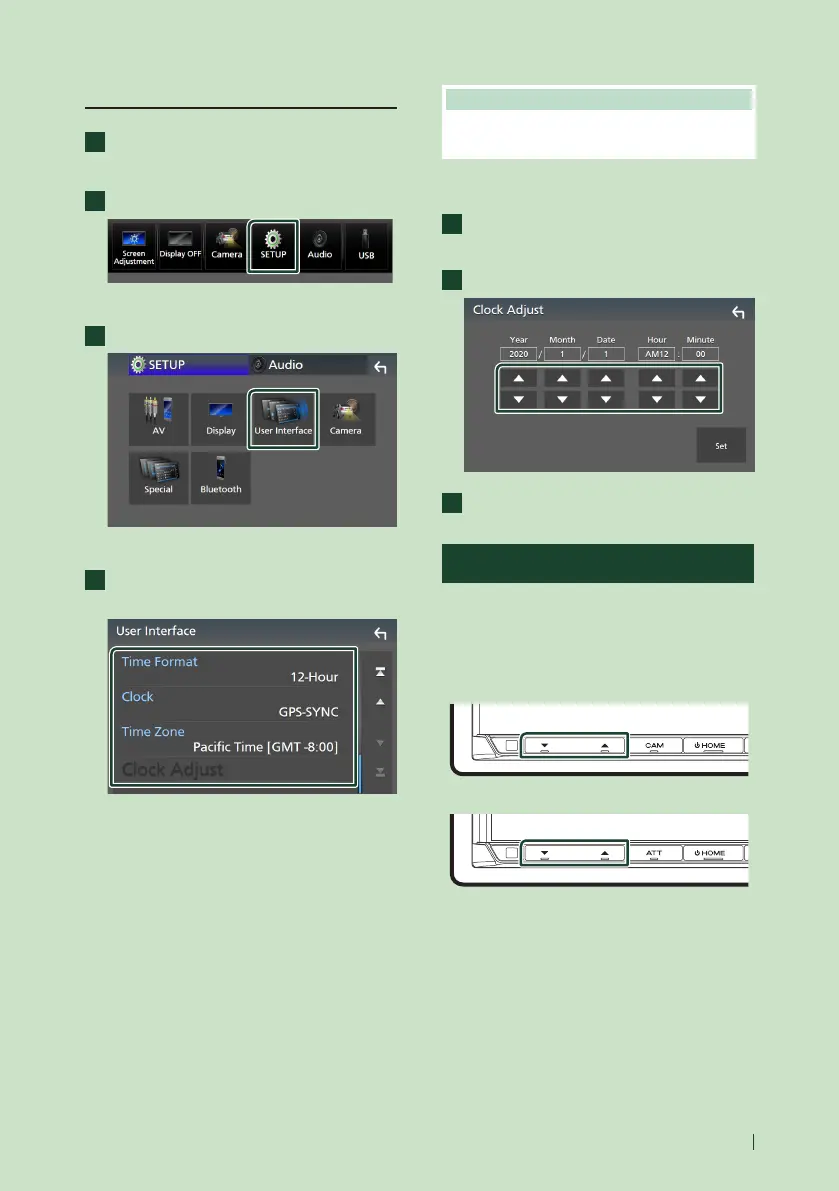
Calendar/clock settings
1
Press the [MENU] button.
Popup menu appears.
2
Touch [SETUP].
SETUP Menu screen appears.
3
Touch [User Interface].
User Interface screen appears.
4
Set each item as follows.
Scroll the page to show hidden items.
■ [Time Format]
Select the time display format.
[12-Hour ](Default)/24-Hour]
■ [Clock]
[GPS-SYNC ](Default): Synchronizes the clock
time with the GPS.
[Manual]: Set the clock manually.
■ [Time Zone]
Select the time zone.
■ [Clock Adjust]
If you select [Manual] for Clock, adjust the
date and time manually. (P.9)
NOTE
• Please set the date and time. If they are not set,
some functions may not work.
● Adjust the date and time manually
1
Touch [Clock Adjust] on the User
Interface screen.
2
Adjust the date, then adjust the time.
3
Touch [Set].
Adjusting the volume
You can adjust the volume (0 to 40).
Press [R] to increase, and press [S] to decrease.
Holding [R] increases the volume continuously
to level 15.
DDX9907XR / DDX9707S
DMX957XR / DMX907S / DMX9707S


 To Next Page
 Loading...



