Need help?
Do you have a question about the Kenwood DPC-741 and is the answer not in the manual?
Covers power requirements for U.S.A./Canada and FCC warning for U.S.A. equipment.
Key warnings about fire, shock, moisture, laser products, and copyright infringement.
Guidelines for power sources, heat, moisture, dust, vibrations, and handling to prevent hazards.
Instructions for cleaning, magnetic fields, non-use, and when to seek qualified service for unit damage.
Detailed explanation of buttons, switches, and indicators on the main portable CD player unit.
Operation of the remote controller integrated with headphones for DPC-741/541 models.
Details and usage notes for the card remote control unit exclusive to DPC-741/641.
Details on pausing, stopping playback, and turning the unit off.
Explanation of the Digital Anti-Shock Circuit (D.A.S.C.) and its role in preventing audio skips.
Using the DSP key to select tone setups like B.BOOST, LIVE, POPS, ROCK, FUSION, or OFF.
Playback resumes from the stopped position; maintains memory with batteries.
Connect via cigar lighter socket using car battery adapter or cassette deck using car cassette adapter.
Warning against improper use of controls, which may result in hazardous radiation exposure.
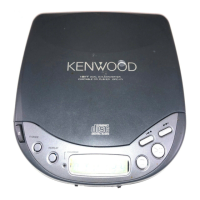
The Kenwood Portable Compact Disc Player, available in models DPC-741, DPC-641, DPC-542, and DPC-541, is designed to provide versatile and high-quality audio playback on the go. This instruction manual serves as a common guide for all four models, highlighting their shared features and operational procedures.
The device functions as a portable compact disc player, capable of reproducing digital audio from CDs. It incorporates a Digital Anti-Shock Circuit (D.A.S.C.) to prevent sound skips caused by vibration or shocks, storing approximately 3 seconds of digital data in memory for uninterrupted playback. The Digital Sound Processor (DSP) allows users to select from five different tone setups (B.BOOST, LIVE, POPS, ROCK, FUSION) or turn the DSP off to return to the original tone, enhancing the listening experience according to music genre or desired live feeling.
Playback features include standard playback from the first track, direct track selection, programming tracks in a desired order (up to 20 tracks), one-track repeat, all-track repeat, random play (for all tracks or programmed tracks), and scan play (playing 20 seconds of each track). The unit also includes a HOLD/RESUME switch: the RESUME position memorizes the last stopped position and elapsed time, resuming playback from there even after power off (provided batteries remain in the unit); the HOLD position disables most operation keys to prevent accidental presses, useful when carrying the unit in a bag. An auto power-off function conserves battery life by turning off the unit after 3 minutes of inactivity in stop mode.
Format:
Audio:
General:
Powering the Unit: The unit can be powered by dry cell batteries (R6/"AA" or LR6-size), rechargeable batteries (supplied or optional NB-88), an AC adapter, or a car battery adapter (optional, for car use). Manganese dry cell batteries are not recommended due to their low capacity. When using rechargeable batteries, they should be recharged for about 2 hours to reach full capacity, especially when used for the first time, after a long period of disuse, or when the battery indicator blinks. Recharging is not possible during playback and requires the unit to be powered off. An external battery case (for DPC-741/541 only) allows for extended use with additional dry cell batteries.
Basic Playback: To start playback, ensure the HOLD/RESUME switch is in the OFF or RESUME position. Open the top cover, place a disc with the labeled side up, and close the cover securely. Press the Play/pause key to turn on the power and start playback. The "KENWOOD" logo blinks before playback and lights steadily during playback (DPC-741). Volume can be adjusted using the VOLUME control on the main unit or the remote controller.
Track Navigation:
Programming Playback: In stop mode, press the P.MODE key to enter programming mode. Use the Skip/search keys to select desired track numbers and press P.MODE again to enter them into the program. Up to 20 tracks can be programmed. Press the Play/pause key to start programmed playback. To check programmed contents, enter stop mode and press P.MODE repeatedly. To clear the program, enter stop mode and press either the OPEN key or the Stop/power OFF/recharge key once. Programmed tracks can also be changed by entering stop mode, displaying the track to be changed, and then selecting a new track number.
Special Playback Modes: Pressing the REPEAT key cycles through one-track repeat, all-track repeat, random play, and scan play. The selected mode starts after the current track finishes.
DSP Tone Settings: Press the DSP key to cycle through B.BOOST (Bass boost), LIVE, POPS, ROCK, FUSION, and OFF (original tone).
Remote Control: Headphones with a remote controller (DPC-741, 541) provide controls for HOLD, DSP mode selection, Stop, Play/pause, Skip/search, and Volume. A card remote control unit (DPC-741/641 only) offers numeric keys for direct track selection, in addition to standard playback controls.
Car Use: An optional car battery adapter (DC-C3A for DPC-541) connects the unit to a car's cigar lighter socket, and a car cassette adapter (CAC-1 or CAC-2) allows audio playback through the car stereo. Ensure the unit is placed in a stable position and connected to a 12V car battery.
Simple Care:
Disc Handling:
Troubleshooting: The manual provides a detailed troubleshooting guide for common issues such as no operation, no sound, sound skips, and noise interference, along with remedies. It advises against using contact cleaner and notes that erroneous operation may occur due to external noise or when plugging/unplugging headphones, which is not a malfunction. In case of persistent issues, users should contact a KENWOOD service center.


 To Next Page
 General