21
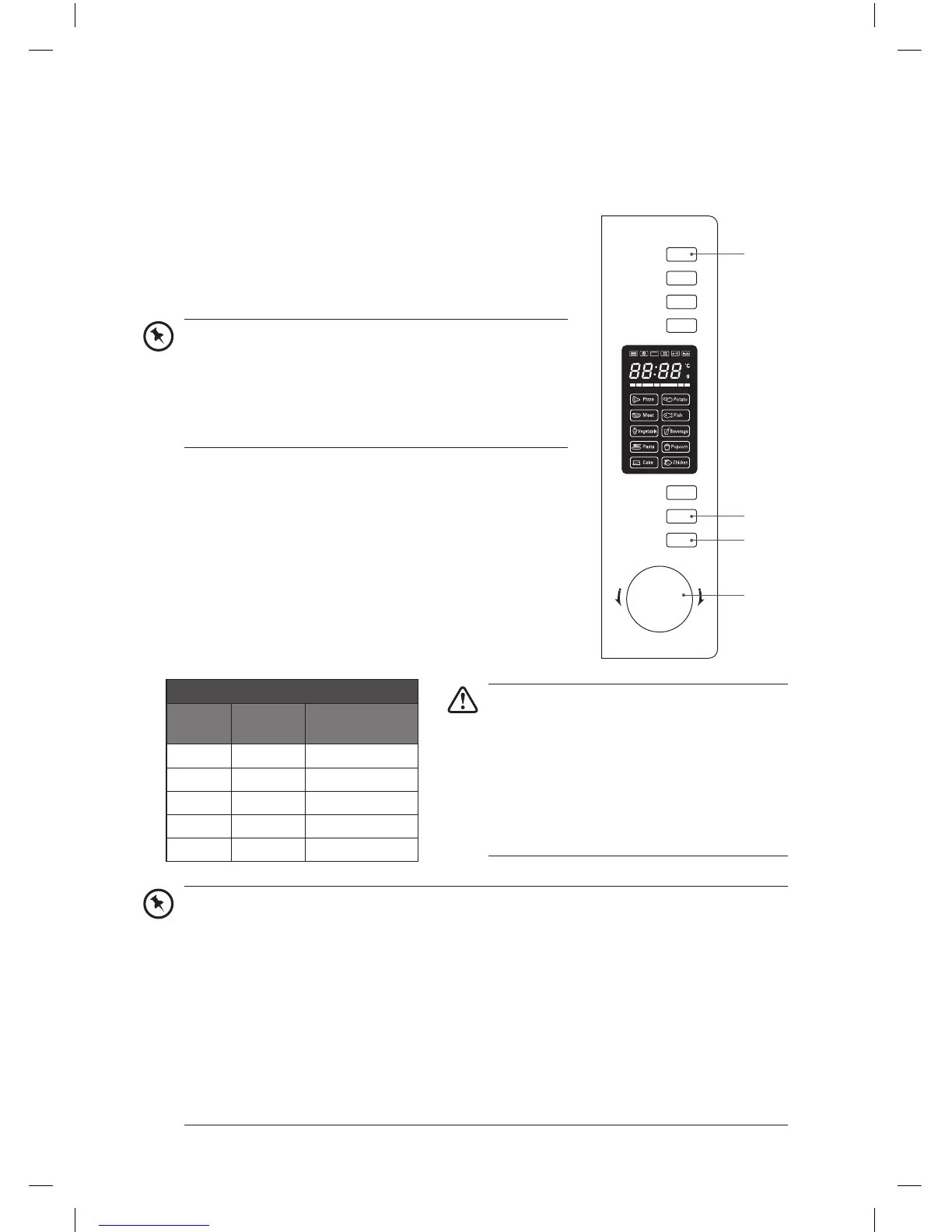
3. Press the Start/+30Sec./Confirm button to confirm the
setting.
4. Turn the Timer/Weight/Auto Menu dial to select “20:00” (20
minutes).
5. Press the Start/+30Sec./Confirm button to confirm and start
cooking.
6. Press the Stop/Clear button once to pause. Press the Stop/
Clear button again to cancel the setting.
microwave button control
press
order
LED
display
microwave
power
1 P100 100%
2 P80 80%
3 P50 50%
4 P30 30%
5 P10 10%
• Stop the microwave before removing food.
• Operating the microwave without food in
it can result in overheating and damaging
the magnetron.
• Cooking with a microwave is much faster
than conventional cooking. Whilst you
should ensure that food is thoroughly
cooked, you should be careful not to
overcook it.
microwave cooking
For simple microwave cooking, please follow the steps below.
For instance: If you want to use 80% microwave power to cook for 20 minutes:
1. Press the Microwave button once. The LED display will
show “P100”.
2. Press the Microwave button again to select 80% microwave
power (“P80”).
Microwave
Grill/Combi.
Convection
W.T./Time
Defrost
Clock/
Kitchen Timer
Stop/Clear
Start/+30Sec.
/Confirm
T
i
m
e
r
•
W
e
i
g
h
t
•
A
u
t
o
M
e
n
u
4
3, 5
6
1, 2
• Alternatively, after you press the Microwave button
once, you can turn the Timer/Weight/Auto Menu dial
until the LED display shows “P80”.
• The default microwave power is 100% (P100). You can
skip step 2 if you plan to use the microwave at 100%
power for cooking.
• When 0% is selected, no microwave power will be present. This setting is for deodorising
purposes only.
• To find out the current microwave power level while the microwave is in use, press the
Microwave button. It will display the current power level for 2-3 seconds, then return to
its previous status.
• The time setting is between 0:05 – 95:00. Varying time increments are added or
subtracted with each turn of the Timer/Weight/Auto Menu dial:
- 0-1 min: 5 seconds
- 1-5 mins: 10 seconds
- 5-10mins: 30 seconds
- 10-30 mins: 1 minute
- 30-95 mins: 5 minutes
K30CSS13_IB_RC_131126_Zell.indd 21 26/11/13 2:35 PM


 To Next Page