45
clock setting
When the microwave is connected to the mains power, the LED display will show “0:00”, and the
microwave will sound once. Please ensure that you have set the clock prior to use.
Please follow the steps below to set the clock.
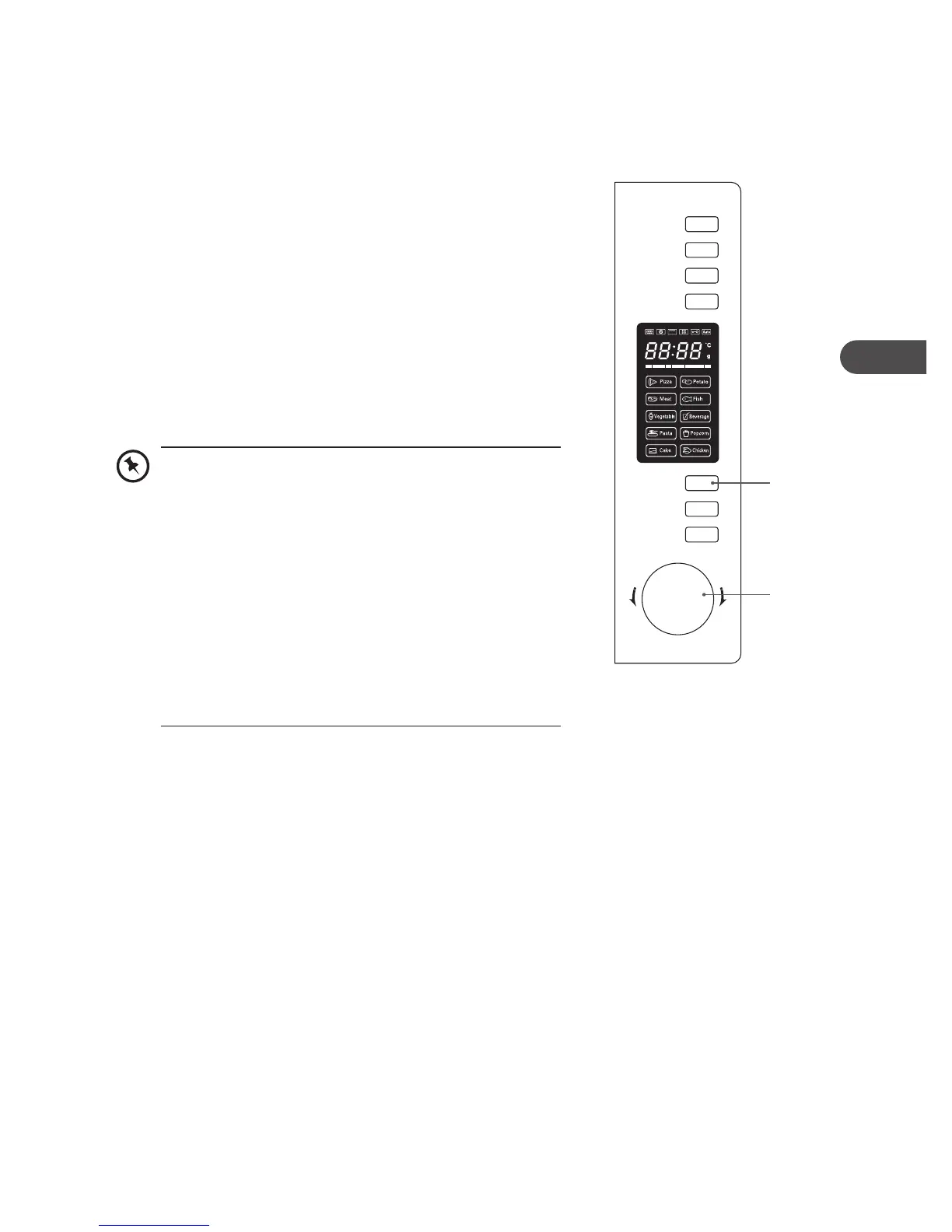
1. Press the Clock/Kitchen Timer button once. “00:00” will be
displayed on the LED panel.
2. Turn the Timer/Weight/Auto Menu dial to set the hour. The
hour input should be within 0-23 hours.
3. Press the Clock/Kitchen Timer button to confirm the hour.
The minute digits will also begin flashing.
4. Turn the Timer/Weight/Auto Menu dial to set the minutes.
The minutes input should be within 0-59 minutes.
5. Press the Clock/Kitchen Timer button to confirm the
minutes.
6. “:” will flash.
• This is a 24-hour clock. When the microwave is
connected to the mains power for the first time, or
when the power resumes after a power interruption,
the LED display will show “0:00”. To re-set the clock,
follow the above 6 steps.
• While setting the clock, if you press the Stop/Clear
button, or if there is no operation within 5 minutes,
the microwave will return to its previous status
automatically.
• To find out the current time while the microwave is
in use, press the Clock/Kitchen Timer button. It will
display the current time for 2-3 seconds, then return
to the remaining cooking time.
Microwave
Grill/Combi.
Convection
W.T./Time
Defrost
Clock/
Kitchen Timer
Stop/Clear
Start/+30Sec.
/Confirm
T
i
m
e
r
•
W
e
i
g
h
t
•
A
u
t
o
M
e
n
u
2, 4
1, 3, 5
K30CSS14E_IB_5L_Final140204.indb 45 10/02/2014 12:25 PM


 To Next Page