To Next Page
L
Lorraine MaloneAug 20, 2025
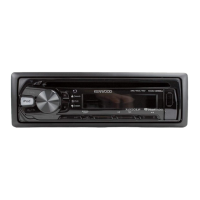
How to fix Kenwood Car Receiver that does not turn on?
- RRyan GarciaAug 20, 2025
If your Kenwood Car Receiver does not turn on, reset the unit.

How to fix Kenwood Car Receiver that does not turn on?
If your Kenwood Car Receiver does not turn on, reset the unit.
Why is the radio reception poor on my Kenwood KDC-230U Car Receiver?
If the radio reception is poor on your Kenwood Car Receiver, ensure the antenna is firmly connected.
What to do if sound cannot be heard on Kenwood KDC-230U Car Receiver?
If you cannot hear any sound from your Kenwood Car Receiver, first adjust the volume to the optimum level. Also, check the cords and connections to ensure they are properly connected.
What to do if Kenwood KDC-230U Car Receiver displays “PLEASE EJECT”?
If your Kenwood Car Receiver displays “PLEASE EJECT”, reset the unit.
How to fix “iPod ERROR” on Kenwood KDC-230U Car Receiver?
If your Kenwood Car Receiver displays “iPod ERROR”, try reconnecting the iPod. If the error persists, reset the iPod.
How to fix “READ ERROR” on Kenwood KDC-230U Car Receiver?
If your Kenwood Car Receiver displays “READ ERROR”, copy the files and folders onto the USB device again. If the problem continues, reset the USB device or use another USB device.
What to do if Kenwood KDC-230U Car Receiver shows “ANDROID ERROR”?
If your Kenwood Car Receiver displays “ANDROID ERROR”, reconnect the Android device or restart the Android device.
How to resolve “TOC ERROR” on Kenwood KDC-230U?
If your Kenwood Car Receiver displays “TOC ERROR”, make sure the disc is clean and inserted properly.
Why can't I playback at [BROWSE MODE] on my Kenwood KDC-230U?
If you cannot playback in [BROWSE MODE] on your Kenwood Car Receiver, ensure that KENWOOD MUSIC PLAY APP is installed on the Android device. Reconnect the Android device and select the appropriate control mode. If the problem persists, the connected Android device may not support [BROWSE MODE].
What to do if Kenwood Car Receiver displays “PLEASE LOGIN”?
If your Kenwood Car Receiver displays “PLEASE LOGIN”, log in again.
Crucial guidelines for safe and proper operation of the product.
Alerts users to avoid distractions and maintain focus on driving.
Advises on volume settings, external device use, and preventing shorts.
Covers setting display language, clock, date, and other initial system configurations.
Explains how to search, store, select stations, and manage tuner settings.
Covers starting playback, ejecting discs, and basic navigation for media sources.
Guides on controlling devices, selecting music drives, and using apps.
Covers preset EQs, bass boost, loudness, and subwoofer settings.
Solutions for common issues like no sound, wiring errors, and poor radio reception.
Addresses errors related to media playback, device recognition, and file compatibility.
Solutions for Android, Pandora, and iHeartRadio specific troubleshooting.
Important safety warnings and step-by-step guides for mounting the unit.
Instructions on how to remove the unit and alternative mounting methods.
Detailed guide for connecting all power, speaker, and control wires correctly.
 General
| Tuner | FM / AM |
|---|---|
| CD Playback | Yes |
| USB Input | Yes |
| Bluetooth | No |
| Aux Input | Yes |
| Display Type | LCD |
| Preout Voltage | 2.5V |
| MP3 Playback | Yes |
| WMA Playback | Yes |
| FLAC Playback | No |
| RDS | Yes |
| Channels | 4 |
| RMS Power Output | 22W x 4 |
| Peak Power Output | 50W x 4 |
| Remote Control | Optional |
| Power Output | 50W x 4 |