Need help?
Do you have a question about the Kenwood KDC-DAB43U and is the answer not in the manual?
Critical warnings and cautions for safe operation, including volume and general driving safety.
Maintenance, cleaning procedures, and handling condensation to prevent operational issues.
Details on EMC directive, EU representative, and laser product safety standards.
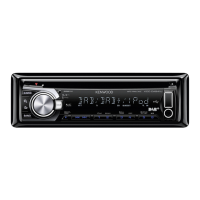
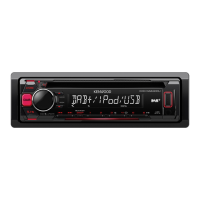
Identifies and explains the function of each button and terminal on the unit's faceplate.
Instructions on how to read the manual, attach/detach faceplate, and cancel demonstration mode.
Covers turning the unit on/off, selecting sources, adjusting volume, and switching display.
Step-by-step guide to set the current time, including automatic time synchronization from DAB.
Explains how to customize initial settings like preset type, key beep, and language display.
Guide to enable or disable the display demonstration mode for product showcasing.
Describes how the audio system automatically mutes for incoming calls and how to resume playback.
Instructions for inserting discs, playing USB devices, and connecting iPods.
Explains how to select songs, folders, fast-forward, pause, repeat, and random play modes.
Guide on searching for songs by folder, track, or file, including skipping and alphabet search.
Details on selecting characters to search for specific content like artists, albums, or songs.
How to adjust the skip search ratio for faster song searching within media.
Covers disc handling, audio files, USB device requirements, and compatible iPod/iPhone models.
Instructions for updating service list information and canceling the update process.
How to search for services, select bands, and tune into ensembles or components.
Steps to obtain the service list and select a desired service or component.
Method to search for DAB services using an alphabet search function.
How to select and search for stations based on program type categories.
Automatically switches to a desired program type when it starts in the received ensemble.
Options to accept or reject interruptions from announcement providers for various event types.
Customizes digital radio settings like seek mode, priority, and list update preferences.
How to search for stations, select bands (FM, MW, LW), and use station preset memory.
Automatically registers up to six stations with good reception for easy access.
Allows searching for analog radio stations based on program type categories.
Customizes analog radio settings like local seek, seek mode, and regional settings.
Instructions to enable built-in AUX and start playback from a portable audio device.
Allows customization of the displayed name for the AUX source.
Adjusts various audio parameters like balance, fader, subwoofer settings, and EQ.
Explains the Supreme technology for enhancing high-frequency components in compressed audio.
Sets display brightness, text scrolling, and key illumination color for the unit.
Detailed steps to customize the panel illumination color, including creating custom colors.
Addresses issues where functions become disabled due to incorrect setting configurations.
Helps diagnose problems caused by minor operation or wiring mistakes before seeking service.
Explains various error messages like 'PLS EJECT', 'TOC ERROR', 'PROTECT', and their solutions.
Detailed technical specifications for DAB tuner, FM/MW/LW tuners, CD player, USB, audio, and auxiliary inputs.
Lists trademarks like Apple, Microsoft, and Android, and their associated product logos.
 General
| MP3 playback | Yes |
|---|---|
| DVD Audio playback | No |
| Audio formats supported | AAC, MP3, WMA |
| FM band range | 87.5 - 108 MHz |
| LW band range | 153 - 279 kHz |
| Supported radio bands | FM, LW, MW |
| Preset stations quantity | 24 |
| Display type | LCD |
| USB version | 2.0 |
| Line outputs (RCA) | 1 |
| Output power | 200 W |
| Product color | Black |
| Volume control | Rotary |
| Disc types supported | CD-R, CD-RW |
| Key illumination color | Blue |
 Weight and Dimensions
| Weight | 1200 g |
|---|---|
| Dimensions (WxDxH) | 182 x 53 x 160 mm |


 To Next Page