
 Need help?
Do you have a question about the Kenwood KDC-MPV622 and is the answer not in the manual?
Information on connecting compatible Kenwood CD players and disc changers, and warnings about unsupported connections.
Warning against inserting 3-inch CDs with adapters into the unit due to potential damage.
Instructions for turning the unit's power on and off using the SRC button.
How to select the audio source, such as Tuner, CD, or Auxiliary input.
Instructions for increasing and decreasing the audio volume using the VOL knob.
How to choose between Auto seek, Preset station seek, and Manual tuning modes.
Steps to select the tuner source, band (FM1/FM2/FM3, AM), and tune stations.
Explanation of how to enter, select, set, and exit menu items for system configuration.
How to set and use a security code to prevent unauthorized use or theft of the unit.
Step-by-step guide for installing the unit, including wire connections and safety precautions.
Specific steps for installing the unit in Japanese-made cars, involving frame removal and bracket alignment.
Troubleshooting steps for general issues like power not turning on, source switching problems, and memory loss.
Technical specifications for the FM tuner, including frequency range, sensitivity, and response.
Technical specifications for the AM tuner, including frequency range and usable sensitivity.
Technical specifications for the CD player, including laser type, digital filter, and playback capabilities.
Technical specifications for the audio output, including maximum power and tone control ranges.
General specifications for the unit, including operating voltage, current consumption, installation size, and weight.
Highlights the digital sound quality and S>PLEX technology used by Sirius.
Describes how Sirius integration provides additional information like artist and song title on the display.
Encourages users to visit Sirius.com for streaming audio and samples before purchasing.
Description of the Sirius Tuner as the central component for receiving satellite signals.
Description of the Sirius Antenna and its easy roof-mounting installation.
Specifies the warranty period for Kenwood car stereo components, which is one year from the original purchase date.
Details on what defects are covered by the warranty and common exclusions like damage from misuse or unauthorized repair.
Clarifies that the warranty is only enforceable by the original purchaser of the product.
Explanation of Kenwood's policy on paying for labor and material expenses for covered warranty items.
Instructions on how to contact Kenwood for warranty service, including shipping and proof of purchase requirements.
States the limitation on implied warranties, such as merchantability and fitness for a particular purpose.
Kenwood's liability limitations regarding damages, including installation charges, incidental, and consequential damages.
 General
| Category | Car Receiver |
|---|---|
| Brand | Kenwood |
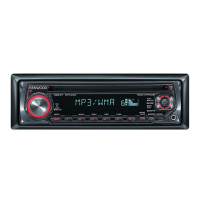
| Model | KDC-MPV622 |
| Type | CD Receiver |
| DIN Size | 1 DIN |
| Detachable Face | Yes |
| CD Playback | Yes |
| MP3 Playback | Yes |
| WMA Playback | Yes |
| AM/FM Tuner | Yes |
| Presets | 18 FM, 6 AM |
| Output Power | 50W x 4 |
| RMS Power Output | 22W x 4 |
| RMS Power Bandwidth | 20Hz - 20kHz |
| Sub Preamp Output | Yes |
| Display | LCD |
| CD Signal-to-Noise | 105 dB |
| FM Sensitivity | 9.3 dBf |
| CD Frequency Response | 5Hz - 20kHz |
| Remote Control | Yes |
| Auxiliary Input | Yes |
| USB Port | No |
| Bluetooth | No |
| HD Radio Ready | No |
| Peak Output | 50W |
| Preamp Outputs | 3 (front, rear, sub) |
| Sirius Satellite Radio Ready | Yes |
| iPod Compatibility | Yes |



 To Next Page
