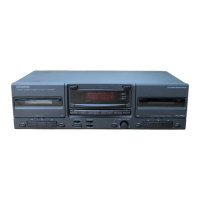
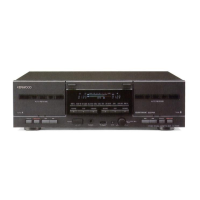
Need help?
Do you have a question about the Kenwood KX-W1060 and is the answer not in the manual?
Record the serial number for future reference and service.
Instructions for unpacking the unit and checking for shipping damage.
Warning about copyright infringement for copying tapes/discs.
Lists included accessories with the unit.
Important voltage information for units in the U.S.A., Mexico, and Canada.
Important voltage information for units in Australia and Europe.
Important voltage information for units in the UK.
How to set the AC voltage selector switch for international use.
Instructions for handling the mains plug and fuse replacement.
General warnings to prevent fire or electric shock.
Connect to the correct power supply type as marked on the appliance.
Route power cords to avoid damage or pinching.
Handle polarized plugs carefully to avoid electric shock.
Ensure proper ventilation to prevent overheating.
Keep the unit away from water and moisture.
Operate within the recommended ambient temperature range.
Keep the unit away from heat sources like radiators.
Avoid contact with internal parts and liquids to prevent shock.
Never remove the enclosure to avoid serious electric shock.
Keep the appliance away from sources of magnetic fields.
Clean the cabinet with a clean dry cloth.
Use only with manufacturer-recommended carts or stands.
Unplug during lightning storms or long periods of disuse to prevent damage.
Turn off and unplug if an abnormal smell or smoke is detected.
When to seek qualified service personnel for repairs.
User should not service beyond manual instructions; refer to qualified personnel.
Ground antenna system for protection against voltage surges.
Keep antenna away from power lines to avoid fatal shock.
Do not connect other high-power appliances to the AC outlet.
Avoid overloading outlets and cords to prevent fire or shock.
Use only manufacturer-recommended attachments for safety.
Use specified replacement parts for safety and performance.
Perform safety checks after service or repairs.
Tips for handling cassette tapes, including safety tabs.
Proper storage methods for cassette tapes to prevent damage.
How to fix slack tape using a pencil.
How to clean the heads, capstan, and pinch roller for optimal performance.
How to demagnetize the head using a head eraser.
Precautions regarding condensation and how to dry the unit.
Instructions for connecting the cassette deck to other audio components.
Explanation of the peak level meter display for monitoring audio levels.
Indicator for Dolby NR reference level during operation.
Indicator light for the dubbing operation.
Indicator light for the recording operation.
Information about the unit's display function.
Controls for Deck A: PLAY, REWIND, FAST FORWARD, STOP/EJECT, PAUSE.
Controls for Deck B: PLAY, REWIND, FAST FORWARD, STOP/EJECT, PAUSE, REC.
How to turn the unit on and off.
Switch to enable or disable Dolby Noise Reduction.
Switch to activate the tape dubbing function.
Control for adjusting the recording input level.
Switch for selecting the type of cassette tape used.
Turn the unit on before commencing playback.
Step-by-step guide to inserting tape and starting playback.
Setting tape type and Dolby NR mode for playback.
Instructions on how to start playback on Deck A or Deck B.
How to stop playback and safely remove the tape.
How to use the fast forward and rewind functions on cassette tapes.
How to stop the fast forward or rewind process.
Basic recording procedure on Deck B, excluding metal tapes.
Prepare Deck B by inserting tape and setting switches before recording.
How to adjust the recording level using the REC LEVEL knob for optimal results.
Step-by-step guide to initiate the recording process.
Explanation of the Dolby NR system and its usage for reducing tape hiss.
Information about the Dolby B NR system, commonly used in audio components.
How to insert tapes into both Deck A and Deck B for dubbing.
How to stop the tape dubbing process.
Setting the tape selector for Deck B during dubbing operation.
Steps to initiate the tape dubbing process from Deck A to Deck B.
How to pause and resume the dubbing operation.
Important notes regarding recording level and Dolby NR during dubbing.
Troubleshooting steps for no sound output during playback.
Troubleshooting steps for unresponsive operation keys.
Explanation for different dubbing end timings between decks.
Troubleshooting steps for a cassette holder that fails to open.
Troubleshooting steps for hoarse sound or lack of high frequencies.
Troubleshooting steps for distorted sound output.
Troubleshooting steps for when the REC key does not start recording.
Troubleshooting steps for excessively high noise levels.
Troubleshooting steps for vibrating sound output.
General notes on tape issues and cleaning for troubleshooting.
Warning about radio frequency energy and unauthorized modifications.
FCC compliance statement for Class B digital devices.
Canadian DOC regulation for radio noise emissions.
Details of the track and channel system configuration.
Information on the recording bias and frequency used.
Specifications for the playback and erase heads.
Details on the motors used in the cassette decks.
Measurement of tape speed variation.
Time taken to wind a C-60 tape.
Frequency response for different tape types.
SNR levels with and without Dolby NR.
Measurement of harmonic distortion.
Specifications for the LINE IN connection.
Specifications for the LINE OUT connection.
Power usage of the unit.
Physical dimensions of the unit.
Net weight of the unit.
 General
| Type | double cassette deck |
|---|---|
| Track System | 4-track, 2-channel stereo |
| Wow and Flutter | 0.07% (WRMS) |
| Output | 0.5V (line) |
| Dimensions | 430 x 120 x 310 mm |
| Weight | 3.9 kg |
| Tape Types Supported | Normal, Chrome, Metal |
| Frequency Response (Normal Tape) | 30Hz to 15kHz |

 To Next Page