EasyManua.ls Logo

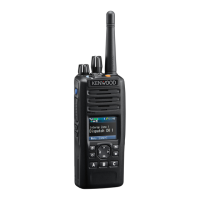
Kenwood NX-5300 - User Manual

Kenwood NX-5300
33 pages
Print Icon
To Next Page IconTo Next Page
Loading...
.
NX-
NX-
NX-
USER GUIDE
GUIDE DE L’UTILISATEUR
GUÍA DEL USUARIO
.
.
BA-- K

Other manuals for Kenwood NX-5300

Questions and Answers

  • C
    Chelsey MiddletonAug 17, 2025
    How to fix LCD displaying control abnormal value on Kenwood NX-5300?
    • A
      Anthony BrennanAug 17, 2025
      If the LCD of your Kenwood Transceiver displays an abnormal control value, remove the following parts: C47, R21, R39, R66, Q32, IC36, and IC61.
  • J
    Jeremiah MendozaAug 19, 2025
    What to check if CS4 has an abnormal voltage in Kenwood NX-5300?
    • S
      Sarah SosaAug 20, 2025
      If CS4 has an abnormal voltage in your Kenwood Transceiver, check the terminal of L802, re-insert the FPC of the LCD module, and replace the LCD module.
  • K
    Kimberly JonesAug 22, 2025
    What to do if IC706 (1 pin) is 0V or 1.8V in Kenwood NX-5300?
    • D
      David MorrisAug 22, 2025
      If IC706 (1 pin) is 0V or 1.8V in your Kenwood Transceiver, remove the following parts: SBC MPU/DSP side R21 3.3V C47 R21 R39 R66 Q32 IC36 IC61.
  • C
    christopherstewartAug 26, 2025
    What does it mean if Reset/Control signal has an abnormal value in Kenwood Transceiver?
    • E
      Elizabeth OliverAug 26, 2025
      If the Reset/Control signal of your Kenwood Transceiver has an abnormal value, and correcting the voltage doesn't solve the issue, it indicates a problem other than the BGA parts.
  • G
    gwalkerAug 28, 2025
    Why my Kenwood Transceiver cannot be powered on?
    • B
      bcoffeyAug 28, 2025
      If your Kenwood Transceiver cannot be powered on and the LCD does not function, it may be due to broken BGA parts on the printed circuit board (XC1-0341-82/XC1-0341-83). It is recommended to bring the printed circuit board in for service.
  • C
    conwaybarbaraAug 30, 2025
    What to do if /FRST is always 0V in Kenwood NX-5300 Transceiver?
    • C
      Charles JonesAug 30, 2025
      If /FRST is always 0V on your Kenwood Transceiver, remove D705 to check the voltage of the Flash memory side R747.
  • K
    Kyle WhiteSep 2, 2025
    What to do if CN2 voltage is less than 6V in Kenwood NX-5300 Transceiver?
    • S
      saundersjessicaSep 2, 2025
      If CN2 voltage is less than 6V on your Kenwood Transceiver, charge the battery.
  • M
    Matthew SerranoSep 5, 2025
    How to check voltage of the 33M in Kenwood NX-5300 Transceiver?
    • E
      Ellen VegaSep 5, 2025
      To troubleshoot an abnormal voltage at 33M on your Kenwood Transceiver, remove L712 to check the voltage of the 33M.
  • G
    Gina BradfordSep 7, 2025
    How to check voltage of the 18M_3 in Kenwood NX-5300 Transceiver?
    • P
      Paul DuranSep 7, 2025
      To troubleshoot an abnormal voltage at 18M_3 on your Kenwood Transceiver, remove L719 to check the voltage of the 18M_3.
  • M
    Matthew MaynardSep 12, 2025
    How to check voltage of the 18M in Kenwood NX-5300 Transceiver?
    • L
      Lauren WatersSep 12, 2025
      To troubleshoot an abnormal voltage at 18M on your Kenwood Transceiver, remove L710 and L711 to check the voltage of the 18M.

Summary

Notices to the User

FCC Radio Frequency Exposure

Warning about RF energy use and potential interference.

FCC Digital Device Compliance

FCC Part 15 compliance for residential interference.

General Precautions

Safe Handling and Operation Guidelines

Essential safety rules for charging, usage, and component handling.

Location and Environmental Warnings

Prohibited Locations and Conditions

Warnings for operating near explosives, medical devices, and in hazardous atmospheres.

Waterproof Seal Integrity

Precautions to maintain waterproof efficiency regarding seals and sheets.

Usage and Handling Cautions

Driving and Temperature Cautions

Advice on using the transceiver while driving and exposure to extreme temperatures.

Battery and Static Electricity Handling

Precautions for battery terminals, disposal, straps, and static electricity.

Battery Pack Safety

Battery Handling Dangers

Critical warnings about battery disassembly, short-circuiting, heat, and water.

Battery Heat and Water Precautions

Avoiding high temperatures and water immersion for battery safety.

Battery Pack Charging and Usage Warnings

Charging and Usage Restrictions

Warnings for charging duration, using damaged batteries, and polarity reversal.

Water-Resistant Model Information

Water Resistance Standards

Conformance to Military Standards and IP ratings for water resistance.

Water Resistance Maintenance Precautions

Guidelines for maintaining water resistance and cleaning.

Preparation and Installation

Battery Pack Installation;Removal

Steps for attaching and detaching the battery pack.

Accessory Installation

Antenna Installation

Instructions for securely attaching the antenna.

Belt Clip Installation

How to attach the belt clip using supplied screws.

Connector and Audio Accessory Installation

Universal Connector Cap Installation

Securing the cap for the universal connector.

Speaker;Microphone or Headset Connection

Connecting external audio accessories.

microSD Memory Card Installation

Orientation and Controls

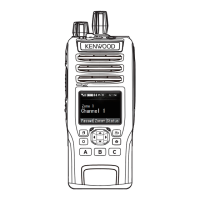
Keys and Controls Overview

Identification and basic function of transceiver controls and keys.

Display Information

LCD Display Description

Explanation of the display layout, function icons, and indicators.

Basic Operations

Powering On;Off and Volume Adjustment

How to turn the transceiver on/off and adjust audio volume.

Zone and Channel Selection

Steps to select operating zones and channels for communication.

Transmission and Reception

Transmitting and Receiving Procedures

Procedures for sending and receiving audio signals using the PTT switch.

Kenwood NX-5300 Specifications

General IconGeneral
Power Output5W (VHF), 4W (UHF)
Waterproof RatingIP67
RF Output Power5W (VHF), 4W (UHF)
Zones128
Operating Voltage7.5V DC ±20%
Battery Life (Digital)Up to 15 hours
GPSYes
BluetoothYes
Ingress ProtectionIP67
Operating Temperature-30°C to +60°C
Battery LifeUp to 15 hours (digital), up to 13 hours (analog)
Channel Spacing12.5/25 kHz
Battery Life (Analog)Up to 13 hours
Digital ProtocolNXDN, DMR
DisplayColor LCD
MIL-STDMIL-STD-810 C/D/E/F/G
Modulation16K0F3E, 11K0F3E
Frequency Range136-174 MHz

Related product manuals