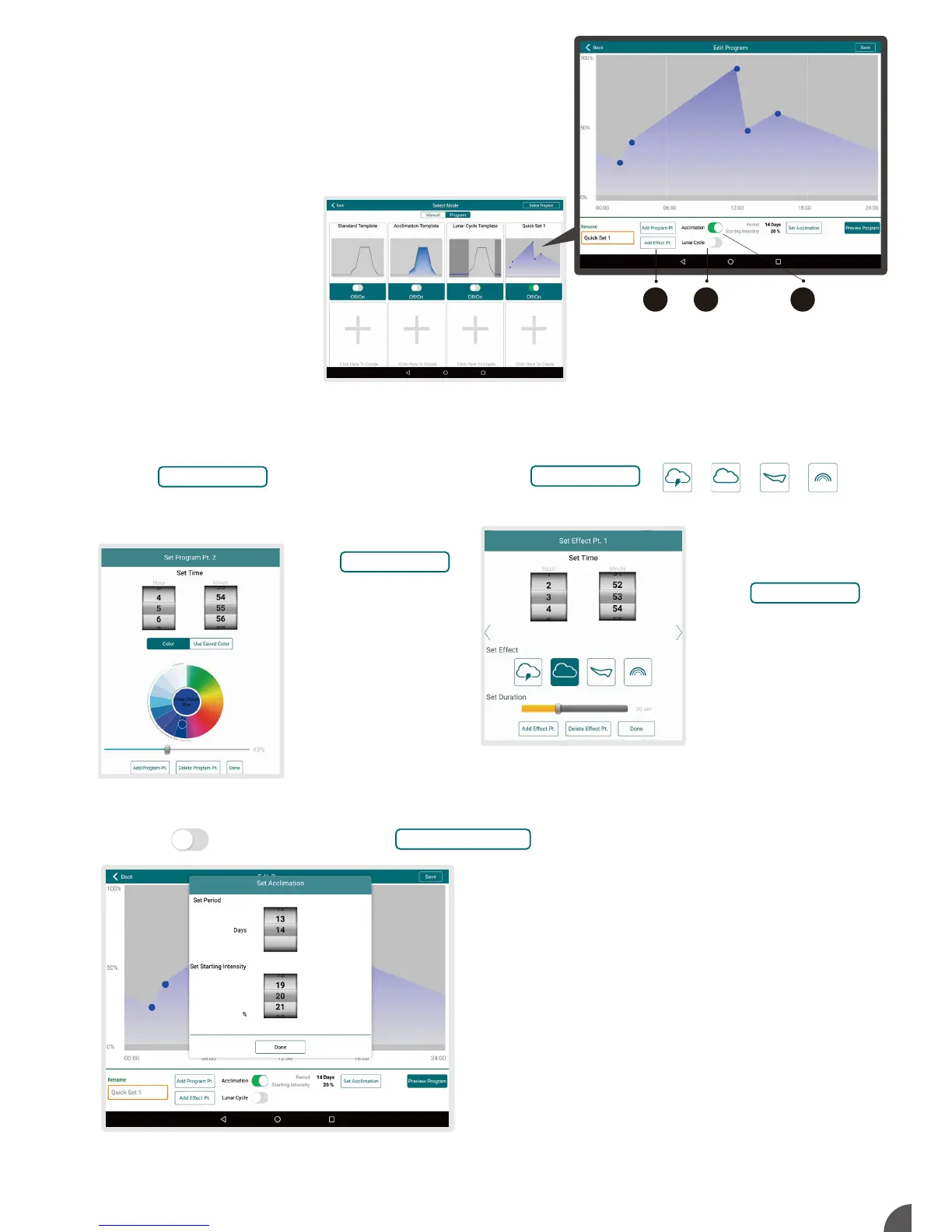
Edit Program: Press “Create New Program” to create new programs or to edit from templates.
Press to the right of “Acclimation” and to set an acclimation schedule.
Press ( Max. 10 points ) or any
blue spots to set time, color, and intensity
Press “Use Saved Colors” to apply favorite sets.
.
.
Program Mode
1 Standard Template
2 Acclimation Template
3 Lunar Cycle Template
(Templates cannot be changed and saved)
4 5 others customized Quick Set Programs
(Can edit from templates)
Acclimation Mode allows user to lower the light intensity
in order for creatures to acclimate to the new lights. This
can be used when adding new corals or when using Kessil
LED lights for the first time. “Starting Intensity” means a
proportion of the point’s intensity, e.g. if you have a point at
80% intensity, under Acclimation & “Starting Intensity” as
50%, that point will be at 40% on Day 1, and ramp up
gradually to reach 80%.
1 Set the length of acclimation and starting intensity.
2 Press “Done” to return to “Edit Program” screen.
Press
( Max. 10 points ) to add:
.
A
B
Storm Cloud Aurora Rainbow
Set Acclimation
Add Effect Pt.
Add Program Pt.
Press
once to delete point.
Press “Done” to return to
“Edit Program” screen.
.
.
Delete Program Pt.
Duration: 30 seconds to 120
seconds.
Press
once to delete effect point.
Press “Done” to return to “Edit
Program” screen .
Effect point will appear on the
top of the graph.
(Can show only in real time)
.
.
.
.
Delete Program Pt.
3
CA B



 To Next Page