the value that can be modified using the
CCUURRSSOORR
push buttons.
FF99 BBeenndd DDCCAA
: This assigns the timbre amplitude control to the Pitch Bend Wheel, the intensity of which is established
by the value that can be modified using the
CCUURRSSOORR
push buttons.
FF1100 AAfftteerrttttoouucchh..::
This calls up a new menu dedicated to controlling the after touch. The parameters available are the
following:
FF11 CCuuttooffff::
When On, by pressing the function push button F1 again, the after touch controls the opening of the
filter that can make the timbre more brilliant.
FF22 LLFFOO DDCCOO::
When On, the after touch controls the vibrato.
FF33 BBeenndd::
The value entered using the
DDAATTAA CCUURRSSOOR
R
push buttons indicates the deviation semitones of the into-
nation. By entering a value of –1, additional expressiveness is given to the timbres such as the sax.
FF44 SSlliiddee::
This is an effect associated with the keyboard velocity and consists in a very quick tuning adjustment
of the chord during the sound attack, very similar to that encountered normally in the attack of almost all wind
instruments. The Slide can be used successfully to make the sax, trumpet, clarinet and guitar phrasing more
realistic and expressive.
FF55 AAttttaacckk::
When On, it enables the modulations controlled by the after touch with a slight delay. If for exam-
ple the after touch is used to create a vibrato, with Attack set On the vibrato works only after a few seconds,
creating a more natural sensation.
FF66 LLFFOO DDCCAA::
When On, the after touch controls the tremolo effect.
FF77 LLFFOO DDCCFF::
When On, the after touch controls the modulation of the LFO on the filter cut-off.
FF88 VVoolluummee::
When On, the after touch controls the volume of the timbres of the Right section.
FF99 SSlliiddee TThhrr::
The value entered using the
DDAATTAA CCUURRSSOORR
push buttons establishes the velocity beyond which the
Slide affect is triggered. Lower the value less key dynamics is required to activate the Slide.
FF1
100 SSeennssiittiivv..::
The value entered using the
DDAATTAA CCUURRSSOORR
push buttons establishes the response sensitivity to the
after touch. If modified the control of all the parameters controlled by after touch are also changed.
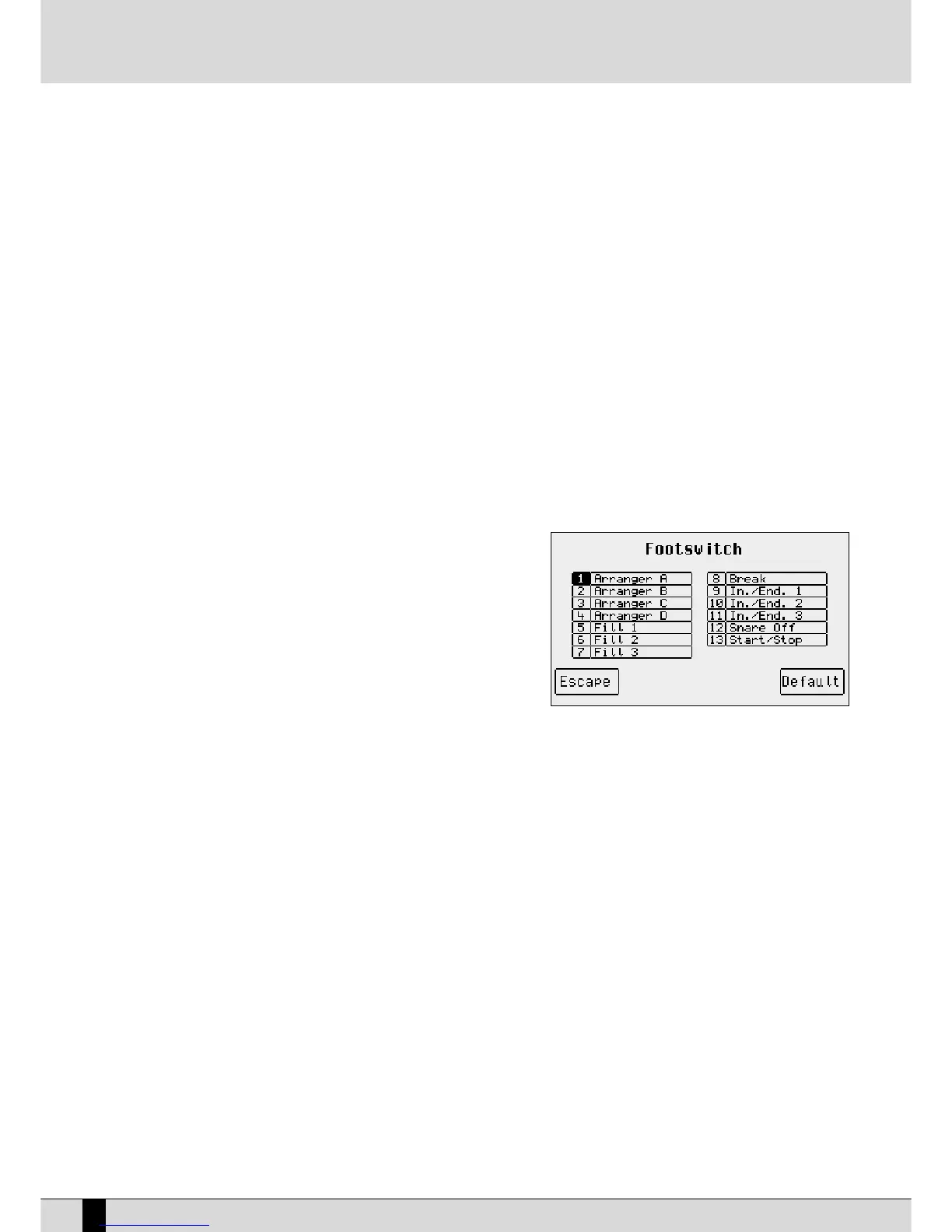
F4 Footswitch: The SD5 can exploit two types of optional pedals (FS13 with
thirteen switches and FS6 with six switches) to control many
functions, including those already available for the X series.
F4 Footswitch calls up a page that shows the function assi-
gned to each of the switches.
To modify it, use the
DDAATTAA CCUURRSSOORR ((UUpp aanndd DDoowwnn))
push buttons
to select the pedal switch and the
DDAATTAA CCUURRSSOORR (( LLeefftt aanndd
RRiigghhtt))
push buttons to modify the function assigned as desired,
amongst the following:
Sustain
Soft
Sostenuto
Arranger A
Arranger B
Arranger C
Arranger D
In./End. 1
In./End. 2
In./End. 3
Fill 1
Fill 2
Fill 3
Break
Start/Stop
Count In
Hold
Key Start
The Footswitch menu also uses the
FF55 EEssccaappee
function, to return to the initial
UUttiilliittyy
page and
FF1100 DDeeffaauulltt
to reset the origi-
nal settings. Once the modification has been completed, save the settings by pressing
SSAAVVEE
to save in Flash RAM using
FF1100
SSaavvee
. or to cancel the procedure use
FF55 EEssccaappee
or to return to the default Footswitch menu, use
FF44 UUnnddoo
.
F5 Swell: When this parameter is enabled, it allows you to use a volume pedal to control only the volume of the right lead section of
the keyboard. The arranger will not be affected.
F6 Regis. Menu:
MMeennuu::
This calls up the menu to program the control of the single parameters of a Registration, as described in the relevant
chapter.
SD5
70
Utility
Key Stop
Jump Intro
Jump Fill
Voice Down
Voice Up
Registr. Up
Registr. Down
Tempo +
Tempo -
Tap Tempo
minor
7th
m7th
5+
dim
Manual Bass
Kick Off
Snare Off
Hi-Hat Off
Cymbal Off
Tom/Fx Off
Rimshot Off
Latin1 Off
Latin2 Off
Latin3 Off
Clap/Fx Off
Drum Lock
Bass Lock
Chords Lock
Interactive
Glide
Fall Off
Shake
Overdrive
Delay
Wha-Wha
Chorus
Reverb
Distorsor
Rotor On/Off
Text Page-
Text Page+
Vocalizer
Arabic_1
Arabic_2
Arabic_3
Arabic_4
Arabic_5
Arabic_6
Arabic_7
Arabic_8
Arabic_9
Arabic_10
Arabic_11
Arabic_12
Arabic_13
Arabic_14
Arabic_15
Arabic_16
Arabic_17
Arabic_18
Arabic_19
Arabic_20
FisaLeftDrum
Micro Dry
Dry on stop
Fade Out
Crash
Harmony
Program
Swell
Transposer -
Transposer +
2nd Voice
Bass To Lowes
Lead On/Off
Pianist
6th
7th+
Bassist
Accordion
Accordion
DrumFx Swell
DrumFx Fade
VoiFiltSwell



 To Next Page