SD5
71
F7 Regis. Mode: This allows you to choose what events should or shouldn't be impacted if a Registration from the Block Registration memo-
ries or a Single Registration is called as described in the relevant chapter.
F8 Test: This enables or disables visualisation in Arranger or Song Play mode of a text file (.TXT).
F9 Song Mode: This selects the access time to a Midi file on Hard Disk between
NNoorrmmaall
, (i.e. beginning with the first beat of the first bar),
and
FFaasstt
(which starts reproduction instantly at the beginning of the Midi file, without keeping in mind the bars that do not
contain any notes). In this way it is possible to play a number of Midi files without interruptions.
F10 Song Expr: If set to Yes, the volume pedal controls the global Song level.
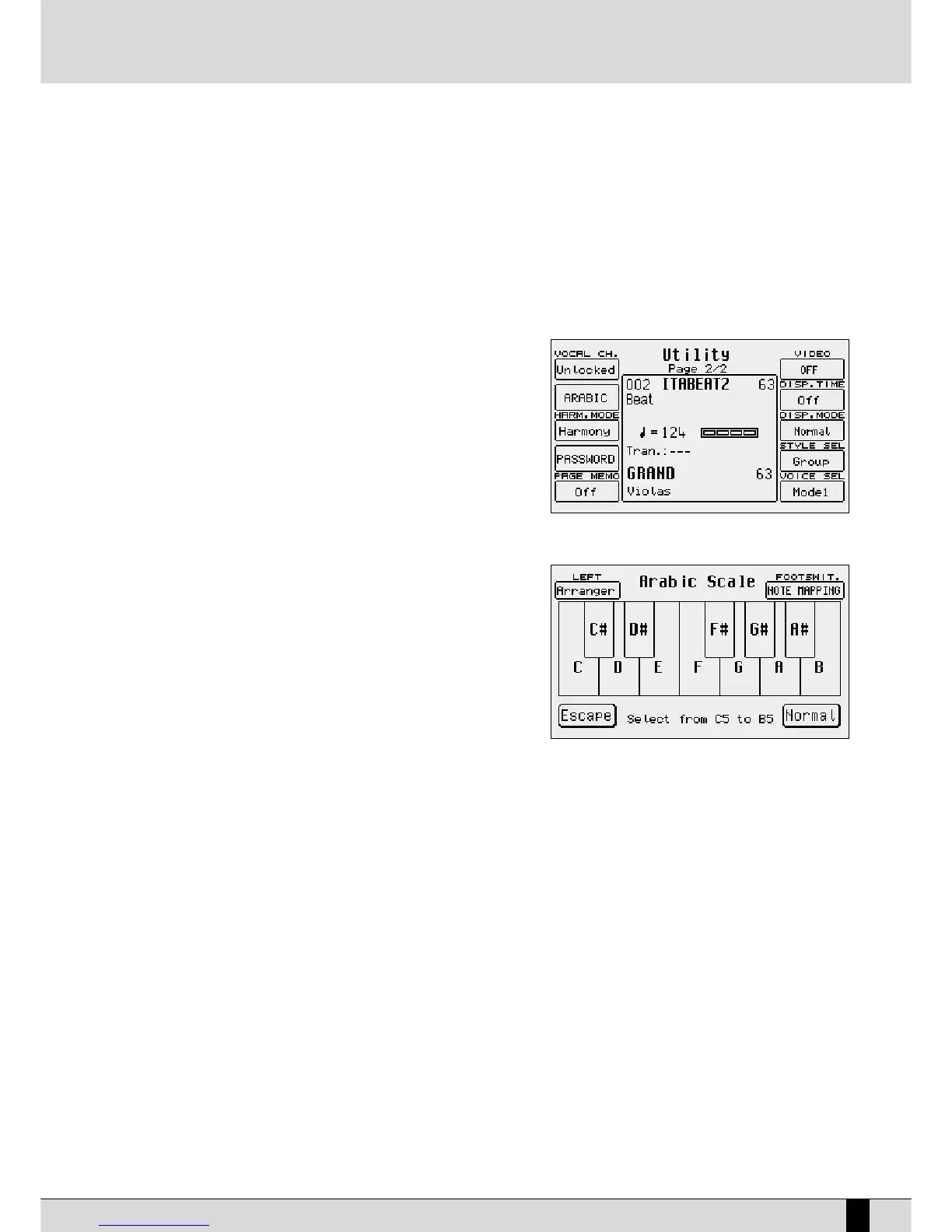
UTILITY, PAGE 2/2
From the initial page of the Utility menu access is gained to the second page by
pressing
PPAAGGEE ++
. The parameters available are the following:
F1 Vocal Ch: This makes it possible to
LLoocckk
the MIDI channel selected to con-
trol the Vocalizer no matter what the source Midi file is. In this
way you avoid the need to always set the same MIDI channel for
different Midi files.
F2 Arabic: This calls up a new page to create tunings suitable for the
various countries using the Arabic scale, which is kept even in
the case of transposition. A scale is shown in the middle of the
display, the notes of which are selected using the octave keys
from C5 to B5. Once the note is selected a box appears indica-
ting a value of -50 Cent (a fourth of a tone) that can be modi-
fied precisely using the
CCUURRSSOORR
push buttons. By pressing the
same key again the modification is cancelled and the tuning
returns to the original one. The parameters available are the
following:
F1 Left: This establishes whether the intervals of the
Arabic scale are operational also on the Arranger and
Lower parts or otherwise. If set as
NNoo
the Arabic scale
is not cut-out from the whole Left part.
FF55 EEssccaappee::
This returns to the initial page of the Utility menu.
FF66 FFoooo ttsswwiittcchh::
If set as
NNoottee MMaappppiinngg
, the Arabic scale is also applied to the notes played using the pedal. If set as
Arabic Set, the thirteen Arabic scales to be called up instantly are assigned to the pedal switches.
FF1100 NNoorrmmaall::
This resets the standard tuning.
When the modifications have been completed, save the scale in one of the thirteen available memory locations. Press
SSAAVVEE
to access the list of memory locations that can be selected using the
CCUURRSSOORR
push buttons.
FF1100 SSaavvee
saves the
scale in the location selected at the time and
FF55 EEssccaappee
returns to the previous page. The thirteen Arabic scales
saved can be easily called up while playing live using the optional pedal switches FS 6 and FS 13.
F3 Harm. Mode:
This makes it possible to use the
HHAARRMMOONNYY
push button to activate the Arab scale instead of calling up the
HHaarrmmoonnyy
function.
F4 Password: This is used to set a password for those Hard Disk folders requiring it (see chapter Disk, Lock function) to protect data wri-
ting and reading. The password is assigned to the Hard Disk folders by pressing the
FF11 MMooddiiffyy
button. If no password has been
assigned yet, use the keys of the keyboard to write the new name into the
NNeeww
line. The name must consist of no more than
six letters. Press
FF1100 CCoonnffiirrmm
to confirm. If an old password exists and you wish to modify it, first of all write the old name
into the Old line and then the new name into the New line. Finally, press
FF1100 CCoonnffiirrmm
to confirm.
FF55 EEssccaappee
takes you back to
the main page of the display.
F5 Page Memo: This stores the last page of each menu that will be displayed the next time the same menu is called up.
F6 Video: This is used to select the type of video output signal using the
CCUURRSSOORR
push buttons, between
PPAALL
(European television
system),
NNTTSSCC
(American television system),
SSVVHHSS PPaall
(super VHS European),
SSVVHHSS NNTTSSCC
(super VHS American),
MMoonniittoorr
(VGA
monitor for computers),
OOFFFF
(video card disabled).
Utility



 To Next Page