SD5
73
MIDI Accordions
The SD5 can be managed by an Accordion connected via MIDI, thanks to the fact
that the attribution of the MIDI channels to the single parts of the keyboard, the
bass transposition, the velocity and also the use of the bass voices can be con-
trolled. The controls directly depend on the
MIDI implementation of the Accordion therefore, for very simple MIDI accordions
some of the functions described hereafter may not be available.
CONNECTING A MIDI ACCORDION
The MIDI Out Output of the MIDI Accordion should be connected using a MIDI cable
to the MIDI 2 In input (Keyboard) of the SD5. Enable the Accordion mode on the
SD5.
ENABLING THE ACCORDION AND ITS PARAMETERS
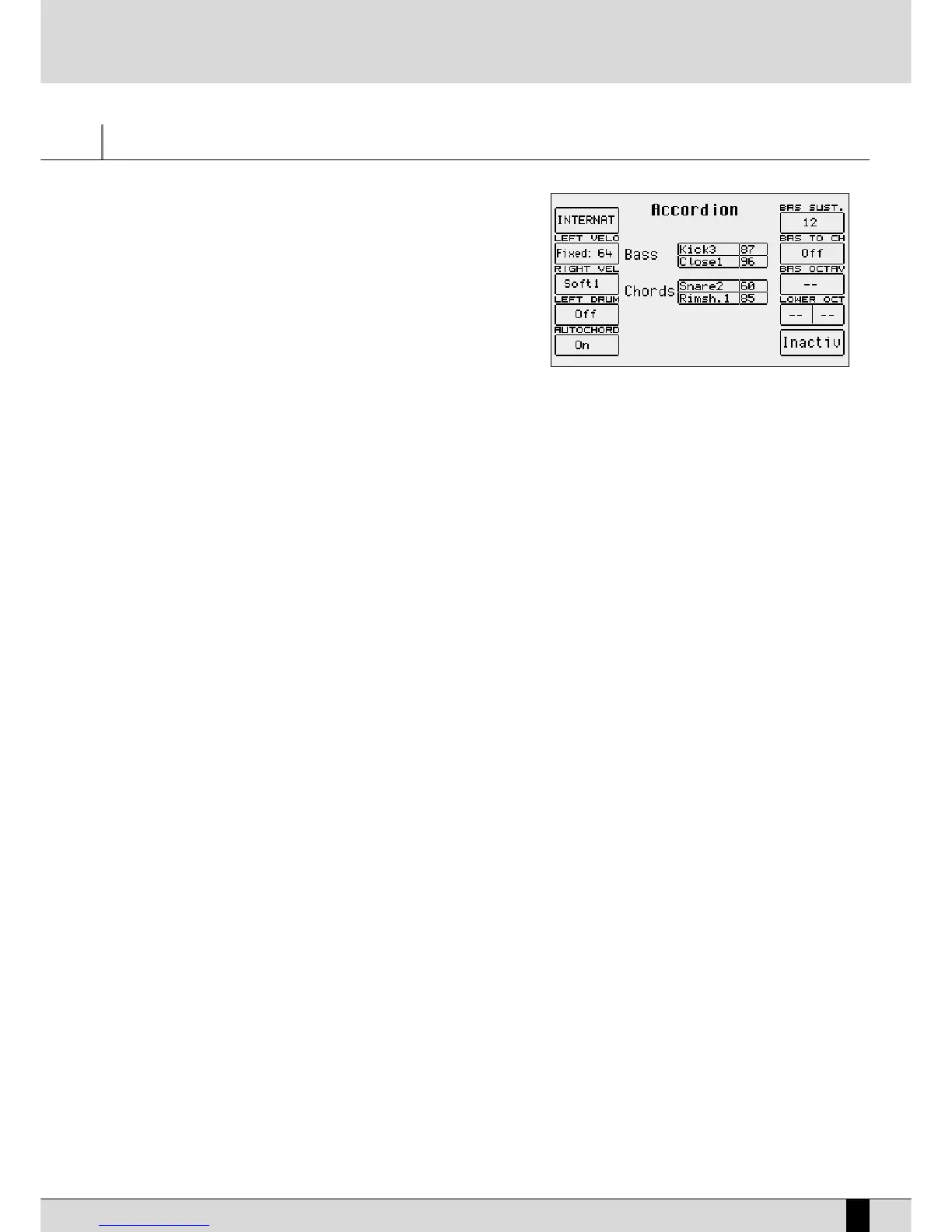
The parameters for the MIDI Accordion are accessed, from the main page of the display, by pressing
FF33 UUttiilliittyy
and, from the first page of the
UUttiilliittyy
menu, by pressing
FF11 AAccccoorrdd
. A new page of dedicated parameters opens. When the Accordion is connected, the Accordion mode is
enabled by pressing F10, which from the disabled mode (denoted by Inactive), becomes enabled (denoted by Active). To disable the Accordion
mode, press the F10 push button again. The Accordion mode calls up a number of MIDI settings that can however be modified as desired.
The following parameters are available in the Utility Accordion menu:
F1 Chord Mode: This is used to select two different methods for acknowledging the chords.
IInntteerrnnaattiioonnaall
is the most widely used system;
BBeellggiiqquuee
is to be used only to acknowledge Belgian chords. Press function push button
FF11
to switch from one system to the
other.
F2 Left Velo: This selects the velocity curve for the notes played manually using the chords of the Accordion. By pressing the
FF22
function
push button repeatedly you can select the response curve. In the case of
FFiixxeedd
curve you can enter the fixed velocity value
applied to the notes played using the
DDAATTAA CCUURRSSOORR
push button.
F3 Right Vel: The same as for
FF22 LLeefftt VVeelloo
but dedicated to the notes played with the right hand, namely the lead.
F4 Left Drum: When set as
OOnn
, it is used to play two percussion sounds of the Drum section of the SD5 with the bass voices of the Accordion
and two more voices with the Accordion chords. The two voices with relative velocity values can be selected for chords and
bass. Using the
DDAATTAA CCUURRSSOORR ((UUpp aanndd DDoowwnn))
push buttons, go to the voice and then select it using the
DDAATTAA CCUURRSSOORR ((LLeefftt aanndd
RRiigghhtt))
push buttons. Moving around again using the
DDAATTAA CCUURRSSOORR ((UUpp aanndd DDoowwnn))
push buttons you can modify the velocity
value using the
DDAATTAA CCUURRSSOORR ((LLeefftt aanndd RRiigghhtt))
push buttons. When a voice is to be completely excluded, set the velocity at 0.
Note: It is advisable to use the Left Drum function when the Arranger is not in use.
F5 Autochord: This excludes the acknowledgement of the chords leaving the Accordion player free to play the bass and the chords manual-
ly, without any automation.
F6 Bas Sust: The value that can be modified using the
DDAATTAA CCUURRSSOORR
push buttons indicates the length of the Sustain on the manual bass,
when the
MMAANNUUAALL BBAASSSS
push button is in use (LED lit).
F7 Bas To Ch: Set as On, it also includes the bass note in the acknowledgement of the chords, to create chords with varied bass using the
BBAASSSS TTOO LLOOWWEESSTT
push button.
F8 Bas Octav:
The value that can be modified using the
DDAATTAA CCUURRSSOORR
push buttons indicates the octave of the manual bass voice, with the
MMAANNUUAALL
BBAASSSS
push button enabled.
F9 Lower Oct: For each voice assigned to Lower 1 and Lower 2, its octave can be modified using the
DDAATTAA CCUURRSSOORR
push buttons and push
button
FF99
to switch between the two parameters.
F10 Accordion Mode:
This enables or disables the use of the parameters for the MIDI Accordion.
SAVING THE PARAMETERS FOR THE MIDI ACCORDION
Thanks to the Power On Set-up function, all the settings of the parameters described can be saved, which will be called up automatically when
the SD5 is turned on. To enable this procedure, press the
SSAAVVEE
push button and then select
FF33 PPoowweerr OOnn SSeett--uupp
. Press
FF1100 SSaavvee
to
save the settings in Flash RAM. Further details on Power On Set-up are given in the dedicated section.
MIDI Accordions



 To Next Page