THE MIDI PARAMETERS FOR THE ACCORDION
When the Accordion is enabled using
FF1100 AAccttiivvee
, the SD5 calls up the
MMIIDDII
AAccccoorrddiioonn 11
set-up to attribute the MIDI channels to the keyboard sections in MIDI
reception. The MIDI
AAccccoorrddiioonn 11
set-up is that most frequently used with most MIDI
accordions. The attribution of the MIDI reception channels can be modified in
menu
FF66 MMIIDDII
that is accessed from the main page of the display and then using
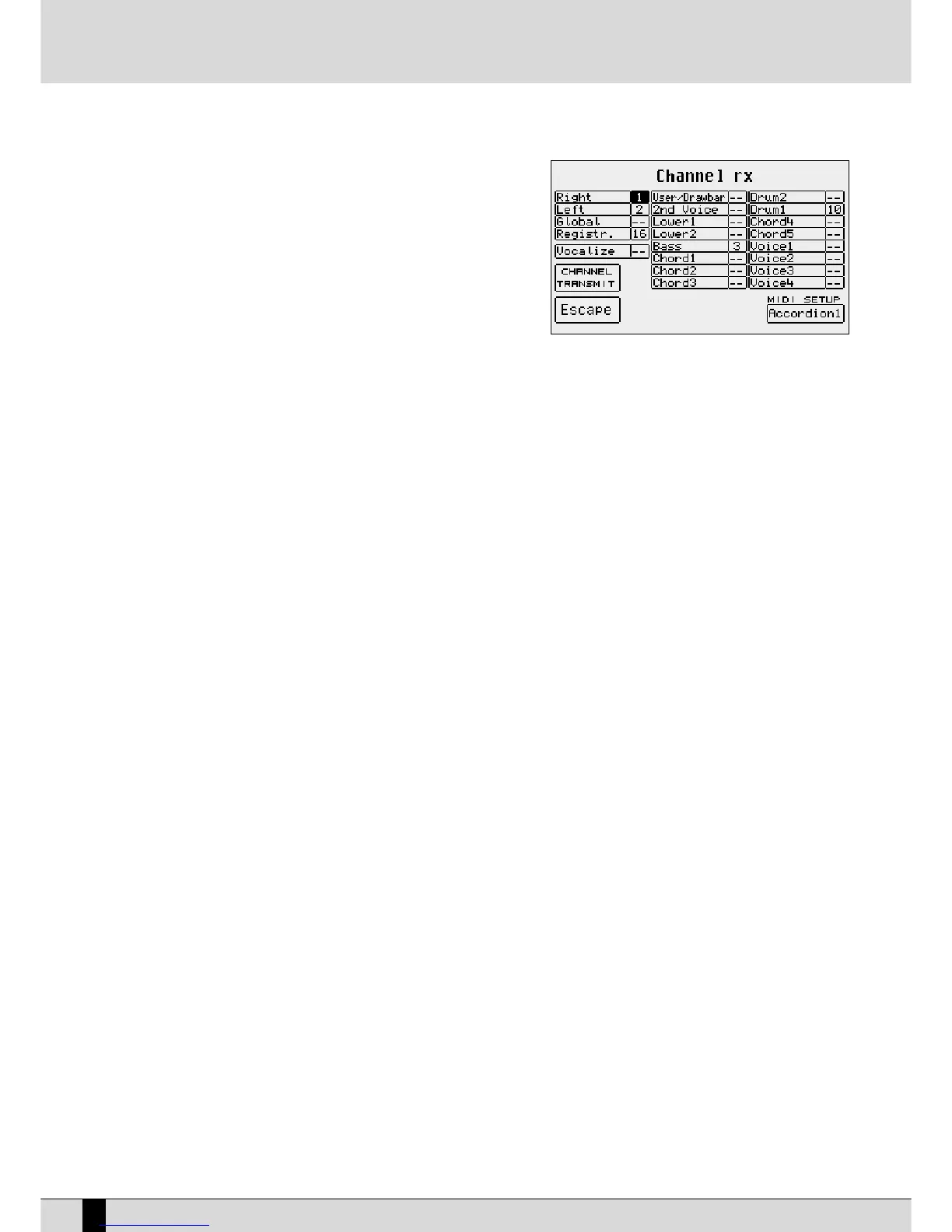
FF22 CChhaannnneell RReecceeiivvee
.
You will see that, when the Accordion mode is enabled, the MIDI Set-up in
FF1100
is
AAccccoorrddiioonn 11
. To modify the settings of the single sections, move onto one of them
using the
DDAATTAA CCUURRSSOORR ((UUpp aanndd DDoowwnn))
push buttons and then enter the MIDI chan-
nel using the
DDAATTAA CCUURRSSOORR ((LLeefftt aanndd RRiigghhtt))
push buttons. The main sections
involved with the MIDI Accordion are:
Right Channel: This is the setting of the MIDI receiving channel for the part played with the right hand, namely the lead.
Left Channel: This is the setting of the MIDI receiving channel for the part played with the left hand, namely the left section of the SD5
dedicated to the acknowledgement of the chords for the Arranger.
Bass Channel: This is the setting of the MIDI receiving channel for the manual bass section.
Drum Channel: This is the setting of the MIDI receiving channel used to play the percussion timbres when the Left Drum mode is enabled.
To save the settings, press the
SSAAVVEE
push button and then
FF1100 SSaavvee
. Further details are given in the MIDI section.
TIPS TO QUICK CONNECTION OF A MIDI ACCORDION
Connect the MIDI cable to the MIDI Out of the Accordion and the MIDI In 2 of the SD5.
Call up the
FF33 UUttiilliittyy
menu from the main page of the display and then press
FF11 AAccccoorrddiioonn
and then
FF1100
to set the parameter on
AAccttiivvee
.
If the sections of the Accordion (Right, Lower and Chords) do not play correctly, exit using the EXIT push button, press
FF66 MMIIDDII
and then
FF22
CChhaannnneell RReecceeiivvee
to set and match the MIDI channels between the Accordion sections and those of the SD5 using the
DDAATTAA CCUURRSSOORR ((UUpp aanndd
DDoowwnn))
and
DDAATTAA CCUURRSSOORR ((LLeefftt aanndd RRiigghhtt))
push buttons. If the settings have been modified, save them using the
SSAAVVEE
push button then
FF1100 SSaavvee
,
in the
AAccccoorrddiioonn 11
set-up, which is called up each time the Accordion mode is enabled.
The Ketron SD5 is provided with two MIDI set-ups for Accordions.
AAccccoorrddiioonn 11
is dedicated to the use of the Accordion with the SD5 Arranger and
AAccccoorrddiioonn 22
controls all sixteen MIDI parts of the SD5. The settings of the Accordion menu in the Utility menu can be saved in a Registration.
To enable the manual bass, press
LLEEFFTT CCOONNTTRROOLL
and then the
FF33 MMaannuuaall BBaassss
push button.
NNoottee::
Remember that most problems relating to a MIDI Accordion depend on the settings of the MIDI transmitting channels on the MIDI
Accordion. If various MIDI instruments are used and connected to the Accordion, it is preferable to modify the MIDI set-up of the SD5 rather than
to re-program the Accordion MIDI set-up to match the MIDI set-up of the SD5.
SD5
74
MIDI Accordions



 To Next Page