SD5
75
MIDI
MIDI is a communication protocol used to transmit and receive commands, messages and events that are then translated by the compatible
musical instrument into notes, events and commands. This protocol is used to connect a computer with dedicated programs to the SD5, to con-
trol other sound modules or keyboards directly from the SD5 and to connect the SD5 to an Accordion, a Sax or a MIDI guitar. Various books have
been written on the MIDI standard and some simple research via Internet or in any specialised library can help you better understand how it
works. Naturally, again on Internet, you can find sites that attempt to explain what MIDI is, free of charge. In any event a skilled musician will
not mix up the MIDI protocol with the Midi files (often called MIDI improperly): the first is indeed the starting point for the second. The SD5
(thanks to the polyphony) offers 32 independent MIDI parts. Sixteen parts are dedi-
cated to using the keyboard when playing live, with separate parts for the
Arranger and the lead. The other sixteen are reached using the MIDI In 1 input that
exploits the tone generator of the SD5 as a module in independent General MIDI
standard. The same sixteen GM parts are used to reproduce the Midi files in
SSoonngg
PPllaayy
and in the sequencer.
The SD5 parameters are used to control each MIDI part and channel of the 32 avai-
lable. Remember not to use MIDI cables longer than 5 meters (15 Feet) to avoid run-
ning into transmission errors.
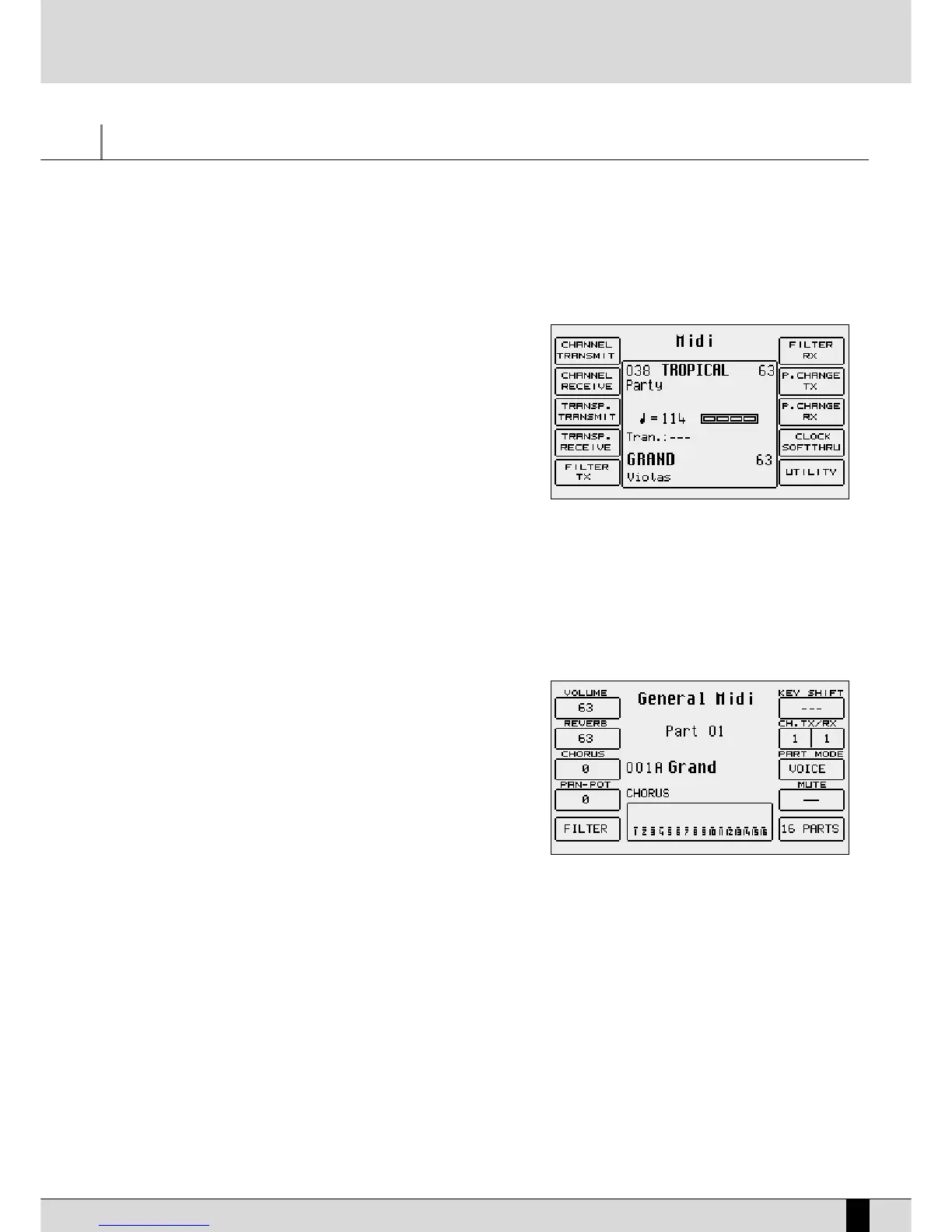
The SD5 distinguishes the programming of the parts between those in General MIDI
and those dedicated to the single sections of the SD5. The General MIDI settings
are called up from the main page of the display using
FF11 GGMM
and the MIDI settings
of the keyboard are called up from the main page of the display using
FF66 MMIIDDII
.
USING THE SD5 AS A GENERAL MIDI MODULE
To reach the sixteen independent MIDI channels from the keyboard, you must use a Midi file loaded in
SSoonngg PPllaayy
, or you can exploit the MIDI In
1 input (GM). With regard to
SSoonngg PPllaayy
there is a dedicated menu (
FF11 GGMM PPaarrtt
) that is used to modify the parameters of each single part, which
has already been explained in the
SSoonngg PPllaayy
section (see relative section). With regard to the MIDI In 1 input (GM), the modification page of the
parameters for each single MIDI part is enabled using
FF11 GGMM
from the main page of the display. The parameters modified using
FF11 GGMM
cannot be
saved, on the contrary to what occurs with the same parameters in
SSoonngg PPllaayy
.
MODIFYING A SINGLE GM PART
From the main page, press
FF11 GGMM PPaarrtt
to call up the page dedicated to the para-
meters of a single GM part. The Part is shown in the middle of the display, the para-
meters (that can be modified) are assigned to the function push buttons. Right
underneath is the voice assigned to the Part and the effect used. The bottom part
of the display is dedicated to monitoring the activities of the sixteen Parts on the
MIDI In 1 (GM) input, and can be useful when searching for the Part to be modified.
To move around between the single Parts use the
PPAAGGEE ++//--
push buttons. You can
also directly access one of the 16 parts using the
MMuullttii--TTaabbss
of the SD5. Consult
the specific chapter for further information.
The parameters that can be modified must be selected using the dedicated func-
tion push button before the value can be modified.
Timbre: Each track can use a voice taken from the Voices and User Voices. To
modify the voice assigned follow the normal procedure using the
VVOOIICCEESS,, UUSSEERR VVOOIICCEESS,, PPAAGGEE ++//--
push buttons and the function push buttons.
Modulation effect: For each single track you can choose the modulation effect to be applied to the voice between Chorus, Distorsor and Delay,
using the
DDAATTAA CCUURRSSOORR
push buttons. The effect entity can be programmed using
FF33 CChhoorruuss//DDiissttoorrssoorr//DDeellaayy
.
F1 Volume: This modifies the volume of the whole track. The value can be changed using the
DDAATTAA CCUURRSSOORR
push buttons which, if pres-
sed together at the same time, reset the value.
F2 Reverb: This modifies the reverb of the complete part. You may vary the value using the
DDAATTAA CCUURRSSOORR
pushbuttons which, if pres-
sed at the same time, put the value to zero.
F3 Chorus/Distorsor/Delay
:
This modifies the entity of the modulation effect chosen between Chorus, Distorsor and Delay assigned to the track using the
DDAATTAA
CCUURRSSOORR ((UUpp aanndd DDoowwnn))
push buttons. The value can be changed using the
DDAATTAA CCUURRSSOORR ((LLeefftt aanndd RRiigghhtt))
push buttons which, if pres-
sed together at the same time, reset the value. The display shows the type of effect chosen next to
FF33
and also below the timbre.
F4 Panpot:
This modifies the arrangement of the timbre on the stereo panorama. The value can be changed using the DATA CURSOR(Left and
Right) push buttons which, if pressed together at the same time, take the timbre back to the middle of the stereo panorama.
F5 Filter: This calls up the page where some MIDI events can be cut-out. It may occur for example, that the musician wishes to avoid
MIDI


 To Next Page
 Loading...








