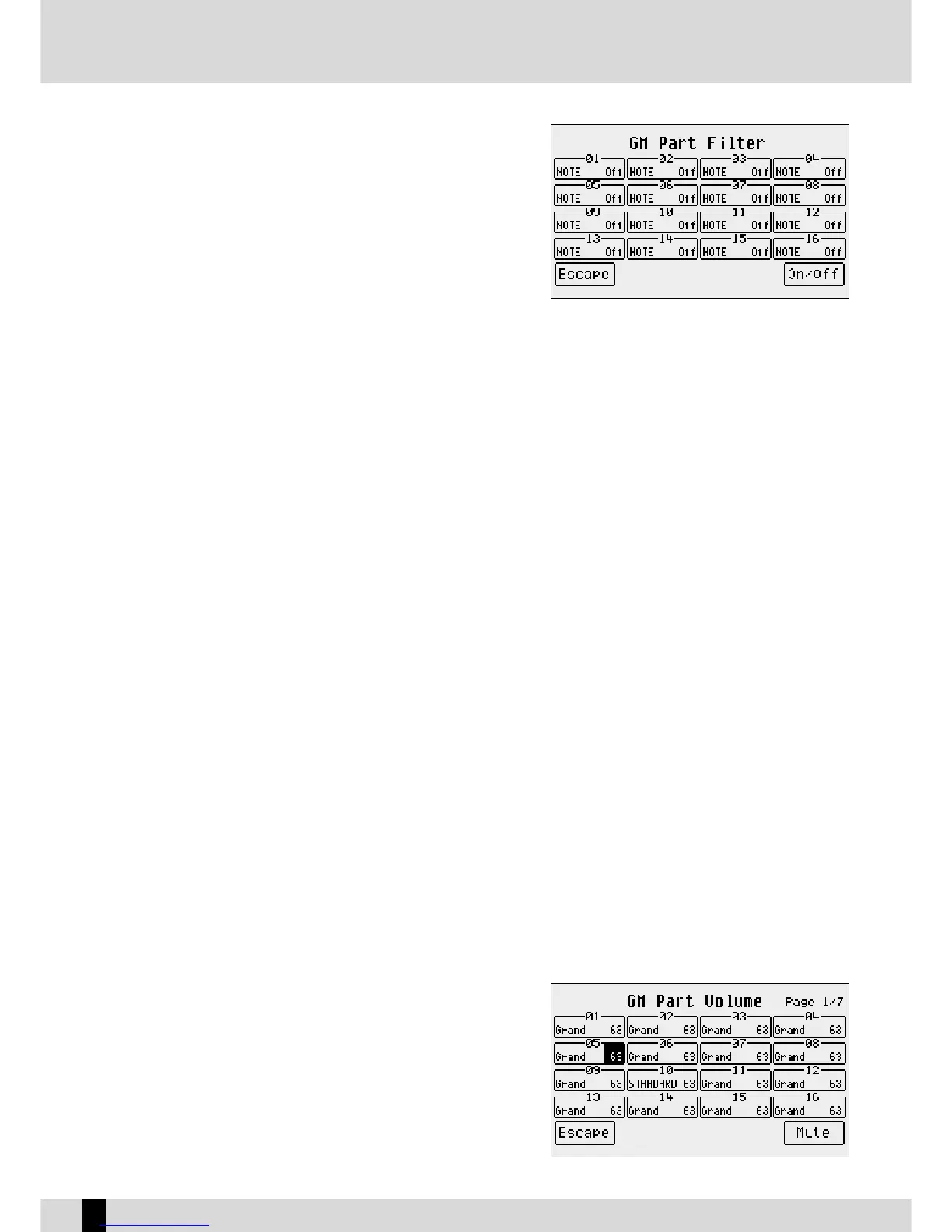
using the Modulation or some other MIDI parameter that direc-
tly affects the voice. The MIDI filters can also be used to better
control an external MIDI module. The page called up from F5
FFiilltteerr
shows a table of four rows and four columns relative to
the sixteen Parts. To be able to access the MIDI filter of a single
Part use the
FF11
and
FF66
push buttons for Parts 1, 2, 3 and 4 that
are to be selected by pressing the same push buttons repea-
tedly. Use push buttons
FF22
and
FF77
for Parts 5, 6, 7, and 8.
Use push buttons
FF33
and
FF88
for Parts 9, 10, 11 and 12 and push
buttons
FF44
and
FF99
for Parts 13, 14, 15 and 16. Once the Part to
which the MIDI filter is to be applied has been found, select
which MIDI message is to be cut-out from the reproduction
using the
DDAATTAA CCUURRSSOORR
push buttons and enable the filter
using the
FF1100 OOnn//OOffff
push button. The filter is enabled when “
OONN
” appears next the MIDI message to be filtered. The MIDI mes-
sages that can be filtered are the following:
Notes: all notes within the track
CCoonnttrrooll CChhaannggee
: all Control Changes within the track
PPrrooggrraamm CChhaannggee::
all Program Changes
AAfftteerr TToouucchh::
all After touch events
PPiittcchh BBeenndd::
all Pitch Bend events
VVoolluummee::
only Control Change 07 Volume
PPaann::
only Control Change 10 Pan
RReevveerrbb::
only Control Change Reverb Send
CChhoorruuss::
only Control Change Effect Send
MMoodduullaattiioonn WWhheeeell::
only Control Change 01 Modulation
EExxpprreessssiioonn::
only Control Change 11 Expression
RRPPNN::
only Control Change RPN
NNRRPPNN::
only Control Change NRPN
To exit from
FF55 FFiilltteerr
press
EEXXIITT
or
FF55 EEssccaappee
that send to the main page of
SSoonngg PPllaayy
.
F6 Key Shift: This changes the transposition of the track selected by up to +/- 24 semitones. The value can be changed using the
DDAATTAA
CCUURRSSOORR
push buttons which, if pressed together at the same time, reset the value.
F7 Channel Tx Rx: When push button
FF77
is pressed repeatedly, it switches from
TTXX
(that indicates the transmission MIDI channel of the selec-
ted part) to
RRXX
(that establishes the MIDI receiving channel). The value can be changed using the
DDAATTAA CCUURRSSOORR
push but-
tons. If no value is specified the track receives and transmits on the MIDI channel having the same number as the Part.
F8 Part Mode: This modifies the operational mode of the track, using the
DDAATTAA
push buttons. The possible choices are:
Voice: track dedicated to the use of a voice
DDrruummsseett::
track dedicated to the use of a Drumset
DDrruumm22::
track dedicated to the use of Live Drumsets
VVooccaalliizzee::
track dedicated to the control of the Vocalizer
Based on the choice made, Drumset, Live Drum, Voice and Vocal Set can be called up or otherwise. Whereas in the case of
Voice and Drumset mode the Voice and Drumset are called up normally. For Drum 2 and Vocal Set the Live Drums and Vocal
Sets must be selected using the
VVAALLUUEE ++//--
push buttons. The modification of operational mode of a track can make the song
incompatible with modules in General MIDI.
F9 Mute: If the function is enabled, the track is cut-out from the reproduction.
F10 16 Parts: This enables the display of each single parameter, showing its value for all sixteen Parts.
MODIFYING A PARAMETER FOR THE SIXTEEN GM PARTS
As already mentioned, the status of a single parameter for all sixteen tracks can
be displayed using the
FF1100 1166 PPaarrttss
function. To rapidly access a parameter, select
it from the
GGMM PPaarrtt
page and then press
FF1100 1166 PPaarrttss
to display the status of that
parameter for the sixteen tracks. The page
FF1100 1166 PPaarrttss
structure shows a table
with four lines and four columns relative to the sixteen Parts. To access the single
Part use push buttons
FF11
and
FF66
for Parts 1, 2, 3 and 4 that are selected by pres-
sing the same push buttons repeatedly. Use push buttons
FF22
and
FF77
for Parts 5, 6,
7, and 8. Use push buttons
FF33
and
FF88
for Parts 9, 10, 11 and 12 and push buttons
FF44
and
FF99
for Parts 13, 14, 15 and 16. Once the Part has been found its value can be
modified using the
DDAATTAA CCUURRSSOORR
push buttons which, if pressed together at the
same time, will reset the value.
The parameters that can be modified in this way are distributed over seven pages
SD5
76
MIDI



 To Next Page