SD5
77
that are called up using push buttons
PPAAGGEE ++//--
, and include Volume, Reverb, Effects, Pan, Shift, Channel Rx and Channel Tx (already explained in
the previous section).
FF1100 MMuuttee
is used to cut-out only the track selected at the time from the reproduction.
THE MIDI PARAMETERS OF THE SD5 SECTIONS
From the main page of the display press
FF66 MMIIDDII
to call up the menus dedicated to the SD5 sections. For each single function the single sections
involved are displayed together with relative value. To move around between the sections use the
DDAATTAA CCUURRSSOORR ((UUpp aanndd DDoowwnn))
push buttons
and use the
DDAATTAA CCUURRSSOORR ((LLeefftt aanndd RRiigghhtt))
push buttons to modify the value.
THE MIDI SET-UPS
To simplify programming, the SD5 uses some memory locations called MIDI Set-up's that are used to save the MIDI settings. When a modifica-
tion has been completed in these menus, you can save it by pressing the
SSAAVVEE
push button. The options available are the following:
F4 Undo: This returns to the page of MIDI channel settings, restoring the initial situation.
F5 Escape: This returns to the MIDI channel settings page without saving.
F9 Default: This restores the default settings.
F10 Save: This confirms that the settings in the current MIDI set-up are to be saved.
The preferred MIDI set-up can be called up when turning the instrument on using the
PPoowweerr O
Onn SSeettuupp
function. Once the MIDI set-up has been
selected, go back to the initial page of the MIDI menu using
FF55 EEssccaappee
, press the
SSAAVVEE
push button, select
FF33 PPoowweerr OOnn SSeettuupp
and then
confirm using
FF1100 SSaavvee
. More details are given in the Power On Set-up section.
THE PARAMETERS OF THE MIDI MENU
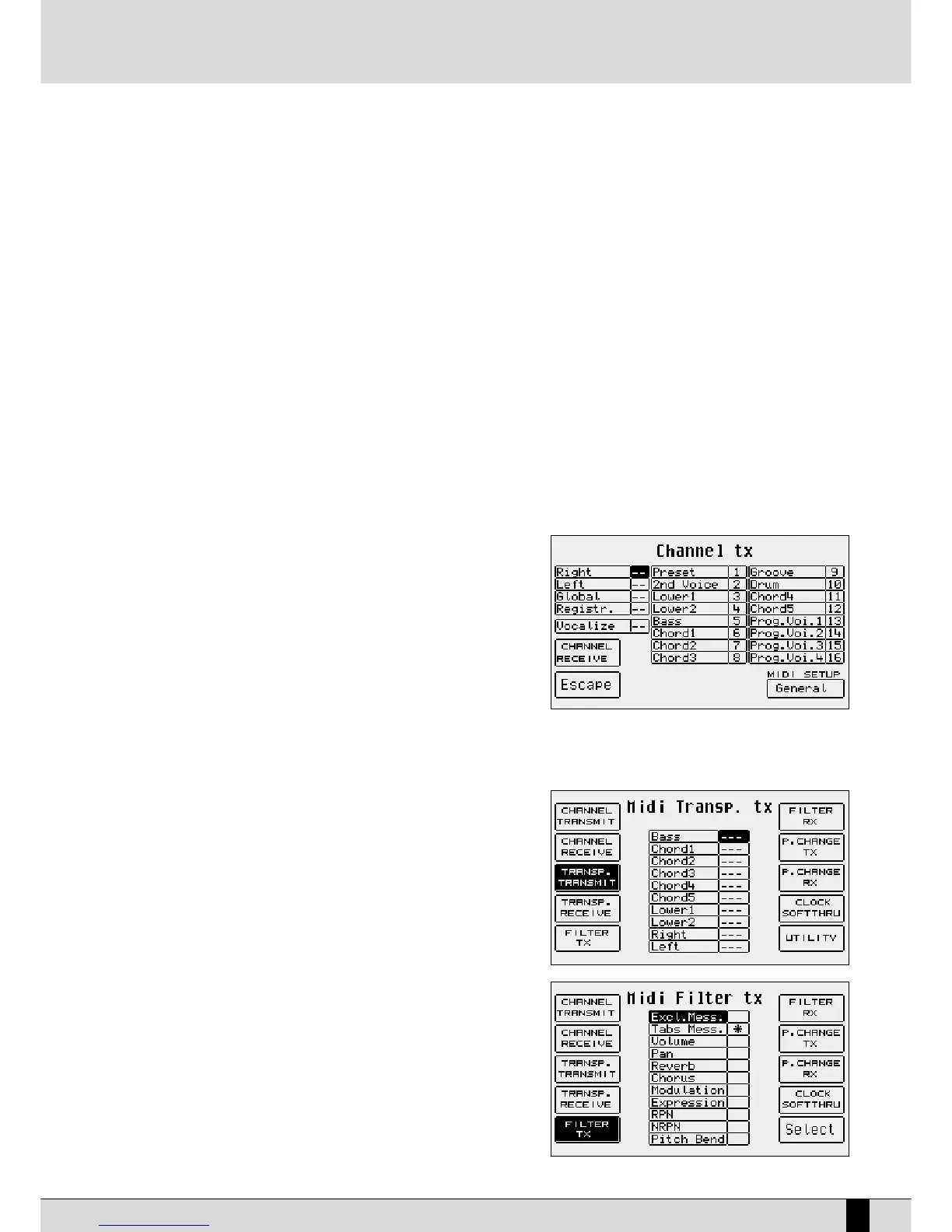
F1 Channel Transmit: This is used to associate a MIDI transmitting channel on the MIDI OUT to each section. The following functions
are also available:
F4: this switches between the Channel
Transmit page and Channel Receive page.
FF55 EEssccaappee
: This returns to the initial page
of the MIDI menu.
FF1100 MMIIDDII SSeettuupp::
This calls up the settings
already put in order and saved to use the
SD5 via MIDI. The MIDI Set-up currently
selected is also that where the settings
will be saved using the
SSAAVVEE
push button.
F2 Channel Receive: This is used to associate a MIDI receiving channel
on MIDI In 2 (Keyboard) to each section. The parameters are the same as
FF11 CChhaannnneell TTrraannssmmiitt
.
F3 Transpose Transmit: The value for each single section identifies the
number of transposition semitones applied to the
notes transmitted on the MIDI Out.
F4 Transpose Receive: The value of each section identifies the number of
transposition semitones applied to the notes
received on the MIDI In 2 (Keyboard).
F5 Filter Tx: Valid for all the sections, the MIDI filters being
transmitted are used to enable or disable the
transmission of some MIDI messages such as the
Pitch Bend, some Control Changes and exclusive
system messages. The type of message to be filte-
red is selected using the
DDAATTAA CCUURRSSOORR
push but-
tons and is enabled or disabled using the
FF1100
SSeelleecctt
push button. The filter is enabled when the
symbol “*” appears next to the MIDI message.
F6 Filter RX: The same as
FF55 FFiilltteerr TTxx
, but dedicated to the MIDI
messages received on MIDI In 2 (Keyboard).
F7 Program Change Tx: For each section you can establish whether the
MIDI



 To Next Page