SD5
83
ted using the
DDAATTAA CCUURRSSOORR
push buttons. The following options are available:
FF55 EEssccaappee::
This cancels the procedure
FF77 SSaavvee CChhaaiinn::
This creates a file with .CHN extension within the same Folder in which the Midi files relative to the chain pro-
grammed are stored.
F10 Select: This selects the Midi files to be added to the chain.
The procedures required to create a chain of Midi files are the following:
●
Select the Folder in which the Midi files are stored.
●
Press
FF77 CChhaaiinn EEddiitt
.
●
Find the first Midi file of the chain using the
DDAATTAA CCUURRSSOORR
push buttons.
●
Select the Midi file using
FF1100 SSeelleecctt
, a number will appear next to the name that indicates the position within the
chain.
●
Find and select the other Midi files that follow.
●
If you make a mistake, find the wrong Midi file and press
FF1100 SSeelleecctt
again. The Midi file will be removed from the chain
and the following Midi files will move back by one place.
●
Save the chain using
FF77 SSaavvee CChhaaiinn
. From the page called up you can enter the name using the keyboard keys and
the
DDAATTAA CCUURRSSOORR
push buttons. Confirm using
FF1100 EExxeecc
or cancel using
FF55 EEssccaappee
.
The chain thus created is loaded in Song Play using the Load function from the Disk menu or called up directly from the first page of Song Play,
by entering the number associated with the file chain using the numeric keypad (STYLES push buttons). If you then go to Song Play, the title
of the first Midi file will appear. There are three ways of moving along the chain, namely:
●
Let the Midi files come-in as they end normally and the SD5 will load the next file and reproduce it without any further input.
●
Without starting
SSoonngg PPllaayy
using the
SSTTAARRTT
push button, use the
DDAATTAA CCUURRSSOORR
push buttons to select the Midi files of the chain.
●
With Song Play running, press the
CCOOUUNNTT//PPAAUUSSEE//RREESSTTAARRTT
push button and then use the DATA CURSOR push buttons to call up another Midi file.
Once you have found the Midi file, press the
CCOOUUNNTT//PPAAUUSSEE//RREESSTTAARRTT
push button again to start Song Play again with the new Midi file.
Whatever the case, if you stop a Midi file using the
SSTTAARRTT
push button,
SSoonngg PPllaayy
will loose the data of the chain permanently and you will have
to re-load them. The same applies to all Juke-Box controls, disabled when a chain is in use. Just the words can be displayed.
F8 Chain List: This displays all the chains of Midi files already stored within the Folder in use.
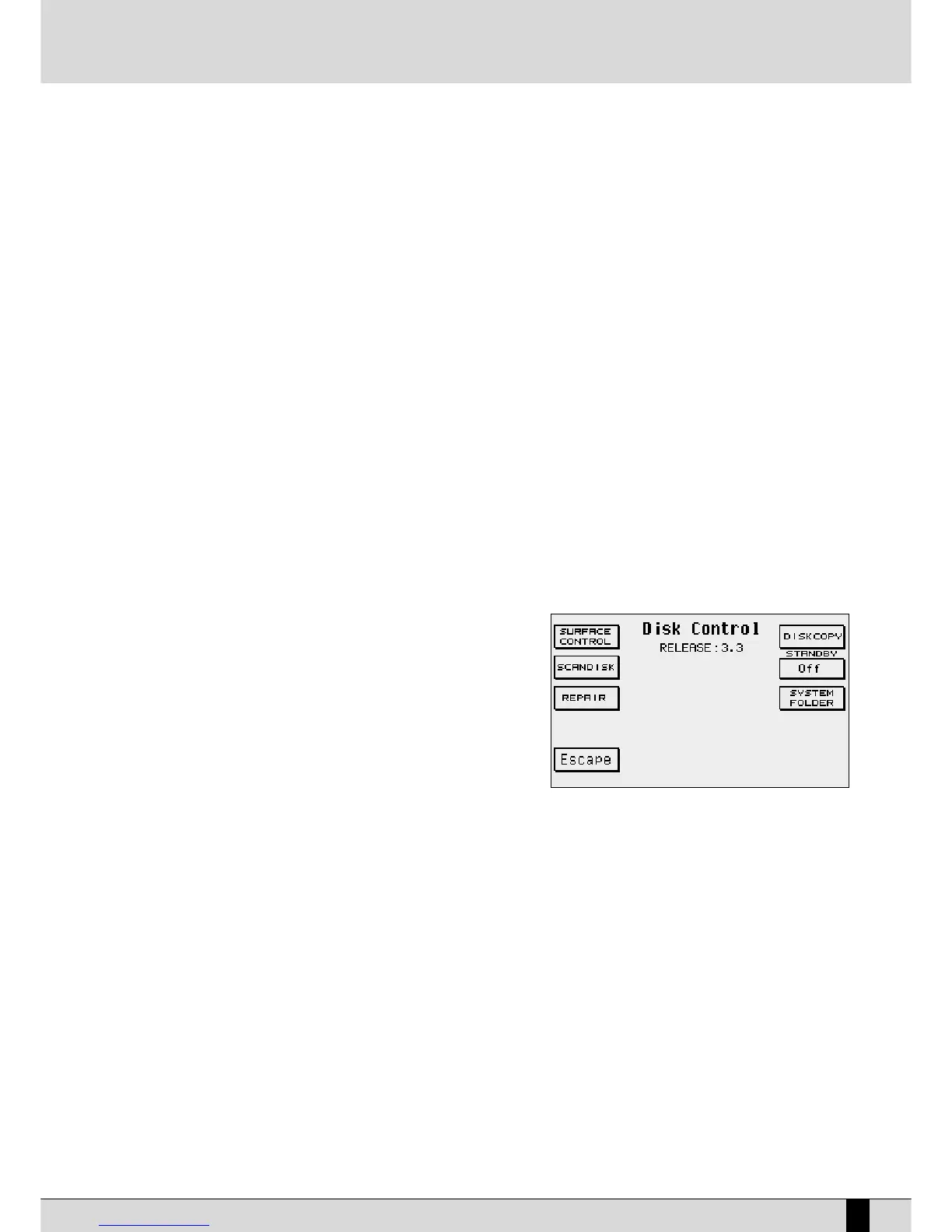
F9 Disk Control:
This calls up a number of functions required to control the Hard
Disk. The options available are the following:
F1 Surface Control: This controls the Hard Disk surface
and takes a few minutes for the procedure to be comple-
ted. If
FFaattaall EErrrroorr
appears you must contact a Ketron ser-
vice centre as the Hard Disk is seriously damaged. If the
Hard Disk surface test detects no anomalies the display
will return to the menu once the procedure has been com-
pleted.
FF22 SSccaannDDiisskk
: This controls the integrity of the Folders and
the files. When the test ends press
FF1100 EEssccaappee
to return to
the previous page. If errors are found the SD5 automati-
cally moves onto the
RReeppaaiirr
function.
FF33 RReeppaaiirr::
This repairs errors found in damaged files. Press
FF1100 EEssccaappee
once this procedure has been completed.
FF55 EEssccaappee::
This returns to the previous page of the menu.
FF66 DDiisskk CCooppyy
: Using a special cable you can connect a second Hard Disk to the standard one for back-up procedures.
Contact Ketron for further information.
FF77 SSttaannddbbyy
: This is used to set the time in minutes, which can be selected by pressing function push button F7 repea-
tedly, after which the Hard Disk enters the stand-by status if it is not used. The Hard Disk is immediately available again
as soon as some function that requires it's use is accessed.
FF88 SSyysstteemm FFoollddeerr
: This creates a so-called System Folder dedicated to containing a system file, after having formatted
the hard disk.
THE DISK FUNCTIONS FOR THE FLOPPY DISK
When using the Floppy Disk, the SD5 offers the following functions:
F1 Dir: This displays all the files stored in the Floppy Disk.
F2 Load: Once a file has been selected using the
DDAATTAA CCUURRSSOORR
and
FF1100 SSeelleecctt
push buttons you can load it in RAM.
F3 Save: This calls up the page used to select the type of memory to be saved on Floppy. The options are the same as those described
for
FF33 SSaavvee
.
F4 Copy: This is used to copy the file, selected using the
DDAATTAA CCUURRSSOORR
and
FF1100 SSeelleecctt
push buttons, in the Folder in use. When copying
DISK


 To Next Page
 Loading...








