you must also re-name the file and the
SSkkiipp
commando for single files and Copy All for all files. It works in the exact same man-
ner as the
FF44 CCooppyy
function of the Hard Disk.
F5 File Choice:When a number of files are stored in Floppy disk but with different
extension, you can find only those desired by choosing the type of
file to be displayed. The options are the exact same as those for
the Hard Disk.
F6 Delete: This cancels one or a number of files selected using the
DDAATTAA CCUURR--
SSOORR
and
FF1100 SSeelleecctt
push buttons.
F7 Rename: This is used to re-name a file selected using the DATA CURSOR
push buttons.
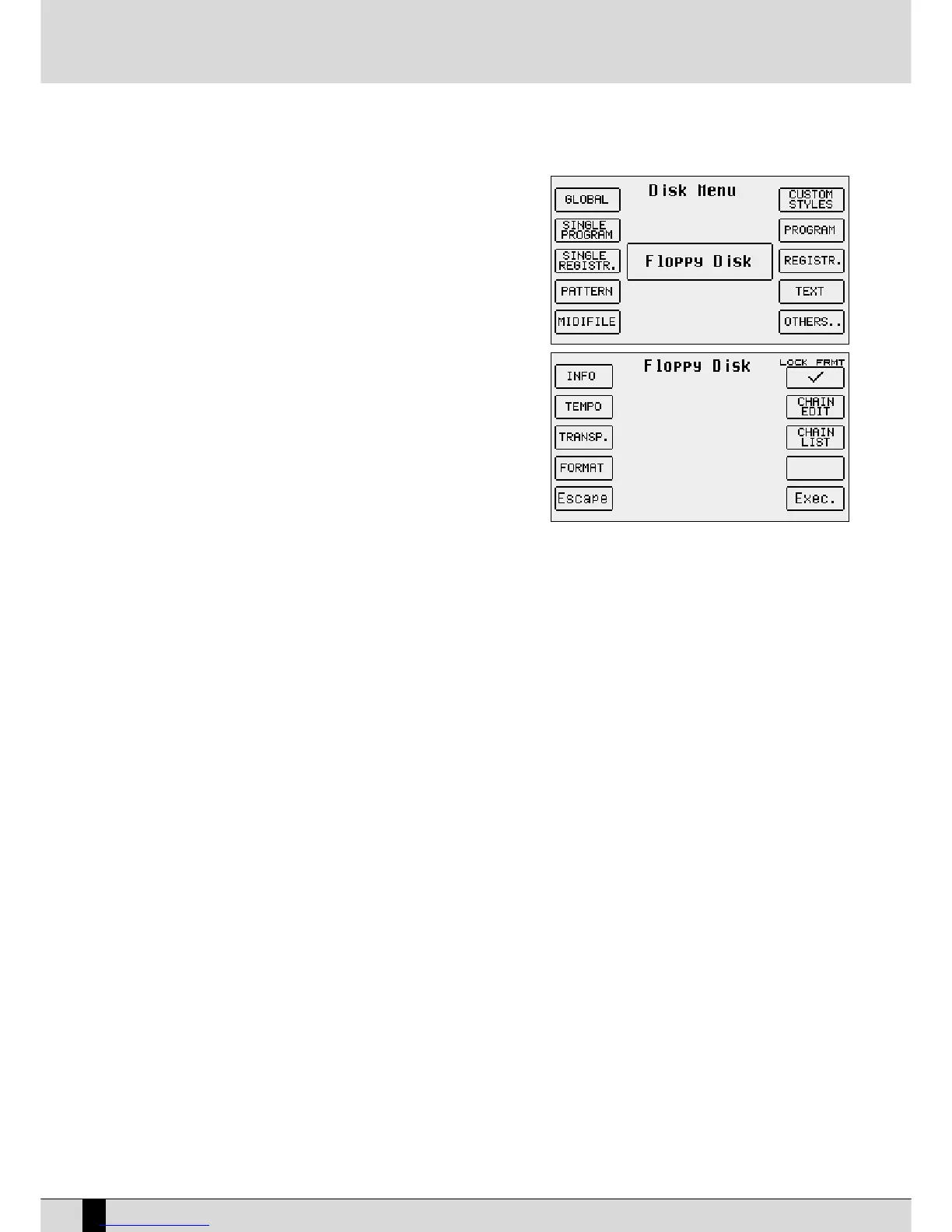
F9 Utility: This calls up a page with the following options:
FF22 TTeemmppoo::
This is used to modify the Tempo value of a
Midifile stored in the Folder currently in use. Once the
Midifiles are displayed, choose the one required using the
DDAATTAA CCUURRSSOORR
keys, then press
FF1100 EExxeeccuuttee
. A window
appears where you can enter the difference in steps of 1
compared to the original Tempo using the
DDAATTAA CCUURRSSOORR
keys. Once you have entered the value, press
FF1100 EExxeecc
to
pull-up a new window where you can modify the original
name of the Midifile. Once you have completed the feasi-
ble modification, confirm it by pressing
FF1100 EExxeecc
or cancel
it by pressing
FF55 EEssccaappee
.
FF33 TTrraannssppoosseerr
: This is used to define a negative or positive transposition value for the Midifile selected. Once the
Midifiles are displayed, select the one required using the
DDAATTAA CCUURRSSOORR
keys, then press
FF1100 EExxeeccuuttee
. The window that
appears is used to define whether the transposition applied will be valid just for the Midifile (
SSoonngg
) or whether it will
also include the transposition of the keyboard (
GGlloobbaall
). To select the operating mode, press function button F9 that
indicates the operating mode cyclically and upon completion press
FF1100 EExxeecc
to confirm or F5 Escape to cancel the pro-
cedure. Once confirmed, you can enter the transposition value to be applied to the Midifile using the
DDAATTAA CCUURRSSOORR
keys
and confirm again with
FF1100 EExxeecc
that will pull-up the window where you can modify the name. Confirm the transposi-
tion procedure using
FF1100 EExxeecc
or abandon the procedure using
FF55 EEssccaappee
.
FF44 FFoorrmmaatt
: This is used to format the Hard Disk, which can only be done by disabling the default protection, using func-
tion button
FF66 LLoocckk FFoorrmmaatt
after which you will be requested to confirm with
FF1100 EExxeecc
or abandon with
FF55 EEssccaappee
.
Having disabled the protection, you can format the Hard Disk by pressing
FF44 FFoorrmmaatt
after which you will be requested
twice to confirm with
FF1100 EExxeeccuuttee
. Press
FF55 EEssccaappee
to cancel the procedure. The Lock Format function is re-enabled
each time the SD5 is turned on, to prevent irreversible errors. The formatting procedure cancels the entire contents of
the Hard Disk.
FF55 EEssccaappee::
This is used to go back to the previous page of the
DDiisskk
menu.
FF66 LLoocckk FFoorrmmaatt
: This locks the
FF44 FFoorrmmaatt
function.
FF77 CChhaaiinn EEddiitt
: This is used to create chains of Midifiles, of no more than 32 Midifiles, to be played in sequence without
therefore having to pull-up each file individually. It only works for Midifiles stored in the same Folder, which is pulled-
up as described for
FF33 TTrraannssppoosseerr
. Once you have pressed
FF77 CChhaaiinn EEddiitt
, the SD5 displays the Midifiles stored in the
Folder, which can be selected using the
DDAATTAA CCUURRSSOORR
keys. The options available are the following:
FF55 EEssccaappee
: This cancels the procedure.
FF77 SSaavvee CChhaaiinn
: This creates a file with .CHN extension within the same Folder that contains the Midifiles related
to the chain programmed.
FF1100 SSeelleecctt
: Select the Midifile to be added to the chain.
The procedures required to create a chain of Midifiles are the following:
●
Select the Folder in which the Midifiles are stored.
●
Press
FF77 CChhaaiinn EEddiitt
●
Find the first Midifile of the chain using the
DDAATTAA CCUURRSSOORR
keys. Select the Midifile using F10 Select; a number
will appear next to the name that indicates the position within the chain. Continue identifying and selecting the
next Midifiles.
●
In the case of error, identify the Midifile and press
FF1100 SSeelleecctt
again. The Midifile will be removed from the
chain and the Midifiles after it will move up one position.
●
Save the chain with
FF77 SSaavvee CChhaaiinn
; from the page pulled-up you can enter the name using the keyboard keys
and the
DDAATTAA CCUURRSSOORR
keys. Confirm with
FF1100 EExxeecc
or cancel with F5 Escape.
The chain thus created is loaded in Song Play with the Load function from the Disk menu, or pulled-up directly from the
first page of Song Play, by entering the number associated with the Chain file using the numerical keyboard (STYLES
buttons). When you move onto Song Play, the title of the first Midifile will appear. There are three ways of moving along
the chain:
SD5
84
DISK


 To Next Page
 Loading...








