2 3
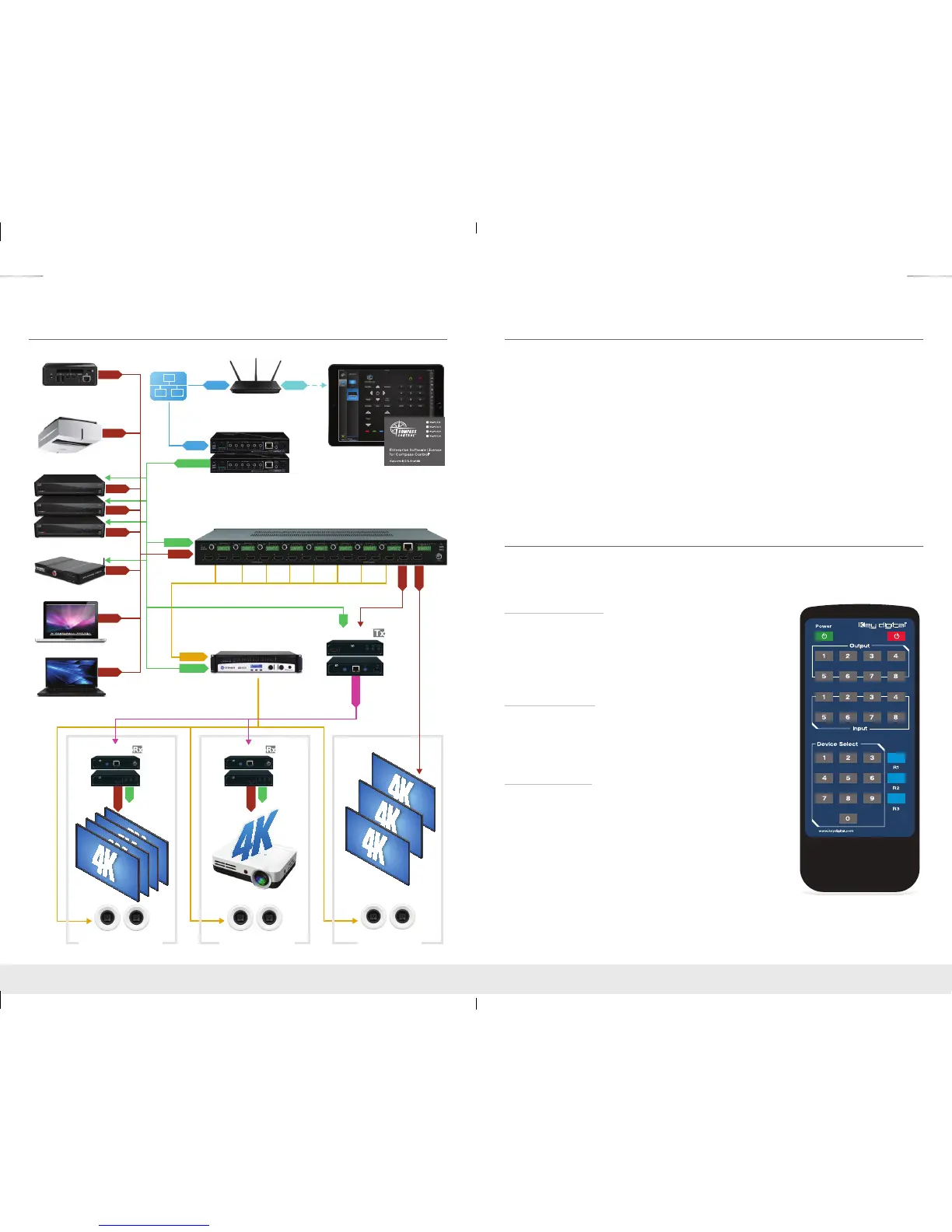
Application Example
Quick Setup Guide
› Step 1: Find a safe and convenient location to mount or place KD-4x4CSA/KD-8x8CSA unit
› Step 2: Begin with the KD-4x4CSA/KD-8x8CSA unit and all input/output devices turned off with
power cables removed
› Step 3: Connect your HDMI sources to the input ports of KD-4x4CSA/KD-8x8CSA unit
› Step 4: Connect your HDMI displays to the output ports of KD-4x4CSA/KD-8x8CSA unit
› Step 5: Before connecting power supply to power outlet, screw-in the power supply to the
KD-4x4CSA/KD-8x8CSA unit
› Step 6: After all connections are made, plug-in power supply to power outlet
› Step 7: Power on input/output devices
› Step 8: Operate the KD-4x4CSA/KD-8x8CSA switcher via front panel buttons, Serial IR, Optical
IR, RS-232, and TCP/IP Control.
Installation and Operation
Before permanently securing the unit for final installation, test for proper operation of the unit and
cables in your system. It is recommended that you leave enough ventilation space to provide
sufficient airflow and cooling.
Push Button Control
The KD-4x4CSA/KD-8x8CSA unit may be controlled via the push
buttons on the front of the unit. Choose which output to change
and then select the desired input by pressing the corresponding
“Input Select” button. The front LED indicators (1, 2, 3, 4/5, 6, 7, 8)
correspond to the input that has been selected for each output.
IR Remote Control
The KD-4x4CSA/KD-8x8CSA may also be operated using the
IR Remote provided with the unit (The remote is powered by a
CR2025 Battery). The KD-4x4CSA/KD-8x8CSA switcher features
an IR sensor on the front of the unit for reception of signals.
IR Emitter Control
The IR Sensor on the front panel may also accept signals from a
Compass Control Master Controller or from a 3rd party control
system. When using a Master Controller or 3rd party control
system, the IR Emitter must be mounted over the IR Sensor on
the front of the KD-4x4CSA/KD-8x8CSA unit. The other end of
the cable is connected to the Multi-function I/O port on the Master
Controller or the IR Extender/IR Connecting Block of the 3rd party
control system.
Satellite x3
Visualizer
Red-Ray
Laptop
Laptop
Ultra HD/4K
Digital Signage
Multi-Zone Amp
HDMI
HDMI
HDMI
HDMI
RS-232
RS-232
HDMI
HDMI
IR/RS232
HDMI
HDMI
HDMI
IR
WiFi Router
RJ45
RJ45
WiFi
x3
Reception Area
Displays
Displays
Projector
IR
HDMI
Boardroom
IR
HDMI
Huddle Room
Audio
HDMI
HDMI
CAT5e/6
KD-ProCL1
x2
KD-MC1000
Master Controller
x4
KD-X411ProK
x4
KD-X411ProK
x5
KD-X411ProK
KD-8x8CSA
KD-4x4_8x8CSA_Manual.indd 2-3 8/4/16 10:30 AM



 To Next Page