2
Quick Setup Guide
CONNECT:
Test for proper operation of the unit and cables in your system before permanently
securing the unit for final installation. Ensure that you leave enough ventilation
space to provide sufficient airflow and cooling.
1. Begin with the KD-DA1x4DC unit and all input/output devices turned off with power and HDMI
cables removed
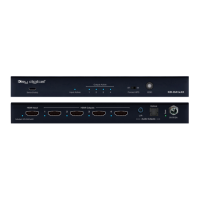
2. Connect your HDMI source to the input port of KD-DA1x4DC unit
3. Connect your HDMI displays to the output ports of KD-DA1x4DC unit
4. Connect the analog and/or digital audio amplifiers/receivers via the analog 3.5mm and optical outputs
5. BEFORE connecting power supply to power outlet, screw-in the power supply to the KD-DA1x4DC
unit
6. AFTER ALL CONNECTIONS ARE MADE, plug-in power supply to power outlet
7. Power on input and output devices
CONFIGURE:
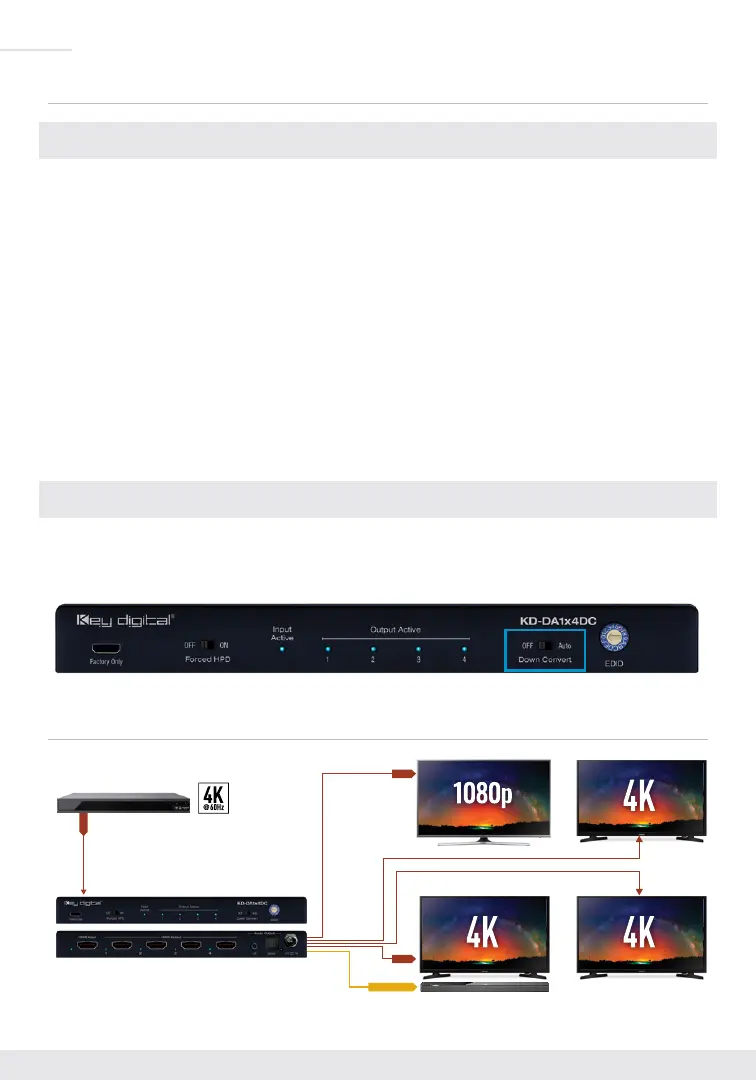
› The default position of the Down-Convert switch is OFF. If sending 4K content to 4K and 1080p
displays, set to the AUTO position.
Application Example
4K Video Source
Down-Convert Applied
KD-DA1x4DC
HDMI
HDMI
Optical Audio
HDMI


 To Next Page