11
FRONT PANEL
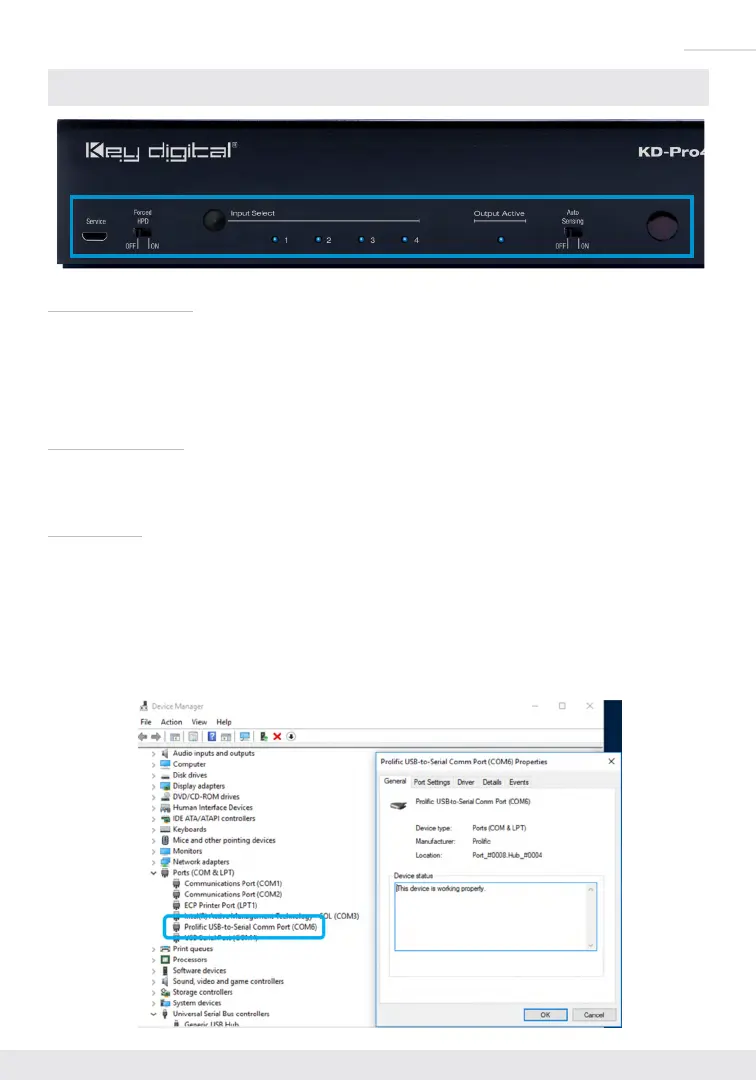
Input Select button
» Used to choose which connected source is output to the connected display/device
» Selecting a source with the Input Select button or IR remote will disable Auto Sensing Mode IF Auto
Sensing has not been set via the front switch.
» To factory reset the unit, press and hold for approx. 10 seconds until the front LEDs blink twice
Output Active LED
» Blue LED illuminates solid when Hot Plug Detection (HPD) is received from the connected display/
output device
Service USB
» Micro USB port
» Used for configuration and control from PC via KDMS Pro, KDMS, or third-party control terminal
» Used for firmware updates (consult with Key Digital tech support before updating firmware)
» Supports USB driver for Windows 10, 7, XP, Mac, Linux
» Will register as “Prolific USB-to-Serial Comm Port in Device Manager
» Can be used as RS-232 control port. Baud rate is 57,600.


 To Next Page