3 Modes of connection
Wired Mode:
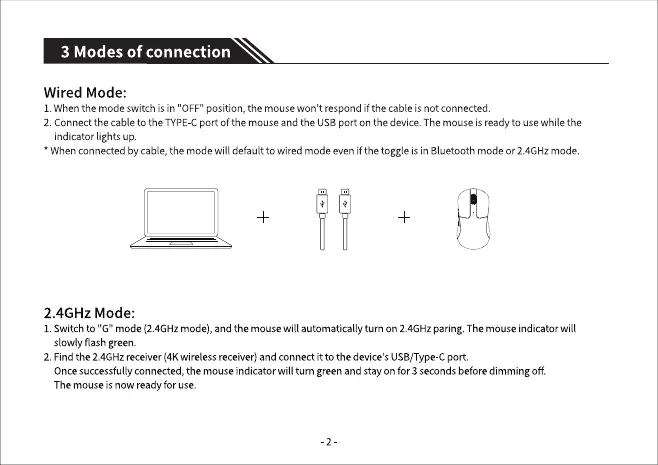
1.Whenthe mode switch is in "OFF"position,the mousewon't respondif the cable isnot connected
2. Connectthe cable to the TYPECport of the mouseandthe USBport on the device.Themouseis readyto usewhilethe
indicatorlightsup.
• Whenconnectedbycable,the modewill default to wired modeevenif the toggle is in Bluetoothmodeor2.4GHzmode.
2.4GHz Mode:
1.Switchto "G" mode(2.4GHzmode),and the mousewill automaticallyturn on 2.4GHzparing.Themouseindicator will
slowly flash green.
2. Find the 2.4GHz receiver (4K wireless receiver) and connect it to the device's USB/Type-C port.
Oncesuccessfullyconnected,the mouseindicator will turn greenandstayon for 3 secondsbeforedimmingoff
Themouseis now readyfor use.
-2


 To Next Page