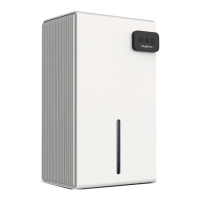
This document describes the Keylitos PD8-KDE Dehumidifier, a household appliance designed to remove moisture from the air.
Function Description
The Keylitos dehumidifier operates by drawing in humid air, passing it over an evaporator coil to condense the moisture, and then expelling drier air. The collected water is stored in a removable water tank or can be continuously drained via a hose. The unit features various operating modes including continuous dehumidification, comfort mode, and automatic defrost. It is designed to protect the health of the whole family by maintaining optimal humidity levels.
Important Technical Specifications
- Model: PD8-KDE
- Power Supply: 120V~60Hz
- Rated Power (104°F RH35%): 150W
- Total Input Rated Current (104°F RH35%): 1.38A
- Moisture Removal (65°F RH60%): 8 Pints/Day
- Moisture Removal (86°F RH80%): 25 Pints/Day
- IEF (65°F RH60%): 1.57 Liters/kWh
- Motor FLA: 0.35A
- Motor Compressor: RLA:1.36A LRA:7.0A
- Refrigerant: R134a / 3.46oz (98g)
- Maximum Allowable Pressure: 2.5MPa
- Maximum Operating Pressure High: 1.3MPa
- Maximum Operating Pressure Low: 0.5MPa
- Dimensions (W x D x H): 290W x 240D x 414H mm
- Applicable Temperature: 41-89°F (5-32°C)
- Water Tank Capacity: 2.3L
- Global Warming Potential (GWP) of R134a: 1430
- Compliance: FCC rules part 15
Usage Features
The dehumidifier is equipped with a control panel for easy operation.
- Power: Turns the unit on or off. The indicating light flashes when indoor humidity reaches the set value and the compressor stops.
- Fan Speed: Allows selection between high (HI) and low (LOW) fan speeds.
- Timer: Can be set for 1-24 hours in 1-hour increments. The timer can automatically turn the unit on (in standby mode) or off (in operating mode). The timer is canceled if the power key is pressed before it finishes counting down.
- Humidity Setting: The display screen shows the current humidity percentage. Users can set the desired relative humidity from continuous dehumidification (CO) to 30-90% RH (in 5% increments), or comfort mode (AU). The unit defaults to continuous dehumidification (CO) upon initial electrification. The compressor stops automatically when ambient humidity is 3% lower than the setting and resumes when it's higher.
- Continuous Mode [CO]: Activates continuous dehumidifying operation, stopping only when the water bucket is full.
- Comfort Mode [AU]: Automatically adjusts humidity settings based on ambient temperature:
- Below 41°F (5°C): Compressor stops.
- 41°F (5°C) to 68°F (20°C): Humidity set to 60%.
- 68°F (20°C) to 80°F (27°C): Humidity set to 55%.
- Above 80°F (27°C): Humidity set to 50%.
- Water Full Indicator: An indicating light illuminates when the water tank is full, and the unit stops operating until the tank is emptied.
- Defrost Function: When the evaporator coil frosts, the LCD screen displays a defrost symbol. The internal compressor shuts off, and the fan continues to run until the frost melts.
- Placement: For optimal efficiency, the dehumidifier should be operated in an enclosed area with doors and windows closed. It must be placed at least 18 inches (45 cm) away from other objects that might restrict airflow. The recommended operating temperature range is 41°F (5°C) to 89°F (32°C).
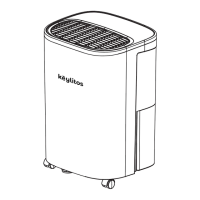
- Mobility: The unit is designed with wheels for easy movement, and users should face the front of the unit when moving it.
Maintenance Features
Regular maintenance ensures optimal performance and extends the life of the dehumidifier.
- Before First Use: To prevent internal damage, the dehumidifier must remain upright for 24 hours outside its box before plugging it in.
- Cleaning the Bucket: The water bucket should be cleaned with water every 2 weeks.
- Cleaning the Air Filter:
- Remove the water tank.
- Pull out the filter using its handles.
- Wash the filter with cool water (below 104°F) every two weeks.
- Allow the filter to air-dry naturally before putting it back.
- Caution: Do not operate the dehumidifier without a filter, as dirt and lint will clog it and reduce performance. Never use gasoline or alcohol to wash the filter.
- Draining Instructions:
- Using the Bucket: When the water tank is full, remove it, pour out the water, and put it back.
- Continuous Drainage:
- Cut off the power.
- Remove the water tank.
- Plug a draining tube into the draining hole.
- Ensure the draining tube is placed lower than the draining hole for water to flow out smoothly.
- Put the water tank back.
- Note: Ensure the connection is tight and leak-free. The drainage facility should be lower than the drain outlet. Improper installation can cause the bucket to fill and the unit to shut off. Check the water pipe for blockages if the bucket fills after continuous use.
- Storage: When storing the dehumidifier for a long period:
- Wait one day after turning it off before emptying the bucket.
- Clean the main unit, bucket, and air filter.
- Wrap the power cord and secure it.
- Cover the dehumidifier with a plastic bag.
- Store it upright in a dry, well-ventilated place.
- General Safety:
- Do not place the unit on soft or uneven surfaces to avoid noise, vibration, or leakage.
- Never insert slim rods or hard objects into the unit.
- Disconnect the power cord when turning off the unit or not using it for a long time.
- Keep the unit in an open place away from barriers to improve performance.
- Children aged 8 and above, and persons with reduced physical, sensory, or mental capabilities, can use the appliance under supervision and with proper instruction. Children should not play with the appliance or perform cleaning/maintenance without supervision.
- Maintain a minimum distance of 50 cm from walls or other barriers.
- Install the appliance following country wiring laws.
Troubleshooting
The manual provides solutions for common issues:
- Dehumidifier does not start: Check for temperature sensor error (E1), no electricity, unplugged power cord, full bucket, or incorrect water tank position.
- Dehumidifier runs but humidity does not decrease: Check if humidity setting is too high, doors/windows are open, a kerosene heater or water vapor source is present, or room temperature is too low (below 41°F/5°C).
- Dehumidifier runs constantly/does not stop: Check for dirty/blocked dust filter, blocked air outlet/intake, insufficient time for moisture removal (allow 24 hours initially), area to be dehumidified is too large, or open doors/windows.
- Water Tank Full is illuminated and beeping: Check if the water tank is full or not in the correct position.
- Dehumidifier blowing cold air: This is normal and depends on room environment and other factors.
- Frost on coils: Normal in low room temperatures (below 41°F/5°C) and disappears after an hour or so when switched off.
- Water condensation not draining out tube: Raise the front of the dehumidifier 1/2 to 1 inch from the floor, or check connections of garden hose/drain hose.
- Water on the floor: Check if the continuous drain hose is still connected when intending to use the water tank, or if the dehumidifier is on an uneven floor.
- Loud noise: Fan operation can create sounds (normal), or check for dirty/blocked dust filter or uneven placement.
Customer Service
For any questions or support, contact Keylitos via email at support@keylitos.com. An E-User Manual can be downloaded from https://www.keylitos.com/downloads. The product comes with a 24-month warranty covering manufacturing defects, parts, or workmanship, but excludes damage from normal wear and tear, abuse, mishandling, accidents, failure to follow instructions, exposure to liquids, foreign particles, or unauthorized modifications. The product is made in China and complies with EU waste disposal guidelines for recycling.


 To Next Page
 General