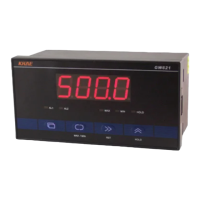
5 indicators AL1 / AL2 / MAX / MIN / HOLD, indicating the working status and display status of the
instrument.
The panel buttons are used to set the parameters They have a second function, in regular
mode.
The key is used as the MAX / MIN (maximum / minimum) key to switch between the current
values, the maximum value and the minimum value. When it is displayed as the maximum or minimum
value, the corresponding indicator light will be on. If you press the MAX / MIN key for more than 3
seconds, you will reset the maximum and minimum values (equal to the current value).
The key is used as the RST (reset) key. When the key is pressed, the measured value and the output
of the instrument are reset and the measurement stops.
The key is used as the HOLD key. When pressed, the input of IN-1 and IN-2 is prohibited, the
measurement value and instrument output remain unchanged, and the HOLD (HOLD) indicator light is
on. Press the button again, exit the holding state and start measuring.
The second function allows or disallows use, which can be set separately in "engineer
menu - display key parameter group". The instrument parameters are distributed in the operation menu,
engineer menu and configuration menu, and can be set according to the need of measurement and
control process.
If the parameter values of PAS1, PAS2 and PAS3 are not 0, the password will be prompted before
entering the corresponding menu. The operation method is the same as the parameter setting.


 To Next Page
 Loading...