8-4
Using Setup
i
Information
•
Press the
Center
button to restore the
Bass/Mid/Treble to the center position.
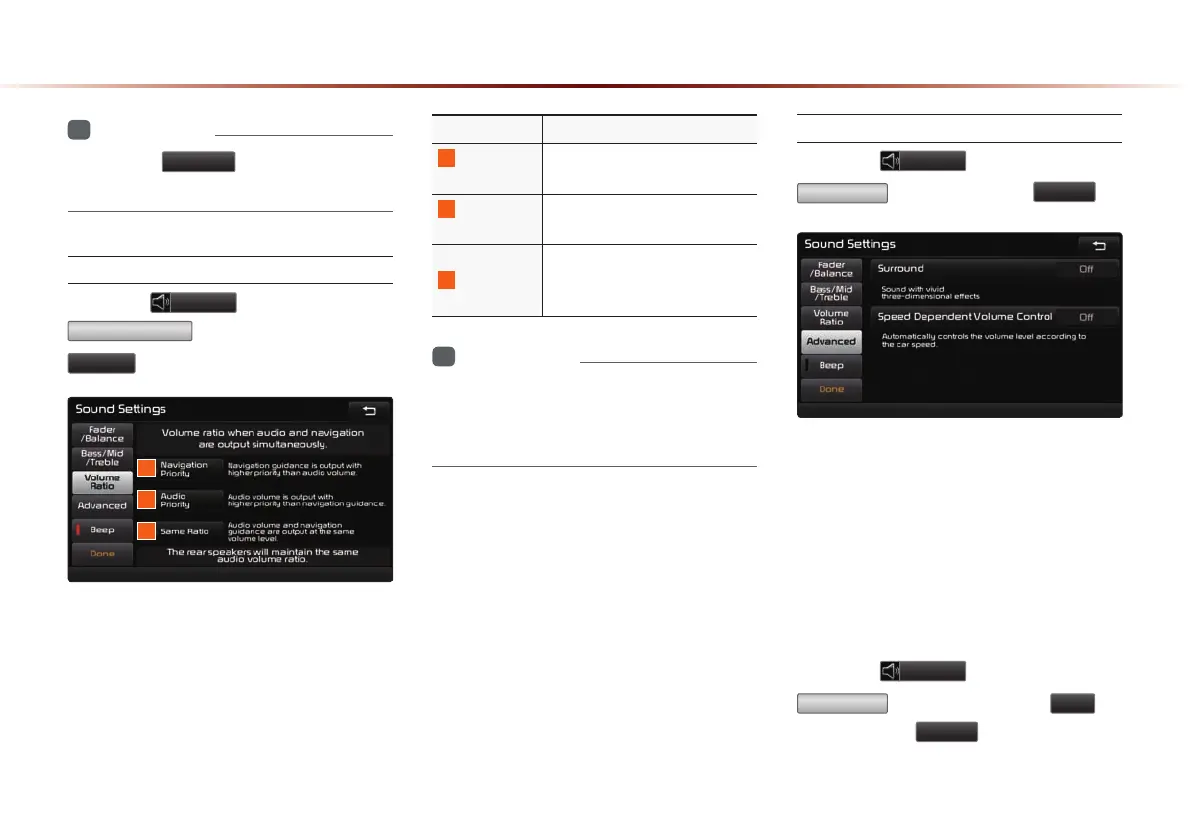
Setting Volume Ratio
Press the
Sound
button ▶ Press
Volume Ratio
▶ Set and press
Done
.
These options are used to set the volume
ratio by selecting from Navigation Priority/
Audio Priority/Same Ratio.
Name Description
1
Navigation
Priority
Navigation guidance is output
louder than audio Volume
2
Audio
Priority
Audio volume is output louder
than the navigation guidance
3
Same Ratio
Audio volume and navigation
guidance are output in identi-
cal volume
i
Information
•
The rear seat speaker will maintain its
audio volume regardless of which volume
ratio is selected.
Advanced
Press the
Sound
button ▶ Press
Advanced
▶ Set and press
Done
.
This is used to set the Surround and Speed
Dependent Volume Control features.
Surround
When turned on, sound with vivid, three
dimensional effects can be enjoyed.
Speed Dependent Volume Control
Press the
Sound
button ▶ Press
Advanced
▶ Turn the feature
On
▶
Set and press
Done
.
When turned on, volume level is controlled
automatically according to the vehicle speed.
1
2
3



 To Next Page