3
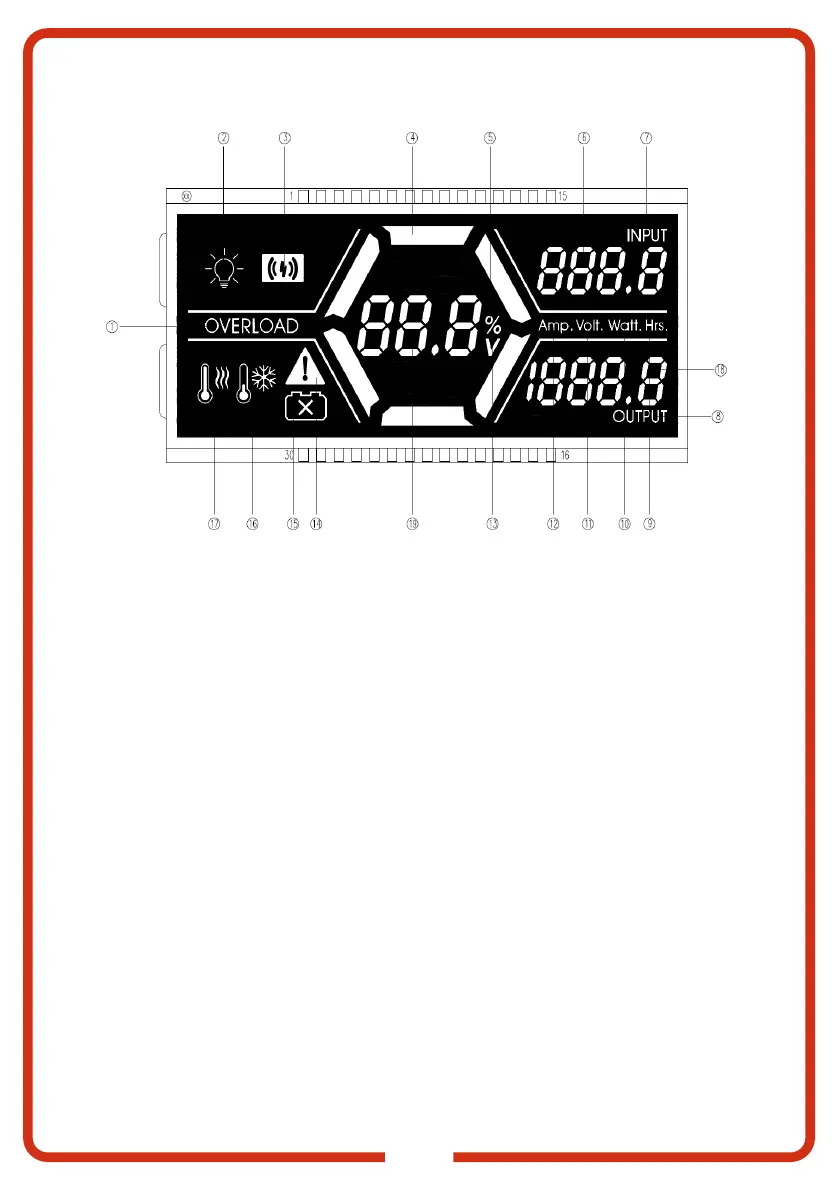
LCD DISPLAY
1. OVERLOAD LED: Character is displayed if
the AC output is short circuited or overloaded.
2. LIGHT LED: Displayed when light bar is
turned on.
3. WIRELESS LED: Wireless charging is
enabled.
4. BATTERY POWR INDICATOR LED: Provides
an approximation of the device SOC.
5. SOC LED: Percentage calculation of device
SOC. (Percentage will only be displayed when
switching to display voltage).
6. "888.8" INPUT LED: Displays voltage,
current, power or hour of charging at the input
terminal.
7. INPUT LED: Indicates input values.
8. OUTPUT LED: Indicates output values.
9. HRS LED: Indicates the battery timing of
charging and discharging.
10. WATT LED: Indicates the input and output
power.
11. VOLT LED: Indicates the input and output
voltage.
12. AMP LED: Indicates input and output current.
13. V LED: Indicates value is a Voltage.
14. LOAD OVER-CURRENT LED: Load over-
current, overload, short circuit, input over-
voltage display icon.
15. BMS COMMS LED: Indicates internal
communication failure with the Battery
Management System (BMS).
16. LOW TEMP LED: Indicates internal temperature.
When the LED is solid, it is less than 0°C.
When the LED is flashing, it is less than 10°C.
17. HIGH TEMP LED: Indicates the inverter is
operating above temperature and the device
is temperature protected.
18. "1888.8" OUTPUT LED: Displays the
voltage, current, power and hour of the load
output terminal.
19. "88.8" LED: Displays the percentage of
battery voltage and quantity (press the
function switch button to select).


 To Next Page