4
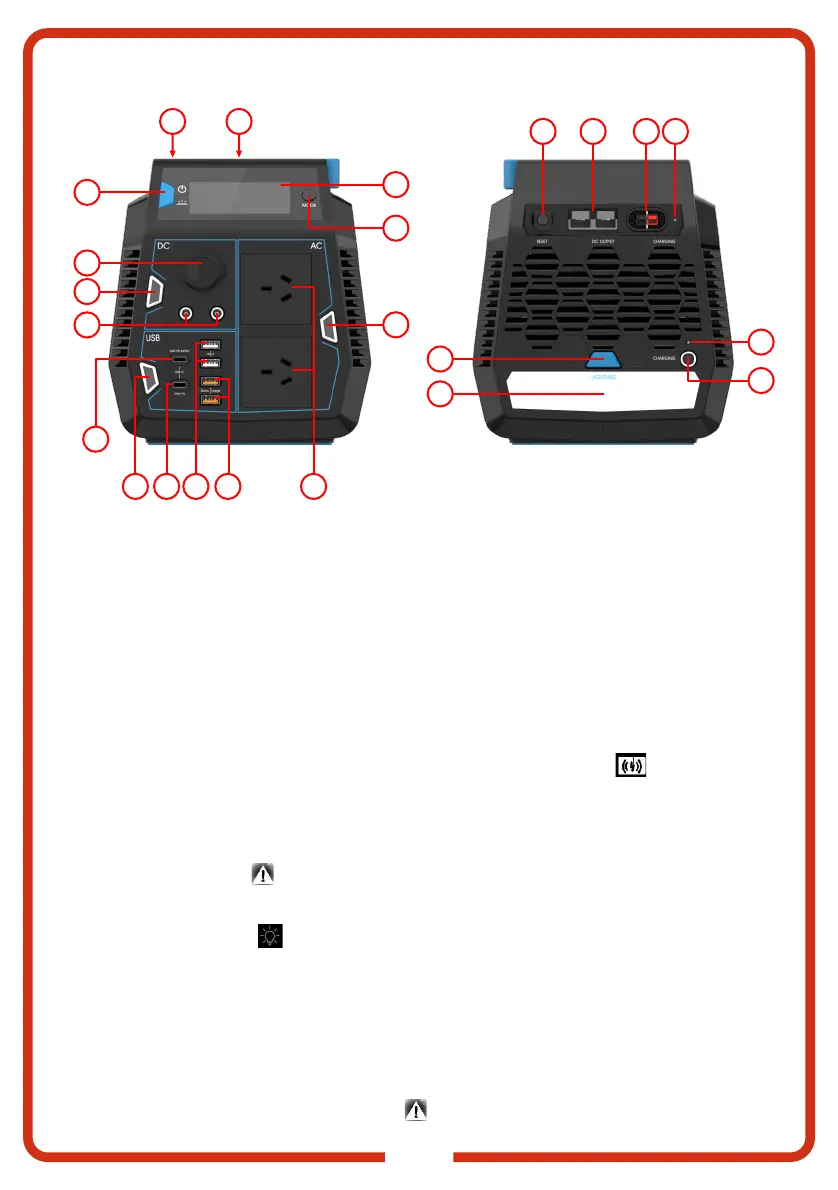
CONTROL PANEL
6
2118
17195
12
13
4
16
1
3
2
7
20
15
14
10
11
9
8
1.Power Button: Press to turn on the COMPACT 600. One short press will turn the back light on
and off. One long press (3s and release) will turn the COMPACT 600 off.
2.Mode Button: Switches the display between Voltage, Current, Power and battery hour.
3.LCD Display: Displays battery voltage, input/output power, display battery percentage, alarms
and error codes.
4.DC Button: Controls DC outputs (6mm DC socket, CIG socket, Anderson Socket). When
enabled and in normal operation, button back-light will be blue. When an over-current or short
circuit occurs, the button back-light will turn red and the LCD will show an error. In an error
condition, all outputs will be disabled. Disconnect and reconnect the load to enable the DC
output.
5.USB button: Controls USB outputs (including wireless charging). When enabled and in normal
operation, the button back-light will be blue and the Wireless Charging LED is displayed on
the LCD screen. No indication is provided for short-circuit or over-current protection. Disconnect
and re-connect with the appropriate load when short-circuit or over-current protection occurs.
6.AC Power Button: Controls AC output. When in normal operation, the button back-light will be
blue. When an over-current or short-circuit condition occurs, the button back-light will turn red
and the error icon LED and OVERLOAD LED will be displayed on the LCD. Disconnect and
re-connect with the appropriate load when short-circuit or over-current protection occurs.
7.LED Lighting Button: Turn on/off the LED light bar. When on, the LCD screen
displays the lighting icon . The LED light has three modes, low light, bright light and pulse
mode. A short press of the battery light will switch between low light, bright light and off. A long
press will initiate the pulse mode.
8.8mm DC Jack: AC/DC brick adapter and PWM Solar charging input. Solar input range 15 ~
24Vdc, maximum charging current is 8A. The COMPACT 600 can be charged via a solar panel
within 100W or via the supplied AC/DC brick adapter. When charging, the Battery Power
Indicator LED on the LCD screen will start flashing. When full, the Battery Power Indicator LED
will stop flashing and display full charge. When the input voltage exceeds 30V, the device will
enter over-
voltage protection and display the
on the LCD will turn on.
23 22



 To Next Page
 Loading...