EasyManua.ls Logo

KidTrax KT1006 - Installing Dashboard and Steering Wheel

Default Icon
28 pages
Print Icon
To Next Page IconTo Next Page
To Previous Page IconTo Previous Page
Loading...
Assemble the Corvette Race Car
1
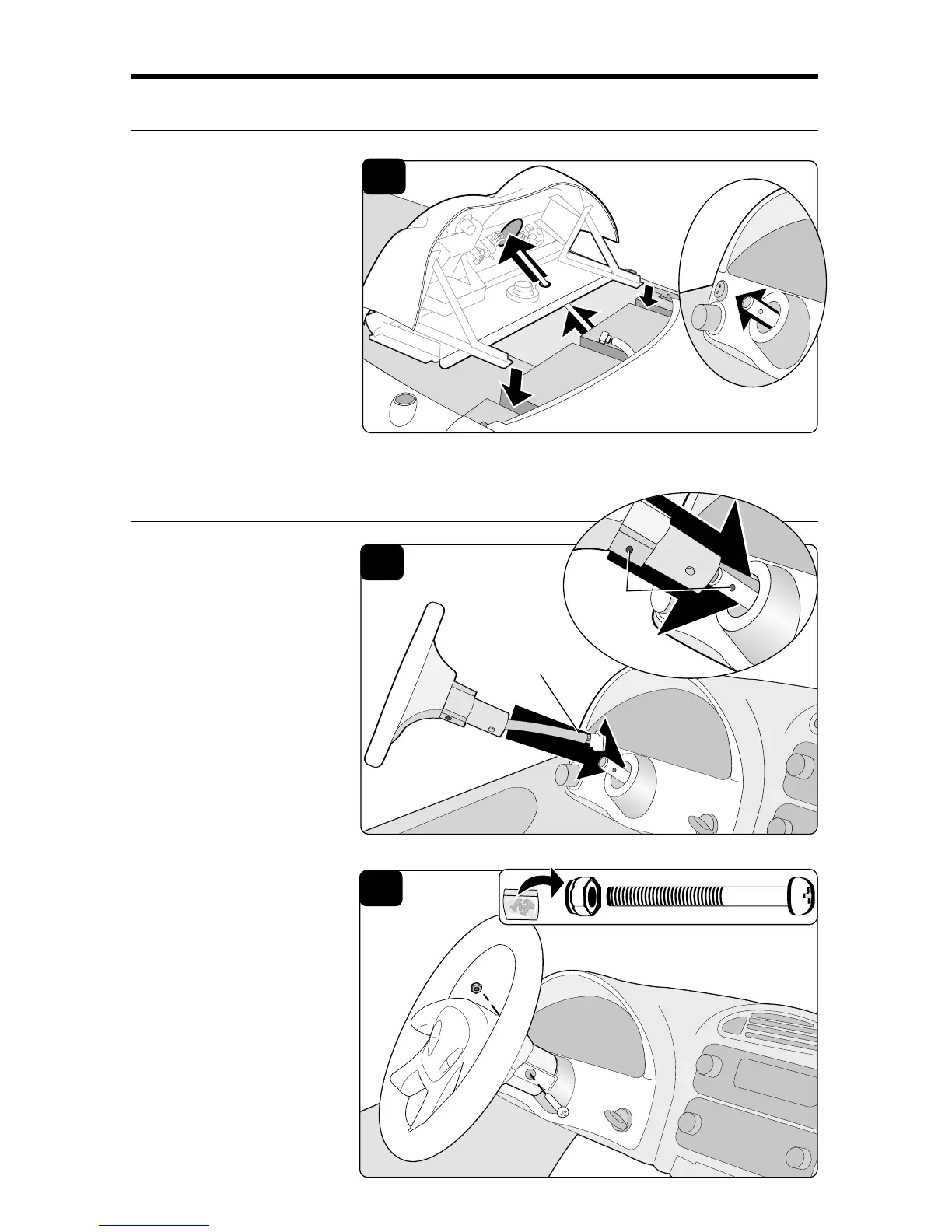
1. Install Dash:
Lower dash into slots
on vehicle and guide
steering column into
steering hole in dash
and out the front of the
dash as shown.
Brackets should be
inserted completely
into slots.
Install Dashboard Assembly
2
2. Install Steering Wheel:
Hold the steering wheel
near front of dash with
the logo oriented right
side up. Guide the
steering wheel cable
into the steering
column hole. Align the
steering wheel holes
with the holes on the
steering shaft.
Install Steering Wheel
3. Connect to Steering
Wheel Shaft:
Locate hardware bag
labeled “C” (Figure 3).
Insert screw into
steering column and
tighten nut securely. Do
not overtighten.
3
Align
Holes
Cable
C

Related product manuals