1. Introduction
1.1. General presentation
The pressure generator allows the adjustment and the calibration of the measuring instruments in laboratory or on site.
There are two versions :
● GP500 0-2500 Pa : from -2500 to +2500 Pa
● GP500 0-10 000 Pa : from -10 000 to 10 000 Pa
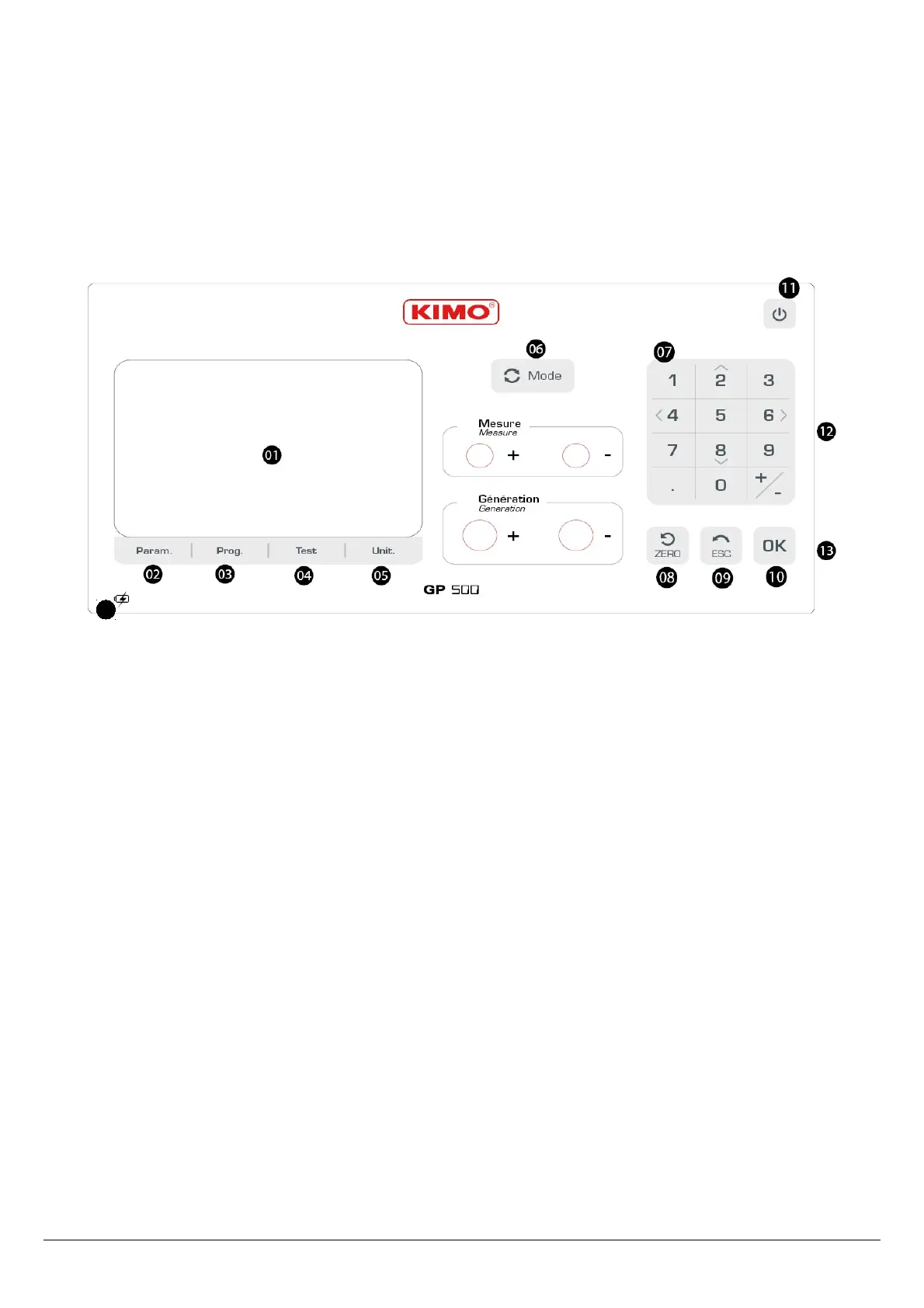
User interface :
01. Screen
02. Param. : device configuration
03. Prog. configuration of the pressure generation programs
04. Test : tightness test
05. Unit. : units modification
06. Mode : choice of « Measurement » or « Generation » mode
07. Keypad : 12 keys integrating the navigation arrows
08. Zero : manual autozero
09. ESC : return
10. OK : validation of the selection
11. On/Off Key
12. Power supply on the right side + fuse
13. USB digital output on the right side
14. Loading indicator
Introduction 5
14


 To Next Page