Page 1
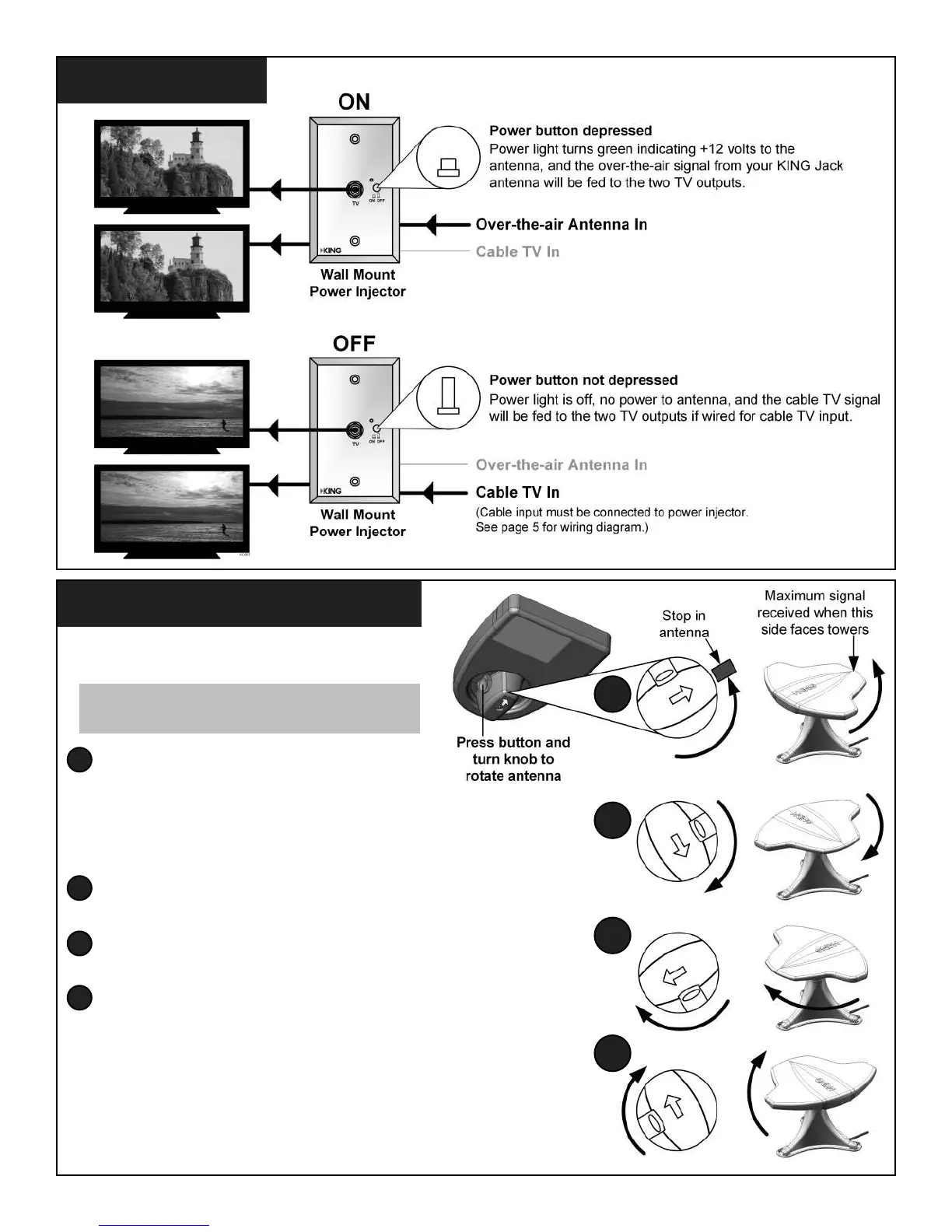
1. Turn on TV and power injector.
2. Press button and rotate the antenna all of the
way in one direction until it hits the stop.
3. Perform a channel scan per the digital TV or digital TV
converter box manufacturer’s instructions.
Note the number of channels received.
4. Press button and rotate antenna 90 degrees. Scan again.
Note the number of channels received.
5. Press button and rotate antenna 90 degrees. Scan again.
Note the number of channels received.
6. Press button and rotate antenna 90 degrees. Scan again.
Note the number of channels received.
7. Reposition your KING Jack antenna to where you received the most channels.
Choose one of those channels on your TV.
Now monitor the signal strength screen and ne tune the KING Jack
until the highest signal strength is achieved. Perform one nal scan.
8. Watch TV!
NOTE: In steps 2-6, keep track of the knob position
where you receive the most channels.
OPERATION
AIMING THE ANTENNA
2
2
4
5
6
4
5
6


 To Next Page