Page 4
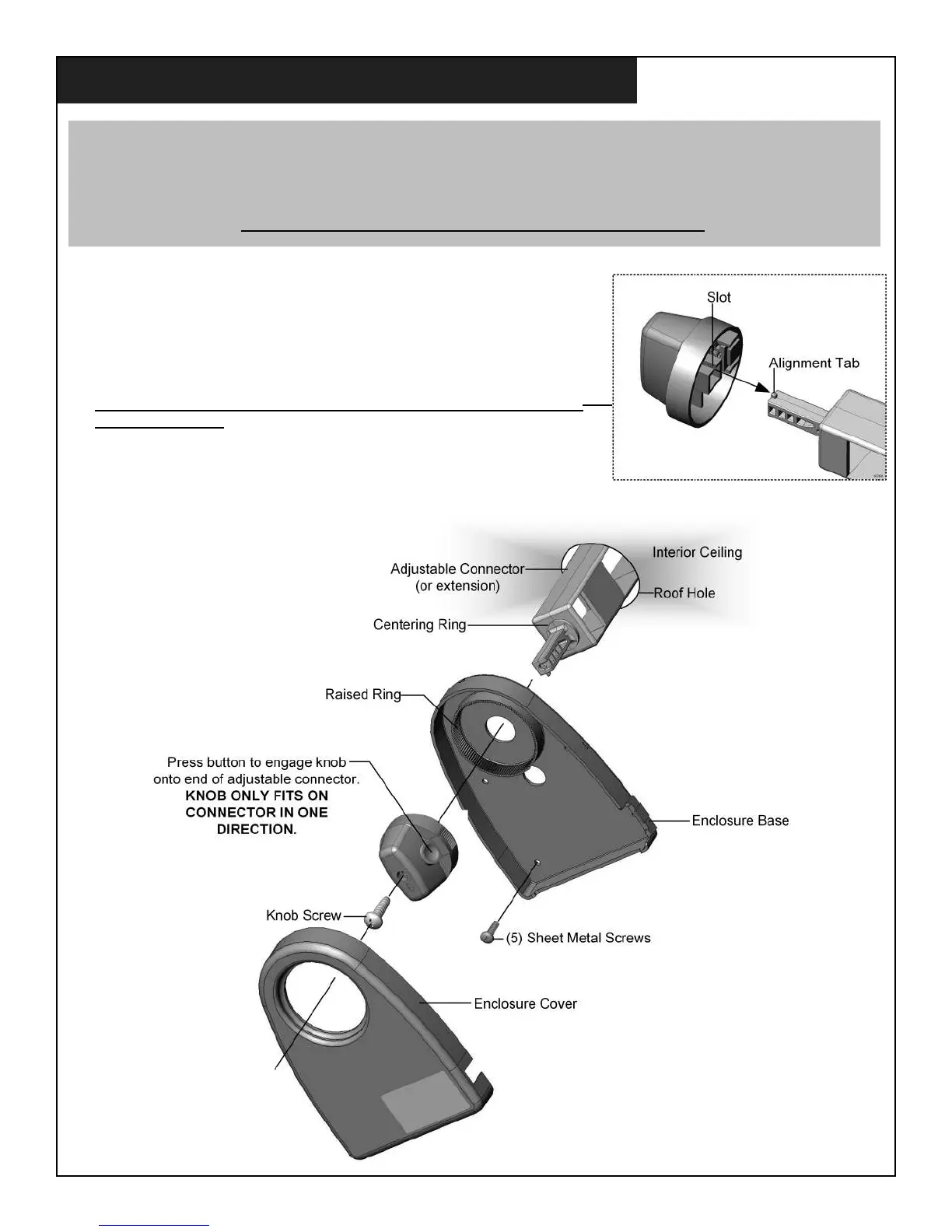
1. Press knob button and remove knob from enclosure base.
2. Place the enclosure base around the adjustable connector and place enclosure
base against ceiling. (The enclosure base will seat around the centering ring
on the adjustable connector.) Rotate the enclosure base to the desired position
and fasten it to the ceiling with the ve included screws.
3. Press the knob button and push knob onto the end of the adjustable connector.
THE KNOB ONLY FITS ON THE END OF THE ADJUSTABLE CONNECTOR
IN ONE DIRECTION and ts into the raised ring on the enclosure.
Fasten knob to connector with included screw.
4. Carefully align the enclosure cover and snap into place.
IMPORTANT!
Before starting step 1, turn the adjustable connector (or extension if installed) in one direction until the antenna hits
the stop. Now turn the connector all the way in the other direction until the antenna hits the stop again
(slightly more than 360°).
THE ANTENNA MUST ROTATE FREELY THRU THE ENTIRE DISTANCE.
INTERIOR ENCLOSURE INSTALLATION


 To Next Page